Choose AutoClips If...
- You want viral character videos with cloned voices
- You're building a faceless YouTube/TikTok channel
- You want gaming backgrounds (Minecraft parkour)
- You need 3D Pixar-quality animations
- You want to create at scale (~$0.25/video)
Choose InVideo If...
- You need extensive stock footage library
- You prefer template-based video editing
- You're making corporate/marketing videos
- You want more manual editing control
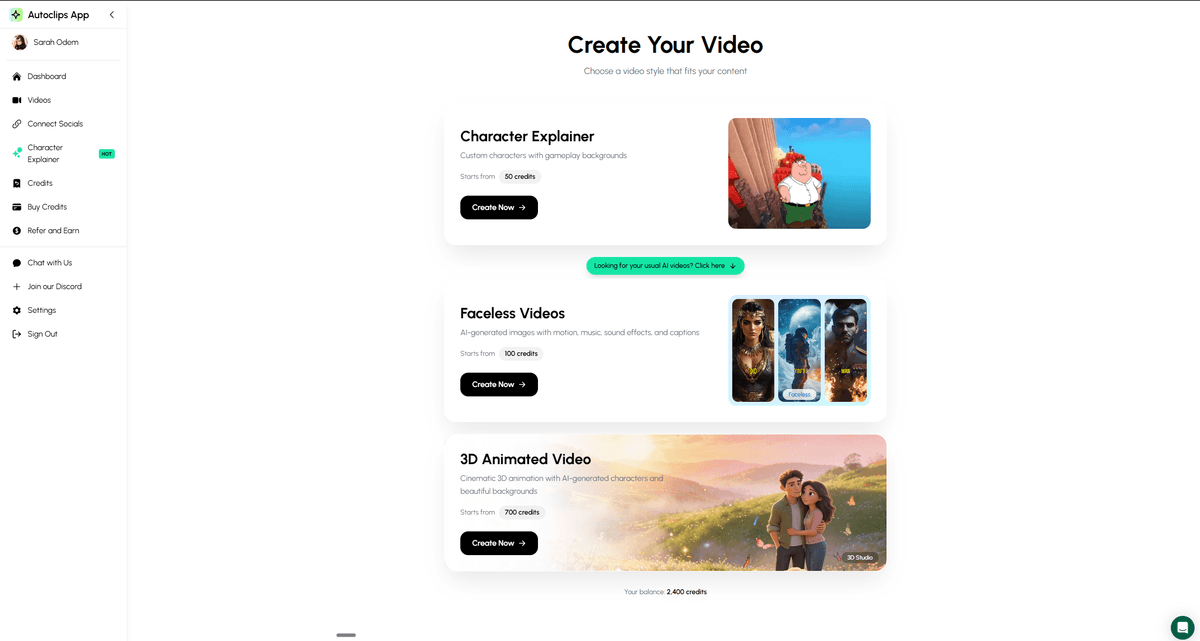
AutoClips offers three specialized video creation tools InVideo doesn't have
Feature-by-Feature Comparison
See exactly how AutoClips and InVideo stack up
| Feature | AutoClips | InVideo |
|---|---|---|
| Character Explainer Videos | ||
| Voice Cloning (Clone Any Voice) | ||
| Multi-Character Dialogue | ||
| 3D Animation Studio | ||
| Gaming Backgrounds (Minecraft) | ||
| AI Script Generation | ||
| Stock Footage Library | ||
| Template-Based Editing | ||
| One-Click Publishing | ||
| Faceless Video Creation |
What Makes AutoClips Different
Voice Cloning
Clone any voice in minutes. Create videos with Peter Griffin, Stewie, or your own custom voice clones. InVideo only offers standard AI voices.
Gaming Backgrounds
Minecraft parkour, satisfying gameplay, and viral gaming backgrounds built-in. These maximize watch time and engagement. InVideo doesn't offer this.
3D Animation Studio
Create Pixar-quality 3D animated videos from text prompts. Turn any idea into stunning cinematic content. InVideo is limited to 2D templates.
See AutoClips in Action
Watch how easy it is to create viral character videos
Pricing Comparison
AutoClips
Best for viral short-form content at scale
InVideo
Better for template-based marketing videos

AutoClips dominates in viral content creation features
Frequently Asked Questions
What's the main difference between AutoClips and InVideo?
AutoClips specializes in character-driven viral content with voice cloning and gaming backgrounds, while InVideo focuses on template-based editing with stock footage. If you want to create faceless character videos that go viral on TikTok and YouTube Shorts, AutoClips is the better choice.
Which tool is better for YouTube Shorts?
AutoClips is specifically optimized for viral short-form content with features like character voices, Minecraft parkour backgrounds, and AI-generated scripts designed for engagement. InVideo is more general-purpose.
Can I clone voices with InVideo?
No, InVideo doesn't offer voice cloning. AutoClips lets you clone any voice and create character videos with voices like Peter Griffin, Stewie, or your own custom voice clones.
Which is more affordable?
AutoClips offers character explainer videos for just 50 credits (~$0.25/video), making it extremely cost-effective for creating viral content at scale. InVideo's pricing varies based on features.