
Best AI Fruit Animation Software in 2026: An Honest Comparison
The best AI fruit animation software is the one that keeps your fruit characters the same from shot to shot and handles the script, voices and captions for you, because that is where fruit videos take the most time. For posting fruit stories often, that means an all-in-one fruit story maker. For one clip, a general AI video generator is enough. For full control, 3D software. Here is how they compare, written by the people who make one of them, so judge us on the facts.
Quick answer
- There are four kinds of fruit animation software: all-in-one fruit story makers, general AI video generators, video editors with AI features, and 3D animation apps.
- For a fruit story channel that posts every day, an all-in-one maker (like Autoclips Fruit AI Stories) saves the most time: script, cast, scenes, animation, voices and captions in one place.
- For a single funny clip, a general AI video generator is cheaper and simpler. For full creative control, 3D software like Blender, if you have days per video.
- Test any tool on the same thing: one fruit character in three different scenes. If the face changes, move on.
What makes good AI fruit animation software
A viral fruit video looks simple: a strawberry and a banana arguing in a living room for a minute. Making one by hand means six separate jobs, and the software you pick decides how many of them you still do yourself.
- Character consistency. The same strawberry, with the same face and dress, in every shot. This is the hardest part and the one most tools fail.
- Story and script. A hook in the first seconds, a twist, an ending that makes people want Part 2.
- Animation. Clips where the fruit move, gesture and react, not just a zoom on a still picture.
- Voices and dialogue. A different voice per character, speaking on the right clip.
- Captions and music. Most viewers watch with the sound off.
- Series and posting. Part 2 with the same cast, and getting it onto TikTok, Reels and Shorts.
The 4 kinds of fruit animation software, compared
| All-in-one fruit story maker | General AI video generator | Video editor with AI features | 3D animation app | |
|---|---|---|---|---|
| Examples | Autoclips Fruit AI Stories, some fruit-specific apps | The text-to-video tools in many creative apps | CapCut, Filmora | Blender (free), other 3D suites |
| You type | One line about the story | One prompt per clip | Prompts plus manual editing | Nothing; you build it |
| Same character every shot | Built in (saved characters) | Hit and miss without reference pictures | Depends on the clips you bring | Yes, you model it once |
| Script and twist | Written for you, editable | You write it | You write it | You write it |
| Voices per character | Built in | Some tools, per clip | Text-to-speech you add | You record or add them |
| Captions | Automatic | Rarely | Yes | You add them |
| Part 2 with same cast | Yes | Manual | Manual | Yes, but slow |
| Your time per 60 s video | Minutes | 1 to 3 hours | 1 to 3 hours | Days |
| Cost | Credits per video | Credits or subscription | Free tier plus paid AI features | Free software, your time |
All-in-one fruit story makers
These are built for this one format. You describe the story, and the tool writes it, casts the fruit, draws the scenes, animates them and voices them. The trade-off is less control over each individual frame than doing it by hand, and you work inside the formats the tool offers. Best for anyone running a fruit channel and posting often.
General AI video generators
Type "a banana in a suit arguing with a strawberry" and you get a few seconds of video. Great for a single meme clip. For a story you generate each scene separately, and keeping the same banana across eight clips usually needs reference pictures and lots of retries. Then you still need voices, captions and an editor.
Video editors with AI features
Editors like CapCut and Filmora have added AI generation and text-to-speech. They are the right place to assemble clips you already have, add music and fine-tune timing. They don't write the story or keep a cast consistent for you.
3D animation apps
Blender is free and can make fruit characters look exactly how you want, with perfect consistency, because you build the model once. You also model, rig, light, animate and render everything, and voice it yourself. Worth it if animation is the hobby. Not if you want to post daily.
Autoclips Fruit AI Stories: what it does and doesn't do
Since we make it, here is a plain list rather than a sales pitch.
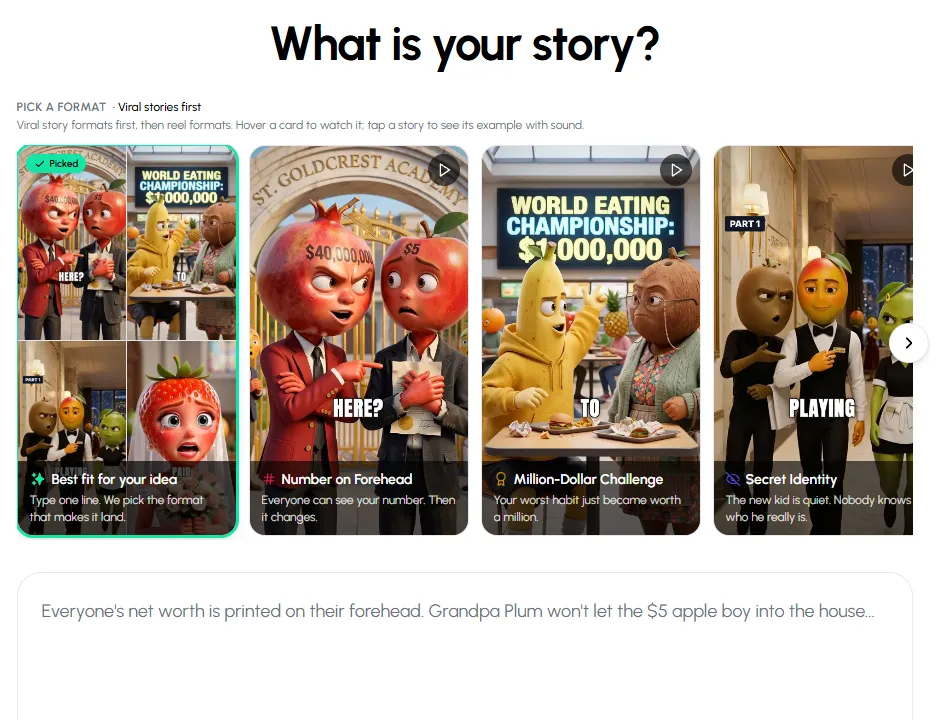
What it does:
- Ready-made formats measured from viral fruit reels, like Number on Forehead, Glow-Up Revenge, Rich vs Poor, Cheating and Emotional Plot Twist, plus Custom for your own idea or script.
- A saved character library, so your cast keeps the same face and voice in every story. You can also make a fruit version of a real face (kept private).
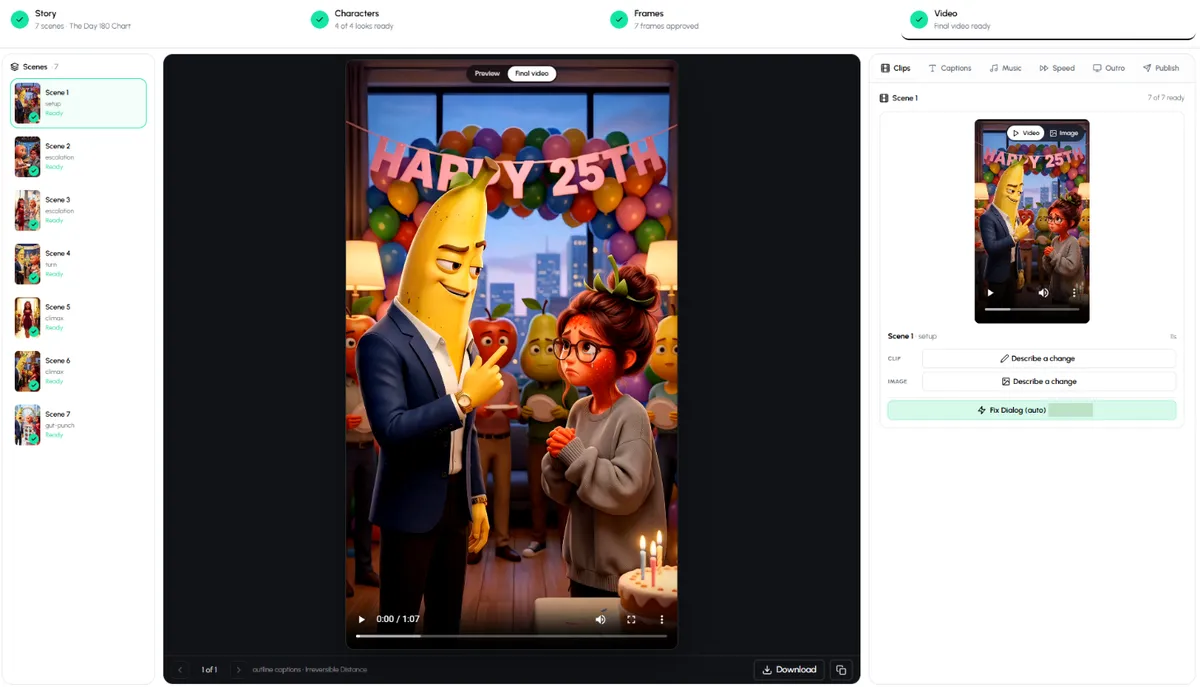
- Four steps you can check and change: Story (every line), Characters (each look), Frames (one per scene) and Video (each animated clip).
- Change one clip by describing what should be different, instead of redoing the video.
- Captions, music, speed, an outro, 9:16, 16:9 or 1:1, and many languages.
- Series that continue from the last cliffhanger, Create Part 2 under a finished story, and automations that post on a schedule.
- The same pipeline makes talking animal stories with lion, tiger or wolf characters.
What it doesn't do:
- It is not free per video. Signing up is free; each video uses credits, and the longer viral story formats need the Pro plan or higher.
- You don't control every frame like in 3D software. You approve and redraw, you don't pose a rig.
- It works in short-form lengths (30 to 85 seconds per part), not 20-minute episodes.
- It won't copy another creator's show or characters, and it won't draw nudity.
Run the consistency test below on Autoclips with your own idea.
Open Fruit AI StoriesHow to test any fruit animation tool in 15 minutes
Don't trust any comparison, including this one. Run the same test on every tool you are considering:
- One character, three scenes. A strawberry girl in a red dress at a party, in a kitchen and on a street. Does she look like the same person?
- Two characters talking. Does each one speak on the right clip, with a different voice?
- A twist. Ask for a story with a reveal. Does the tool write one, or do you?
- Sound off. Watch the result muted. Can you follow it from the captions and the pictures?
- Part 2. Ask for the next part. Does the cast come back unchanged?
- Count your minutes, not just the price. Your time is the real cost of a daily channel.
Which one should you pick?
- You want to run a fruit story channel: an all-in-one fruit story maker. Read how to start a fruit story channel.
- You want one funny clip for a group chat: a general AI video generator.
- You want to fine-tune clips you already have: a video editor.
- You want to learn animation: Blender, and our guide on how to animate fruit characters for the principles that carry over.
For craft tips that make any tool look better, see fruit story animation techniques. And if you want the product page with examples, it is the AI fruit video generator.
Made with Autoclips
Real videos people made in the app. Tap one to watch it with sound.
Frequently asked questions
What is the best AI fruit animation software?
For posting fruit stories regularly, an all-in-one fruit story maker like Autoclips Fruit AI Stories saves the most time, because it keeps the cast consistent and handles script, animation, voices and captions. For one clip, a general AI video generator is enough. For full control, use 3D software like Blender.
What app do people use for AI fruit videos?
Creators use a mix: all-in-one fruit story makers, general AI video generators combined with an editor like CapCut, and a few use 3D software. The viral fruit drama accounts rarely say exactly which tools they use.
Is there free AI fruit animation software?
Blender is free but you animate everything by hand. Most AI tools have a free sign-up or trial and then charge credits or a subscription, because generating video costs money to run. Autoclips is free to sign up; videos use credits.
How do I keep my fruit character consistent across scenes?
Use a tool with saved characters or reference pictures, and approve the character's look before the scenes are made. Generating every scene from a fresh prompt is what makes the face change.
Can I make fruit animations on my phone?
Yes. Browser-based tools like Autoclips work on a phone, and some editors have mobile apps. 3D software like Blender needs a computer.
Do AI fruit videos get monetised?
They can, if they are original stories with your own characters rather than copies of other accounts. Platforms are stricter with repetitive, mass-produced content. See our page on making money with fruit videos for details.
Test it on your own idea
Type one line and see whether Autoclips keeps your fruit cast the same from the first scene to the last.
Try Fruit AI StoriesAyaz Alam · Founder of Autoclips
Ayaz builds Autoclips and makes the tutorials on its YouTube channel. Every step in these guides is tested in the app before it is published.