
Brainrot Video Generator: Make Brain Rot Videos with AI in Minutes
A brainrot video generator turns a topic into the chaotic short-video style people call brain rot: a fast, slang-heavy script, cartoon characters talking over Minecraft parkour or Subway Surfers footage, and big word-by-word captions. In Autoclips Character Explainer you pick the Brain Rot style, type a topic, and it writes, voices and edits the whole video. Here is how, and how to make brain rot that people actually watch to the end.
Quick answer
- Brain rot videos are fast, loud, slang-heavy shorts: characters talking over gameplay, captions flashing word by word, no pause longer than a breath.
- In Autoclips, open Character Explainer, type a topic, pick the Brain Rot style, and choose a length from 30 seconds to 5 minutes.
- Pick background gameplay (101 built-in clips across Minecraft, Roblox, GTA, Subway Surfers and Satisfying, or upload your own), then one character or a dialogue of up to six.
- Autoclips writes the script, voices each character, adds captions and music, and exports a vertical video you can download or post.

What is a brainrot video?
"Brain rot" started as a joke about doomscrolling and became the name of a whole short-video style. You've seen it: a cartoon character in the corner explaining something absurdly fast, a Minecraft parkour run or a Subway Surfers chase underneath, captions popping up one word at a time, slang everywhere. It's designed to grab a viewer who is about to swipe and never let go.
Underneath the chaos it is a simple, proven format: a voice tells you something interesting, the gameplay keeps your eyes busy, and the captions let you follow with the sound off. Done well, brain rot videos explain real things (history, money, science, gossip) in a way people finish.
What a brainrot video generator does
Making one by hand means writing a script in the right voice, generating voices, finding gameplay footage, cutting it to length, syncing captions word by word and exporting in 9:16. A brainrot video generator does all of it:
- Script. Writes it in the brain rot voice: short sentences, slang, no slow intro, a hook in the first line.
- Characters and voices. Puts one or more cartoon characters on screen and gives each a voice.
- Background. Lays gameplay footage under the characters, or animated slides.
- Captions. Big, bold, word-by-word captions with the active word highlighted.
- Export. A vertical video ready for TikTok, YouTube Shorts and Reels.
How to make a brainrot video with AI, step by step
- 1
Type your topic and pick the Brain Rot style
Open Character Explainer in Autoclips. On the Setup step, type the topic in the box ("How casinos trick your brain"), or switch to Your Script and paste your own.
Under Video Style, pick Brain Rot (Gen Z chaos mode: fast, loud and full of slang). The other styles are Explainer, Controversy, Educational, Comedy and Story if you want something calmer.
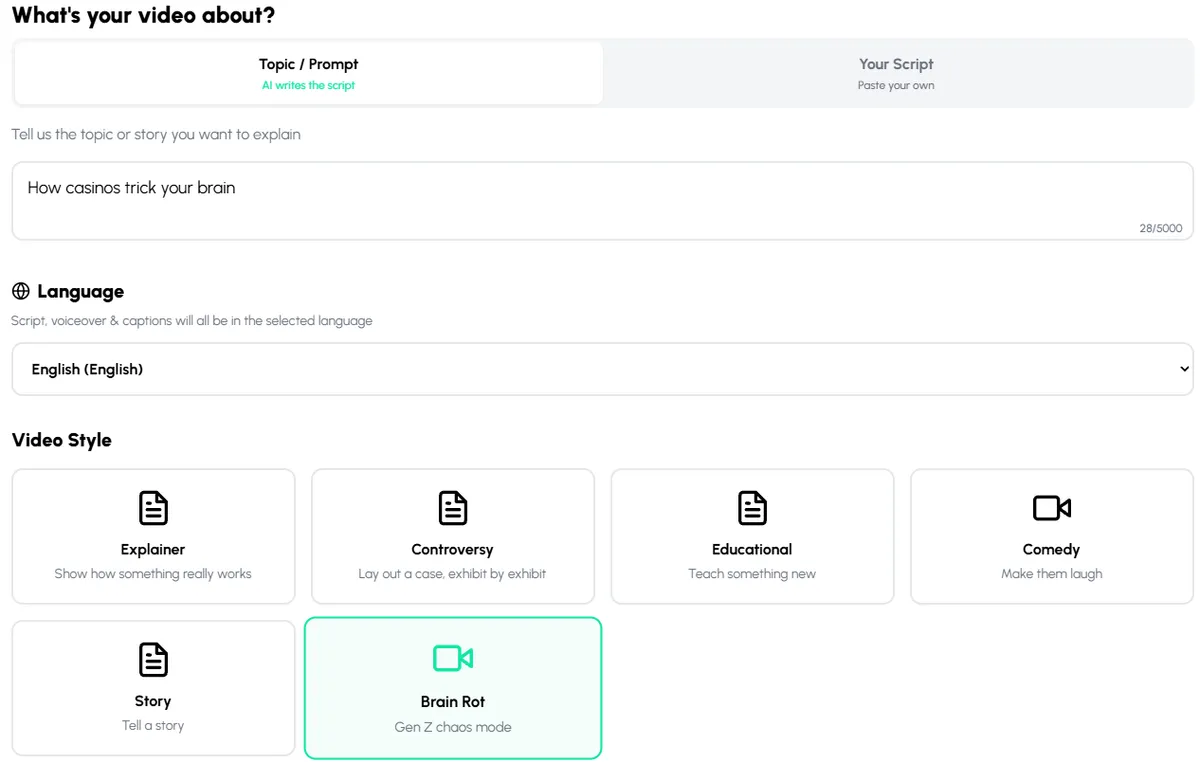
Type a topic, choose the language, and pick Brain Rot as the video style. - 2
Set the language, length and script quality
Pick the language: the script, voices and captions all come out in it. Choose a length from 30s up to 5m; for Shorts and TikTok, 30 to 60 seconds is the sweet spot.
Script Mode sets how the script is written. Trending looks the topic up on the web as it writes, which matters for news and drama from this week. Normal is fine for timeless topics.
- 3
Pick the gameplay behind your characters
On Visual Style, keep Gameplay for the classic look, then choose a clip: 101 built-in clips across Minecraft, Roblox, GTA, Subway Surfers and Satisfying, or Upload Custom Gameplay (MP4, WEBM or MOV, up to 200 MB). You can speed the gameplay up or slow it down without changing the voices.
Want slides instead? Motion graphics puts animated slides in the top panel or full screen.
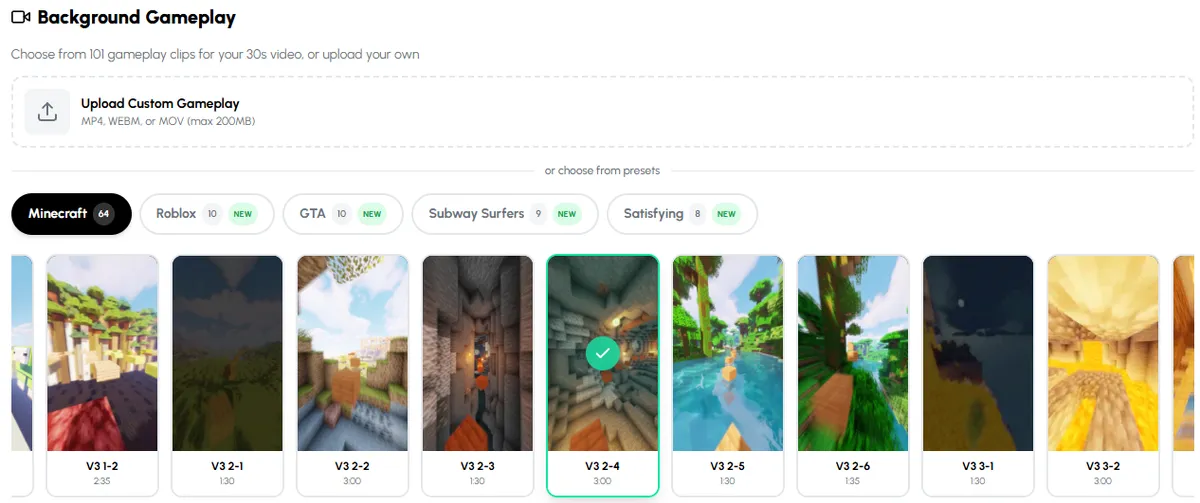
101 gameplay clips to put behind your characters, or upload your own footage. - 4
Choose your characters and their voices
On Character, choose Single Character or Dialogue. A 30-second video holds up to 3 characters, a minute up to 4, and two minutes or more up to 6. Give each a role: The Chaotic Zoomer is made for brain rot, and The Skeptical Normie or The Naive Beginner is the perfect person to argue with.
Set Voice Emotion to Expressive for brain rot energy, push the speech speed up a little, and turn on Floating Effect for a bit of wobble.
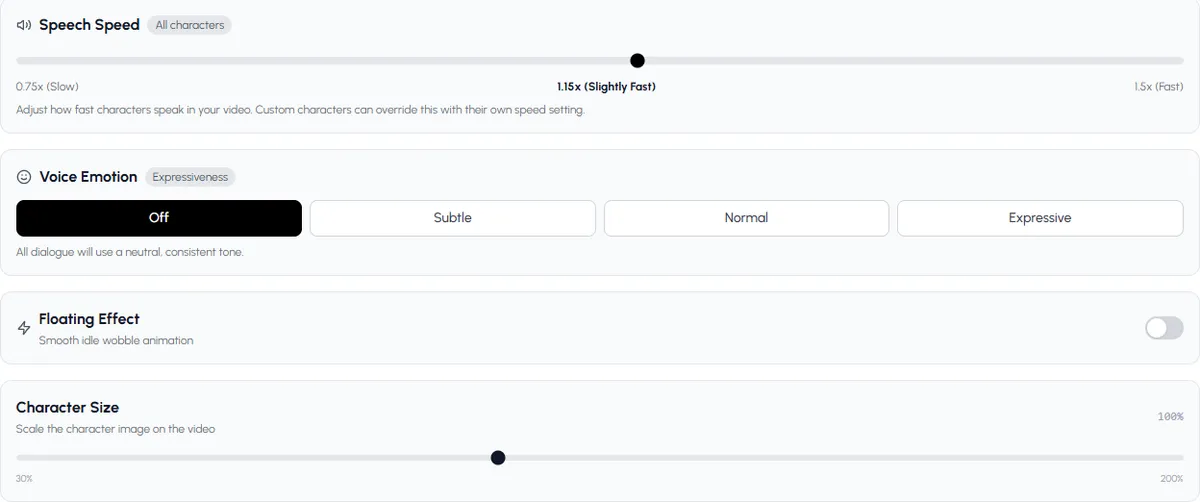
Speech speed, voice emotion, floating effect and character size, all on the Character step. - 5
Check the script and the scenes
Next, Autoclips writes the script. Read it, rewrite any line (make it funnier, shorter, more sarcastic) and check the scenes and pictures. Then pick music.
- 6
Preview, generate and post
Preview the video, move or resize the characters if you want, then generate it. Download it, or post it to your connected TikTok, YouTube and Instagram accounts.
Pick a topic you could talk about for a minute and make it brain rot.
Open Character ExplainerBrainrot video ideas that get watched
Brain rot works best when the topic is genuinely interesting and the style is the fun wrapper. Some starting points:
- How things trick you: how casinos trick your brain, why you can't stop doomscrolling, why supermarkets put milk at the back.
- Weird science: how volcanoes create lightning, what happens to your body after you die, why the ocean is losing oxygen.
- Money explained fast: how credit card points really work, why a $10 coffee costs $10.
- Internet drama: this week's celebrity fight, explained by two characters who disagree (use Trending script mode).
- Study content: a history chapter or a science topic as a 60-second argument. Students love this.
Fifty more, sorted by niche, are in character explainer video ideas.
6 tips for brainrot videos people finish
- Start mid-sentence. "Bro, casinos literally don't have clocks" beats any intro.
- Two characters beat one. An argument keeps the energy up and gives viewers a side to pick. See two characters explaining over gameplay.
- Fast gameplay, steady voice. Speed up the background, keep the speech clear.
- Real facts under the chaos. Slang is the costume; the facts are why people share it.
- Keep captions on. The word-by-word highlight is half the style.
- 30 to 60 seconds. Brain rot is a sprint. Save the 3-minute versions for YouTube.
Brainrot video generator vs editing it yourself
| Editing app (by hand) | Autoclips Character Explainer | |
|---|---|---|
| Script | You write it | Written in Brain Rot style, or paste yours |
| Voices | Generate and import each line | Built in, one voice per character |
| Gameplay | Find, download and cut footage | 101 clips built in, or upload yours |
| Captions | Time them word by word | Automatic, word by word |
| Time for 60 s | 1 to 2 hours | A few minutes of your time |
| Cost | Free editors exist | Credits per video |
For the bigger picture on this format, see our character explainer video maker page and the viral character explainer guide. And if you want brain rot energy in a totally different look, stickman skit videos are worth a try.
Made with Autoclips
Real videos people made in the app. Tap one to watch it with sound.
Frequently asked questions
What is a brainrot video generator?
A tool that turns a topic into a brain rot style short: a fast, slangy script, cartoon characters talking over gameplay footage, and word-by-word captions. Autoclips Character Explainer has a Brain Rot style that does this from one topic.
How do you make brainrot videos?
Pick a topic, write a fast script with a hook in the first line, put one or two characters over gameplay footage, add voices and word-by-word captions, and export in 9:16. A brainrot video generator does every one of those steps for you.
Is there a free brainrot video generator?
Some tools have free tiers with limits. Autoclips is free to sign up, but making a video uses credits because the script, voices and edit are done for you.
What gameplay is used in brainrot videos?
Minecraft parkour and Subway Surfers are the classics, plus GTA driving, Roblox and satisfying clips. Autoclips has 101 built-in clips across those categories, or you can upload your own footage.
Can I use my own script for a brainrot video?
Yes. Switch to Your Script on the Setup step and paste it. It is split into scenes and voiced as written. Using your own script is on paid plans.
How long should a brainrot video be?
30 to 60 seconds for TikTok, Shorts and Reels. Autoclips goes up to 5 minutes if you want longer versions for YouTube.
Can brainrot videos be in other languages?
Yes. Pick the language on the Setup step and the script, voices and captions all come out in that language.
Do brainrot videos make money?
They can, if the content is original. See our guide on making money with AI explainer videos for how creators actually earn from the format.
Make your first brain rot video
Type a topic, pick Brain Rot, and Autoclips writes it, voices the characters and puts it over gameplay with captions.
Make a brainrot videoAyaz Alam · Founder of Autoclips
Ayaz builds Autoclips and makes the tutorials on its YouTube channel. Every step in these guides is tested in the app before it is published.