
Cartoon Character Text to Speech: Turn a Script into a Talking Cartoon Video
Text to speech for cartoon characters turns written lines into speech in a character's voice. Most tools stop at an audio file. In Autoclips Character Explainer you paste your script (with speaker names if there are several characters), and the cartoon characters say every line on screen, in their own voices, over a background, with word-by-word captions. Here is how it works and how to write a script that sounds natural.
Quick answer
- Cartoon character text to speech reads your text in a character's voice. On its own you get audio; inside a video tool you get the character saying it on screen.
- In Autoclips Character Explainer, switch to Your Script and paste it. Write "Name: line" for each speaker and each character says their own lines.
- No script? Type a topic instead and the AI writes it for you.
- Pick the voice emotion and speed, the background and the captions, and you get a finished vertical video, not just a sound file.
Text to speech for cartoon characters: audio file or video?
Most cartoon text to speech tools give you a sound file. That's fine if you are animating the character yourself. If you want a finished short video, you still have to put the character on screen, sync the audio, add captions and a background, and export it. That's where most of the time goes.
| Text to speech tool | Autoclips Character Explainer | |
|---|---|---|
| You give it | Text | Your script, or just a topic |
| You get | An audio file | A finished vertical video |
| Characters on screen | No | Yes, one or a dialogue of up to six |
| Several speakers | Usually one at a time | "Name: line" for each speaker |
| Captions | No | Word by word, automatic |
| Background | No | Gameplay or animated slides |
How to turn a script into a talking cartoon video
- 1
Paste your script
Open Character Explainer and switch from Topic / Prompt to Your Script. Paste it in. For several characters, put the speaker's name before each line:
Professor: So the ocean makes half the oxygen you breathe. Kid: Wait, the ocean breathes?
Speaker names are not read out; each name tells the app who says the line. Pasting your own script is on paid plans. No script yet? Stay on Topic / Prompt, type the subject, and the AI writes it.
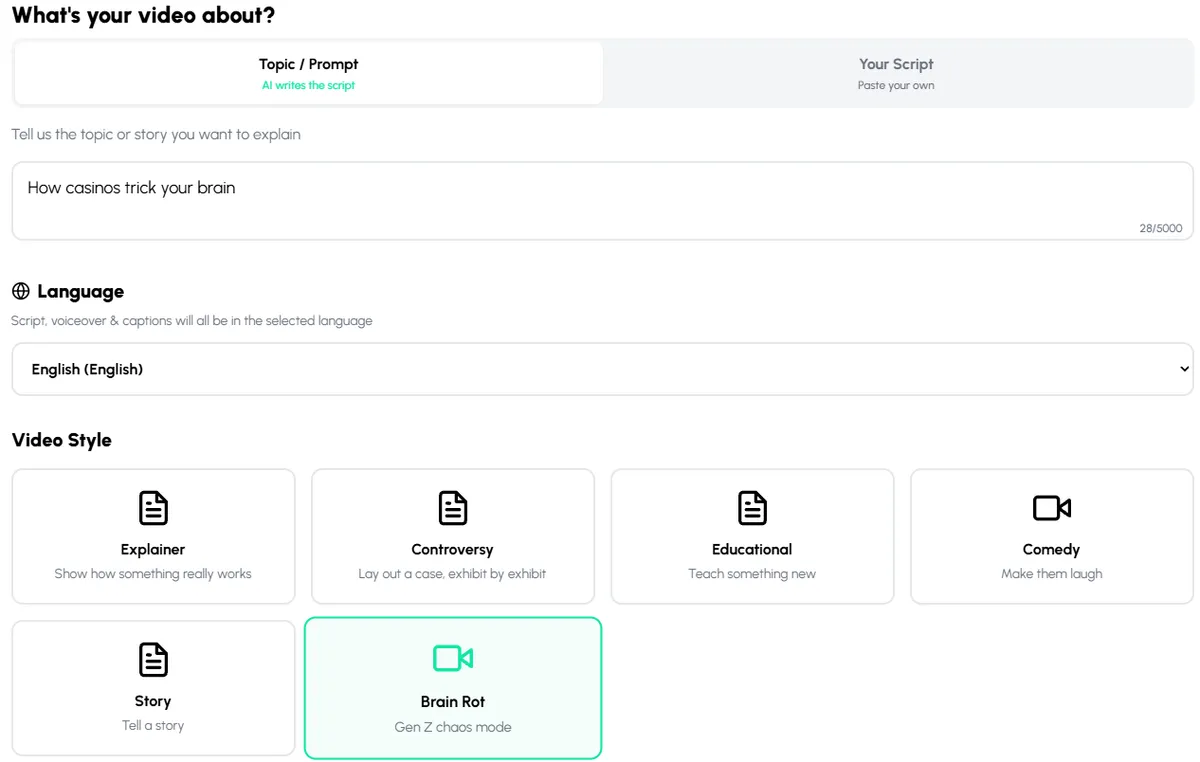
Topic / Prompt writes the script for you. Your Script uses your exact words. - 2
Pick the language and length
Choose the language your script is in, so the voices and captions match. The length is billed at the longer of what you pick and how long your script takes to say, so a long script makes a longer video.
- 3
Choose a background
Pick gameplay (Minecraft, Roblox, GTA, Subway Surfers, Satisfying, or your own upload) or animated motion graphics slides.
- 4
Cast the characters and set their voices
On the Character step, pick one character or a Dialogue. Pick as many characters as your script has speakers. Then set Voice Emotion (Off, Subtle, Normal, Expressive) and Speech Speed (0.75x to 1.5x).
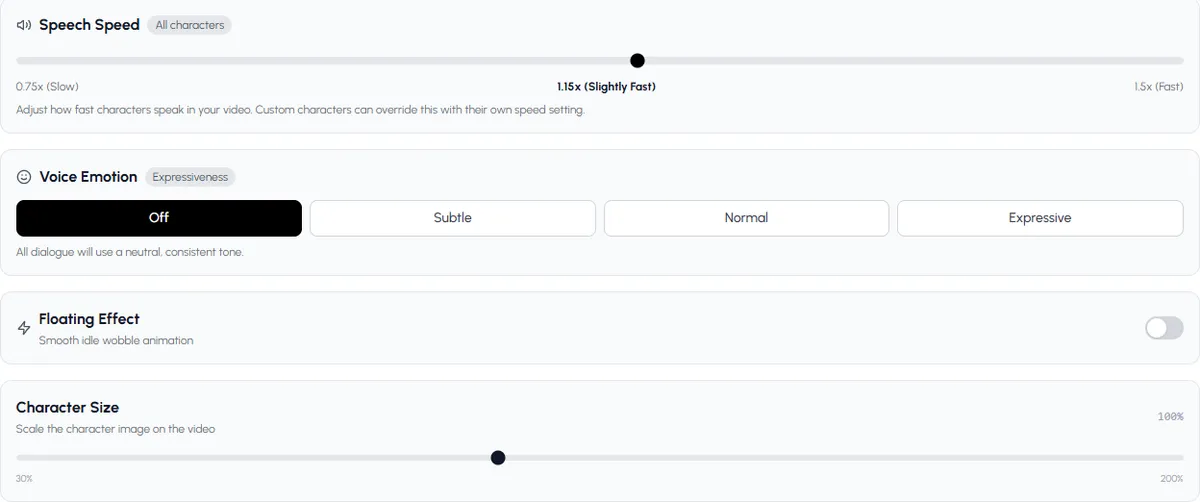
Set how fast and how expressive the cartoon voices are. - 5
Check, preview and generate
Your script is split into scenes, each with its lines and a picture. Check them, add music, preview, and generate. Download the video or publish it to your accounts.
Paste a short script and hear your characters say it.
Open Character ExplainerHow to write a script that sounds natural in a cartoon voice
- Write how people talk. "You won't believe this" beats "It may surprise you to learn".
- One idea per line. Short lines are easier to voice and easier to caption.
- Use questions and short reactions. "Wait, the ocean breathes?" gives the line energy.
- Keep names consistent. Use the same speaker name every time, or lines may go to the wrong character.
- Read it aloud once. If you stumble, the voice will sound rushed there too.
- About 500 characters is 30 seconds of speech in English. Trim before you paste.
Which cartoon voices can you use?
The built-in characters already have a voice set up. Your own characters can use a voice from the library, your own recording, or a voice made from a sample you upload. Only use your own voice or one you have permission to use. Everything about voices is in the AI character voice generator guide.
Want to see finished examples first? The character explainer videos page has them, and character explainer videos for marketing shows how brands use the same thing. For narrated stories with a stickman instead of cartoon characters, turn a script into a stickman video.
Made with Autoclips
Real videos people made in the app. Tap one to watch it with sound.
Frequently asked questions
How do I make cartoon characters say my text?
Use a tool that puts the voice and the character together. In Autoclips Character Explainer, paste your script under Your Script, pick your characters, and each one says its lines on screen in its own voice, with captions.
Can I make two cartoon characters talk to each other?
Yes. Write the script with the speaker's name before each line, like "Professor:" and "Kid:", choose Dialogue on the Character step, and each character says only their own lines.
Is there free cartoon character text to speech?
Some audio-only tools have free tiers with limits. Autoclips is free to sign up; making a video uses credits, and pasting your own script is on paid plans.
What languages does cartoon text to speech support?
Autoclips Character Explainer supports dozens of languages. Pick the language your script is in so the voices and captions match.
Can I use a famous cartoon character's voice?
The built-in characters come with their voice set up. Don't upload recordings of a real actor or another creator's character to make a voice without permission. You can always make an original character with your own voice.
Can I get just the audio?
Character Explainer makes a full video. If you only need audio, a standalone text to speech tool is the simpler choice.
Paste a script, get a talking cartoon video
Your words, your characters' voices, captions and a background, all in one video.
Turn a script into a cartoon videoAyaz Alam · Founder of Autoclips
Ayaz builds Autoclips and makes the tutorials on its YouTube channel. Every step in these guides is tested in the app before it is published.