
How to Make Zack D Films Style Animation with AI (Step by Step)
To make Zack D Films style animation with AI, you need four things: a curiosity hook in the first two seconds, the same 3D characters in every shot, a cut every two or three seconds, and a 20 to 60 second vertical video. Here is how to make one with 3D Animated Studio 2.0 in Autoclips, step by step, plus the habits that make this style work.
Quick answer
- Zack D Films is a YouTube Shorts channel made by a team of 3D animators, mostly in Blender. You can make videos in a similar style with AI instead.
- In Autoclips, open 3D Animated Studio 2.0, type a "what would happen if" idea or paste a script, pick a length from 20 to 90 seconds and press Create.
- Studio writes the script, draws a character sheet for each character so they look the same in every shot, then animates the clips and joins them into one vertical video with sound.
- You can check and change every step (Director) or let it build the whole video for you (Autopilot). Videos use credits.

What makes a Zack D Films video work
Zack D Films is one of the biggest YouTube Shorts channels. Each video takes one question about the body, science or history, like what happens if you swallow gum, and answers it with a short 3D animation. The channel is made by people, not by an AI tool: it hires contract 3D animators and its job post asks for 20 to 45 second clips in its Shorts style (more on that in what Zack D Films uses to animate).
You don't need to copy the channel to use what works about it. These are the parts of the format you can learn from:
- A question as the hook. The first line is a question the viewer already half wants answered: "What happens if you fall into a pool of honey?"
- One character the viewer watches go through it. A plain, stylised 3D person, so the focus stays on what happens to them.
- A cut every two or three seconds. Close-ups, an inside-the-body shot, a reaction. Nothing stays still for long.
- One calm narrator. Short sentences, no filler, numbers said out loud.
- 20 to 60 seconds, vertical. Long enough to answer the question, short enough that people watch it twice.
How to make Zack D Films animation with AI in Autoclips
Everything below happens in 3D Animated Studio 2.0. Before you spend anything, you can open one of the finished sample films (the small pictures at the top of Studio) and click through every step. Nothing in a sample is saved, rendered or charged.
- 1
Open 3D Animated Studio 2.0 and choose Video
Sign in to Autoclips and open 3D Animated Studio 2.0. At the top of the box, keep Video selected (Brainstorm is for when you want help finding the idea first).
Then pick how hands-on you want to be. Director lets you approve every step: the script first, then the characters, pictures and clips. Autopilot builds the whole video on its own, and you can pause or take over at any point.
- 2
Type the question, or paste your script
Write the idea the way the video will open, as a question: "What happens to your body if you stay awake for 11 days?" Add the tone you want, like "Pixar-style 3D, calm narrator, ends on a surprising fact".
If you already have a script, paste it. Studio decides who speaks: a narrator, the characters, or both. For this style, ask for a narrator. You can also attach up to 8 pictures, such as a character you want to keep.
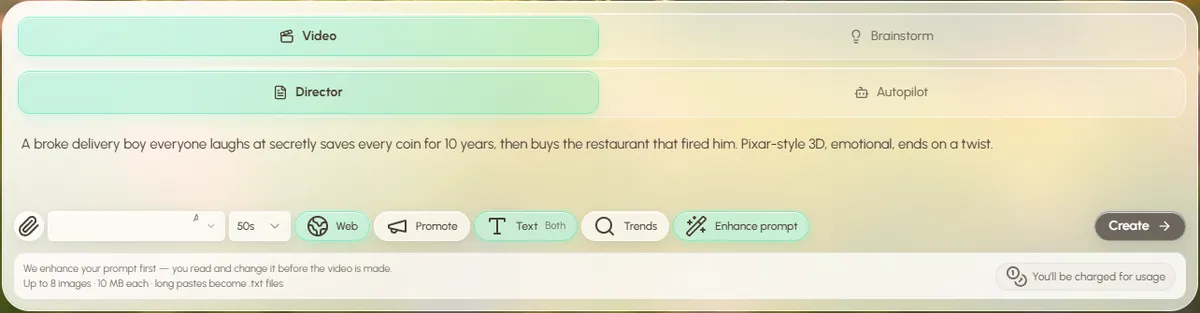
The Studio prompt box: type the idea, set the length, then press Create. - 3
Set the length and switch on research
Pick a length from 20 to 90 seconds. For this style, 30 to 50 seconds is plenty. Switch on Web so Studio checks current facts while it writes: science and history videos live or die on getting the facts right.
Leave Enhance prompt on. Studio rewrites your idea into a fuller brief first, and you read and change it before anything is made.
- 4
Read the script and the plan
Studio writes a script split into scenes and acts, with the hook, the turn and the payoff marked. It also shows a short plan of the opening frame, the payoff and why people might comment.
This is the cheapest place to fix anything. Cut words if a scene is too wordy: Studio warns you when lines are too long to be spoken in the time a scene has.
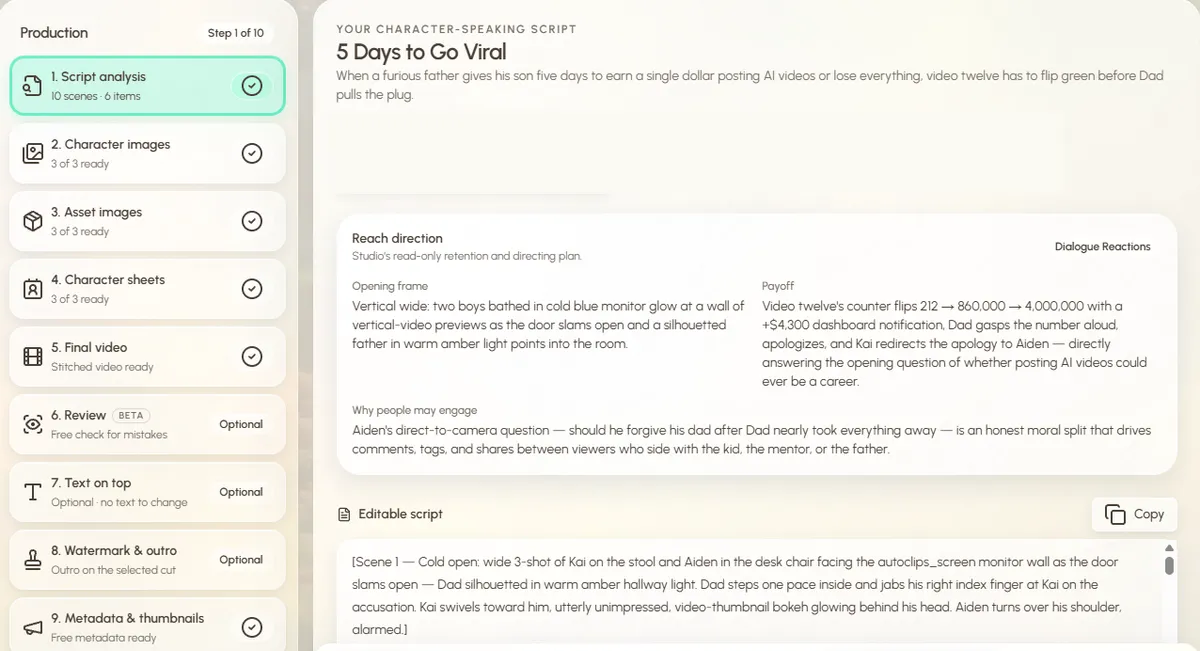
The 10 production steps on the left, the script and its plan on the right. - 5
Lock the characters with character sheets
Next, Studio draws each character, then a character sheet: front, side and back views plus a row of facial expressions. Every clip uses that sheet, which is how the same person keeps the same face, hair and clothes from the first shot to the last.
Not happy with a face? Describe the change ("make the side view clearer and soften the smile") and redraw just that sheet. You can also add a short voice sample per character so they sound the same across clips.
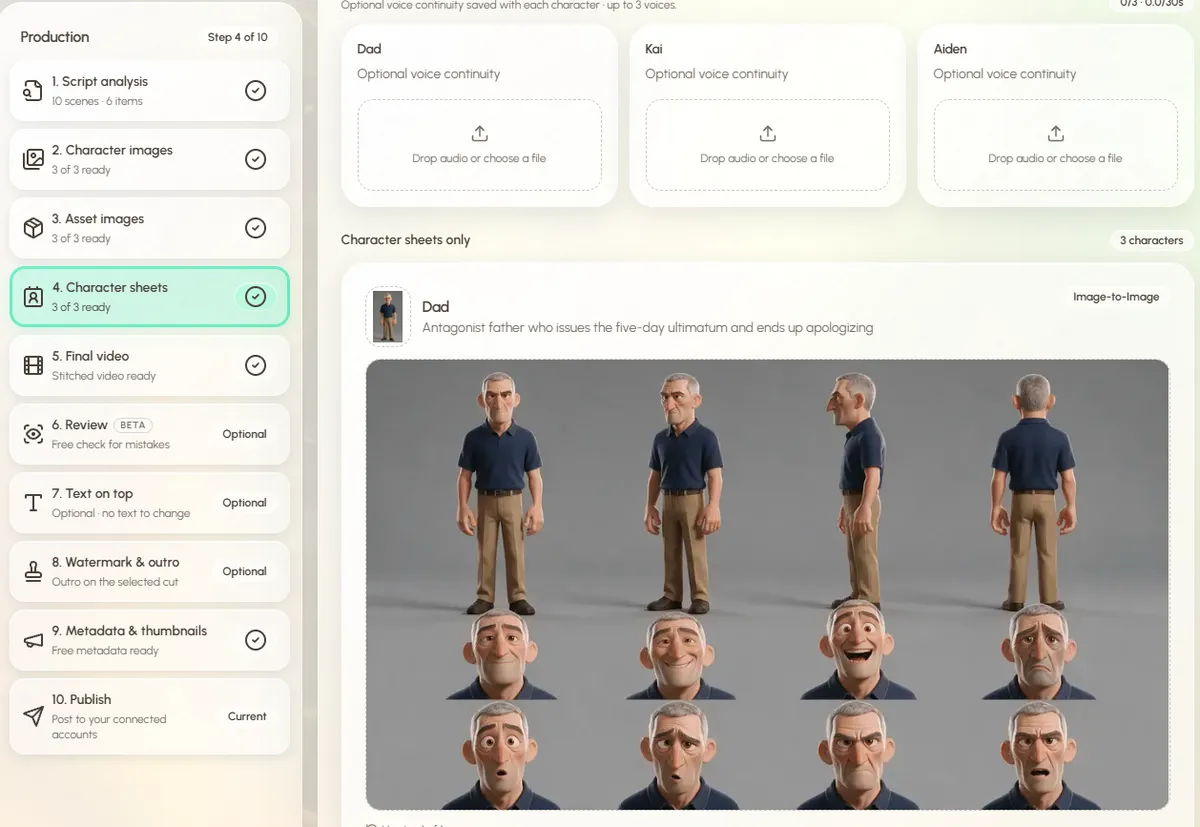
A character sheet: full body from four sides plus expressions, used in every clip. - 6
Make the final video, then fix single clips
Studio animates each scene as a clip with sound and joins them into one video. Watch it through. If one shot is off, use Edit a clip: swap its reference pictures or describe what should be different. Only that clip is redone and the video re-joins itself for free.
The optional steps add a free mistake check (Review), exact text on top of the video, your watermark and outro.
- 7
Copy the title and post it
Studio writes a title, description, tags and hashtags for YouTube, TikTok and Instagram, and can make a thumbnail. Download the video, or post it to your connected accounts from the Publish step.
Open a finished sample film first and click through every step for free, then make your own.
Open 3D Animated StudioWhat you get at the end
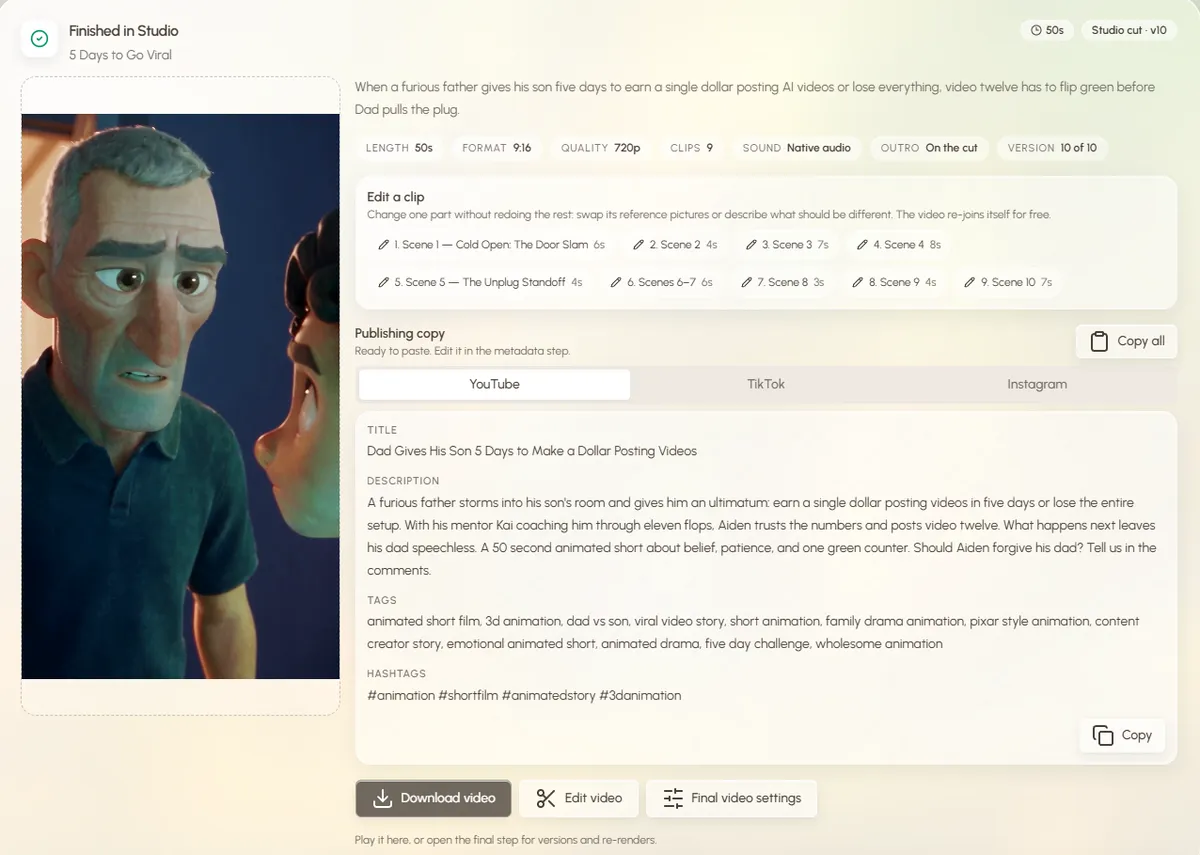
This is a finished sample from Studio: a 50 second, 9:16 short with 9 clips, native sound, an outro and ready-to-paste publishing copy. The same screen is where you download it, open it in the editor or change one clip.
Zack D Films AI vs. animating it by hand in Blender
The channel's own videos come from professional 3D artists. If you want to learn 3D, Blender is free and is what most of them use. If you want to post often without learning it, AI is the shortcut. Here is the honest trade-off.
| By hand (Blender and an editor) | AI (3D Animated Studio 2.0) | |
|---|---|---|
| Skills needed | Modelling, rigging, animation, lighting, editing | Writing a good idea |
| Time for a 40 s short | From hours to days, depending on skill | A few minutes of your time, then it renders |
| Control over every frame | Total | Per scene and per clip, by describing changes |
| Same character every shot | Yes, it's one model | Yes, through character sheets |
| Voice and sound | Record or buy separately | Built in |
| Cost | Free software, your time | Credits per video |
| Best for | Learning 3D, studio-quality work | A channel that posts several times a week |
8 tips for this style of video
- Start with the question, not the answer. "What happens if..." in the first line, the answer at the end.
- One character, one situation. Don't add a cast of five to a 40 second video.
- Keep every scene short. Two to four seconds a shot keeps people watching. Studio's word count per scene helps you see where a scene is too long.
- Check the facts. Switch on Web research and read the script before the clips are made. Viewers will correct you in the comments.
- Show the inside view. Inside the stomach, the bloodstream, the engine. That is the shot people remember.
- End on a surprise. The last fact should be one most people didn't know.
- Post in a series. Same narrator, same look, one topic area. Returning viewers come back for the format.
- Make it yours. Your own topics, characters and voice. Copying another channel's scripts gets videos refused for monetisation.
Want examples and the overview instead of a tutorial? See the Zack D Films style video generator. For other 3D looks, read our guide to Pixar-style AI animation.
Made with Autoclips
Real videos people made in the app. Tap one to watch it with sound.
Frequently asked questions
How do you make Zack D Films animation using AI?
Write a "what would happen if" question as your hook, then use an AI 3D animation tool that writes the script, keeps the same character in every shot and animates short clips. In Autoclips 3D Animated Studio 2.0 you type the idea, check the script and character sheets, and it makes a vertical video with sound.
What do I need to make Zack D Films style animation with AI?
An Autoclips account and an idea written as a question. 3D Animated Studio 2.0 handles the script, characters, animation, voices and captions, so you need no 3D software. If you want to know what the channel itself uses, see what Zack D Films uses to animate.
Can I make Zack D Films style videos for free?
By hand, yes: Blender is free, but you need 3D skills and a lot of time. With AI, signing up to Autoclips is free and you can open the sample films at no cost, but making a video uses credits.
How long should a Zack D Films style video be?
Most are well under a minute. Aim for 30 to 50 seconds: enough to set up the question and pay it off. Studio lets you pick anything from 20 to 90 seconds.
Can I keep the same character across videos?
Yes. Each character gets a character sheet with front, side and back views and expressions, and every clip uses it. For a series, attach the same character picture to your next idea.
Is it allowed to copy Zack D Films videos?
No. Their videos, scripts and characters belong to them. You can learn from the format (a question hook, fast cuts, one narrator) and make original videos on your own topics.
Will AI 3D animated videos get monetised on YouTube?
They can, if they are original and add something: your own research, your own angle, a consistent series. Mass uploads of copied or repetitive content are what YouTube refuses.
Make your first 3D animated short
Type one "what would happen if" idea. Studio writes it, draws the characters, animates the shots and gets it ready to post.
Open 3D Animated StudioAyaz Alam · Founder of Autoclips
Ayaz builds Autoclips and makes the tutorials on its YouTube channel. Every step in these guides is tested in the app before it is published.