
AI 3D Animation for Instagram Reels: Make and Post 3D Shorts That Get Watched
To make AI 3D animation for Instagram Reels, make a vertical 9:16 video of 30 to 60 seconds, put the most dramatic moment in the first two seconds, keep text clear of the bottom of the screen, and end on a question. In Autoclips, 3D Animated Studio 2.0 makes the whole Reel from a typed idea and writes the Instagram caption for you.
Quick answer
- Shape and length: 9:16 vertical, 30 to 60 seconds. Studio makes 20 to 90 seconds and is vertical by default.
- Hook: the most dramatic shot first: the door slam, the fall, the moment someone gets laughed at.
- Make it: type the story into 3D Animated Studio 2.0 in Autoclips; it writes, draws, animates and voices the Reel.
- Post it: Studio writes a separate Instagram caption and hashtags, and you can post to your connected Instagram account from the Publish step.
Why 3D animation works on Reels
Reels is a swipe feed. A soft 3D cartoon character stands out next to talking heads and screen recordings, and a story with a clear underdog or a twist gets watched to the end, shared and commented on. The big 3D trends on Instagram right now are underdog stories (see rags to riches animated shorts), family drama with a twist, and short "what would happen if" explainers.
The Reel checklist
| Setting | What to use | Why |
|---|---|---|
| Shape | 9:16 vertical | Fills the phone screen |
| Length | 30 to 60 seconds | Long enough for a story, short enough to rewatch |
| First 2 seconds | The most dramatic shot | People decide to swipe almost straight away |
| Shots | A cut every 2 to 4 seconds | Keeps the eye moving |
| Text | Large, near the middle of the screen | The bottom and right side are covered by Instagram's buttons and caption |
| Sound | Voices plus music | The voices carry the story; on-screen text helps people watching on mute |
| Ending | A question to the viewer | Comments push a Reel to more people |
How to make an AI 3D animated Reel
- 1
Open 3D Animated Studio 2.0
Sign in to Autoclips and open 3D Animated Studio 2.0. Choose Video, and Director to approve each step or Autopilot to let it run.
- 2
Type the story and pick 30 to 60 seconds
One or two lines: who, what goes wrong, how it turns around. Add the look, like "Pixar-style 3D, warm cinematic light". Studio's videos are 9:16 by default, the Reels shape.
Use the Text option to decide what words appear: text painted into the scene, or exact text Studio puts on top (text on top never misspells).
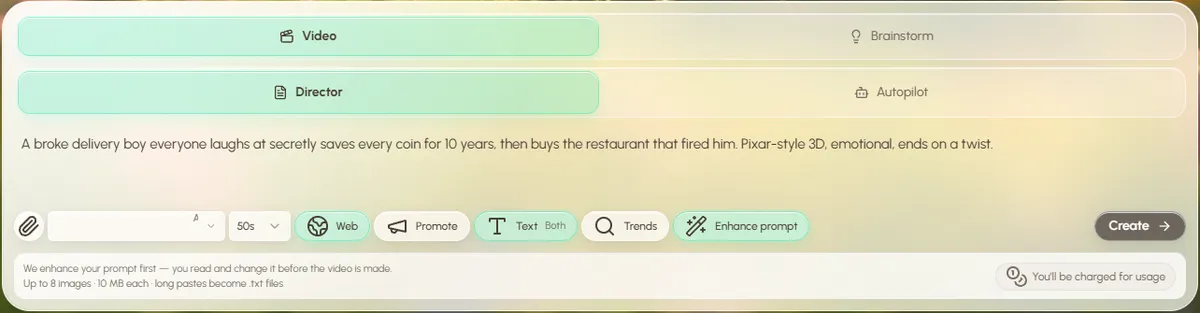
The idea, the length and the Text option, all in the prompt box. - 3
Check the script and the characters
Read the script and shorten any scene that's too wordy. Then approve the character sheets, so your hero looks the same in the first and last shot.
- 4
Make the video and fix single clips
Studio animates each scene with sound and joins them. If one shot is wrong, edit just that clip; the video re-joins itself for free. Add your watermark and an outro in the optional steps.
- 5
Copy the Instagram caption and post
In Metadata & thumbnails, Studio writes the title, description and hashtags separately for YouTube, TikTok and Instagram. Copy the Instagram one, then download the video or post it to your connected Instagram account from Publish.
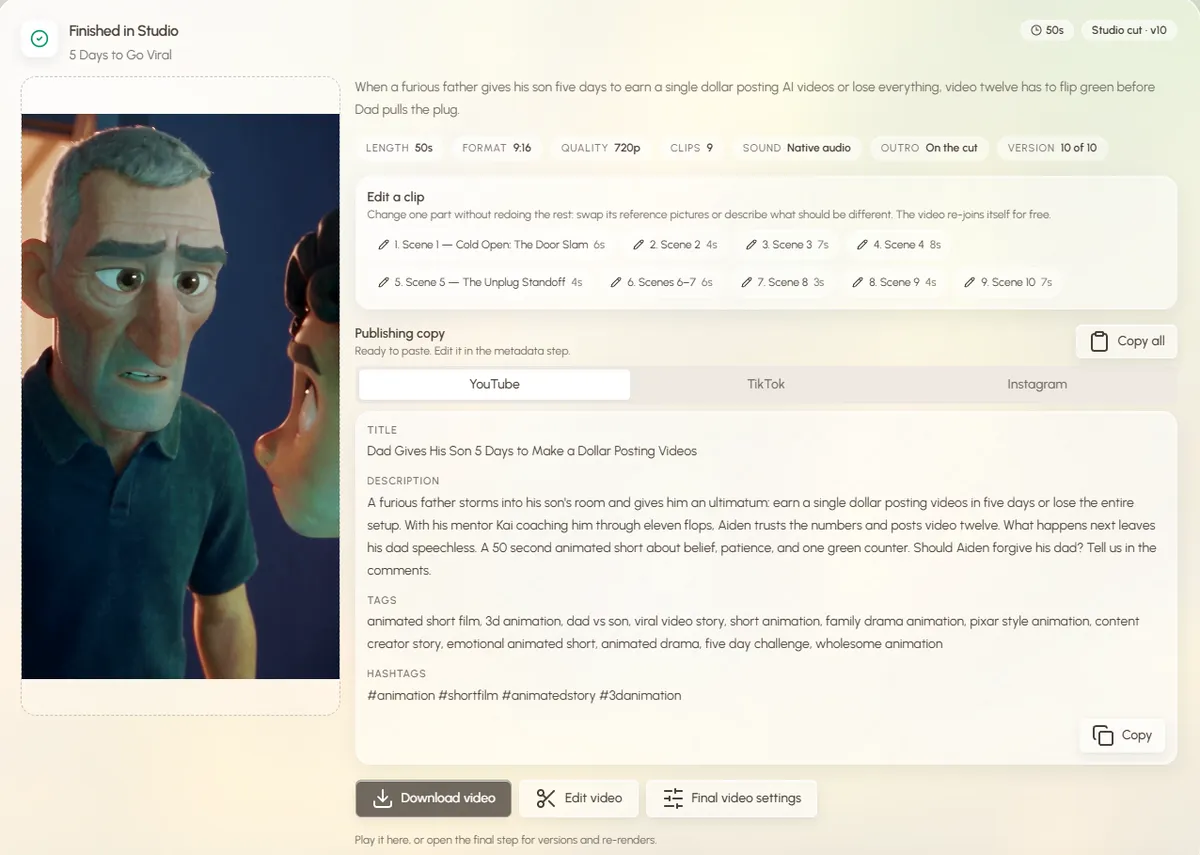
Open a sample film in Studio to see a finished 3D Reel and its captions, free.
Open 3D Animated Studio6 habits of 3D Reels that grow
- Post the same kind of story, often. One format and one look make your page easy to follow.
- Keep the main character. Returning viewers recognise a face. Reuse the same character picture across parts.
- Put a number on screen. Views, money, days left. Numbers make the win feel real.
- Cut the first second. If the first shot is a slow establishing shot, start one beat later.
- Ask, don't tell. "Would you forgive him?" beats "Never give up".
- Post the same video to Shorts and TikTok. Studio writes a caption for each, so it costs you nothing extra.
For the look, read Pixar-style AI animation. For ideas, see 3D animated short story ideas. For posting on a schedule without doing it by hand, see how to automate TikTok posting. And for Reels in other styles, the viral Instagram Reels creator page covers the rest of Autoclips.
Made with Autoclips
Real videos people made in the app. Tap one to watch it with sound.
Frequently asked questions
How do I make 3D animated Reels with AI?
Type your story into an AI 3D animation tool that makes vertical video. In Autoclips 3D Animated Studio 2.0 you type the idea, choose 30 to 60 seconds, check the script and characters, and it makes a 9:16 video with sound and an Instagram caption.
What size should a 3D Reel be?
9:16 vertical, 1080 by 1920 pixels. Studio is vertical by default and offers 720p or 1080p, where 1080p is drawn at 720p and sharpened at no extra cost.
How long should a 3D animated Reel be?
30 to 60 seconds for a story. Shorter is fine for a single joke or fact. Studio makes anything from 20 to 90 seconds.
Can Autoclips post to Instagram for me?
Yes. Connect your Instagram account and post from Studio's Publish step, using the caption and hashtags it writes for Instagram. You can also download the video and post it yourself.
Do AI 3D Reels get reach on Instagram?
They can, like any Reel, if people watch to the end and comment. A strong first shot, a clear story and a question at the end matter more than how the video was made.
Can I use the same video on TikTok and YouTube Shorts?
Yes, the 9:16 shape works on all three. Studio writes a separate title, description and hashtags for YouTube, TikTok and Instagram.
Make your first 3D animated Reel
Type a story. Studio makes the vertical 3D video and the Instagram caption, ready to post.
Make a 3D ReelAyaz Alam · Founder of Autoclips
Ayaz builds Autoclips and makes the tutorials on its YouTube channel. Every step in these guides is tested in the app before it is published.