
Pixar-Style AI Animation: How to Make 3D Cartoon Shorts That Look the Part
Pixar-style AI animation means 3D cartoon video with the look people know from big animated films: soft rounded characters, big expressive eyes, warm light and a shallow, movie-like focus. The look is easy to get from AI now. The hard part is keeping the same character in every shot and turning pictures into a short with a story. Here is how to do both in Autoclips.
Quick answer
- "Pixar-style" is a look, not a product: rounded 3D characters, big eyes, soft skin, warm cinematic light, shallow depth of field.
- Describe it in your idea with words like stylised 3D, big expressive eyes, soft rounded shapes, warm rim light, shallow depth of field.
- The real problem is consistency. In 3D Animated Studio 2.0, each character gets a character sheet (front, side, back and expressions) that every clip uses.
- Studio writes the script, animates 20 to 90 seconds of video with sound, and writes the title and hashtags. Make original characters, never existing film characters.
What "Pixar-style" actually means
When people say Pixar-style, they mean a family of choices that big 3D animated films made famous. None of them belong to one studio, and you can describe each one in plain words:
| Element | What it looks like | Words to use |
|---|---|---|
| Shapes | Rounded, soft, slightly chunky. No sharp edges on faces. | soft rounded shapes, stylised proportions |
| Eyes | Large, glossy, very expressive | big expressive eyes, glossy eyes |
| Faces | Exaggerated brows and mouths that read from far away | expressive brows, readable expressions |
| Skin and fabric | Soft, slightly glowing skin; fabric you could touch | soft skin, subsurface glow, fabric texture |
| Light | Warm key light, a coloured rim light behind the character | warm cinematic lighting, rim light, golden hour |
| Camera | Shallow focus, background softly blurred | shallow depth of field, cinematic framing |
| Colour | Rich but not neon; one or two colours lead each scene | warm palette, teal and amber, storybook colours |
Why most Pixar-style AI videos look off
One AI picture in this style is easy. A 40 second video is twenty or more shots, and most tools draw each shot from scratch. So the hero's hair changes colour, the shirt gains a logo, the eyes turn from brown to blue. Viewers notice in seconds, and the story stops working.
The fix is to design each character once, from every angle, and make every shot use that design. In 3D Animated Studio 2.0 that is the Character sheets step: full body from the front, both sides and the back, plus a row of facial expressions, used as the reference for every clip.
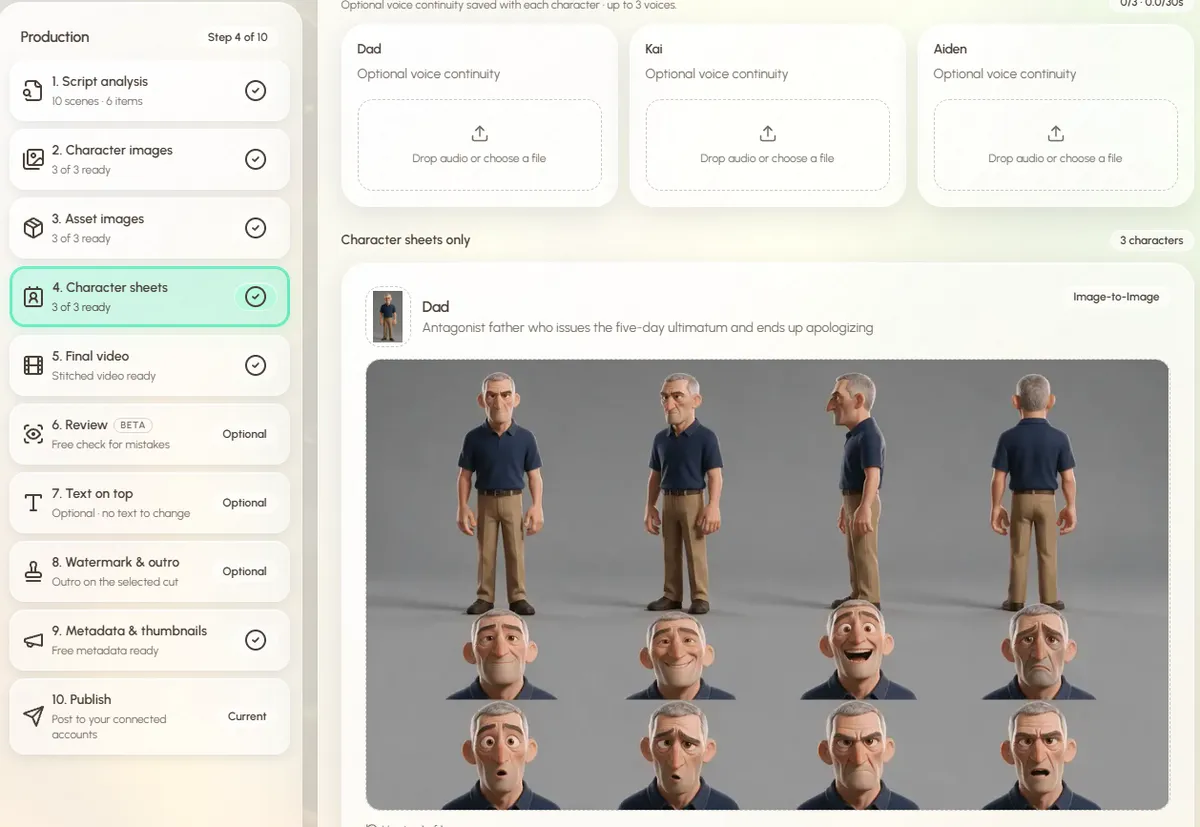
Studio also writes each character's description with the details that must not change, like "navy polo shirt and khaki trousers, this exact outfit and eye colour in every scene". You can edit that text before anything is drawn.
How to make a Pixar-style AI animation, step by step
- 1
Start a video in 3D Animated Studio 2.0
Sign in to Autoclips and open 3D Animated Studio 2.0. Choose Video, then Director if you want to approve each step, or Autopilot to have it build everything and step in only when you want.
- 2
Describe the story and the look
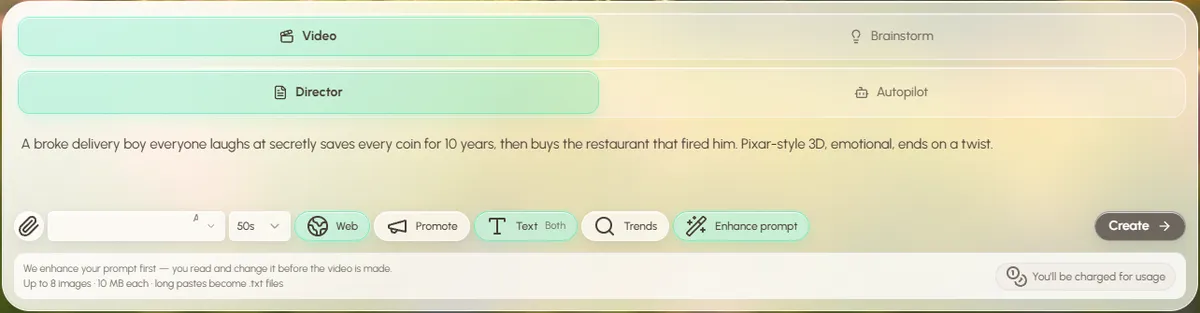
Type the idea in a sentence or two, then the look: "Stylised Pixar-style 3D, big expressive eyes, warm cinematic lighting, shallow depth of field." You can attach up to 8 pictures, for example a drawing of your own character.
Pick a length from 20 to 90 seconds and leave Enhance prompt on: Studio turns your line into a fuller brief, and you can edit it first.
Put the story first, then the look in a few words. - 3
Read the script
Studio splits the story into scenes and acts and decides who speaks: a narrator, the characters, or both. Edit anything you want, or press regenerate with a changed prompt.
- 4
Approve characters, props and places
Studio draws each character, the props that must stay the same (a phone, a trophy, a car) and the main location, then the character sheets. Redraw any of them by describing the change. Add a short voice sample per character if you want them to sound the same in every clip.
- 5
Make the final video
Each scene becomes an animated clip with sound and the clips are joined into one video. Pick 720p, or 1080p (drawn at 720p and sharpened at no extra cost). If one shot is off, edit just that clip: the rest stays and the video re-joins itself for free.
- 6
Finish and post
Add exact text on top, your watermark and an outro if you want. Studio writes the title, description, tags and hashtags for YouTube, TikTok and Instagram. Download it, or post to your connected accounts.
Open a finished sample film in Studio and click through it, free, before making your own.
Open 3D Animated Studio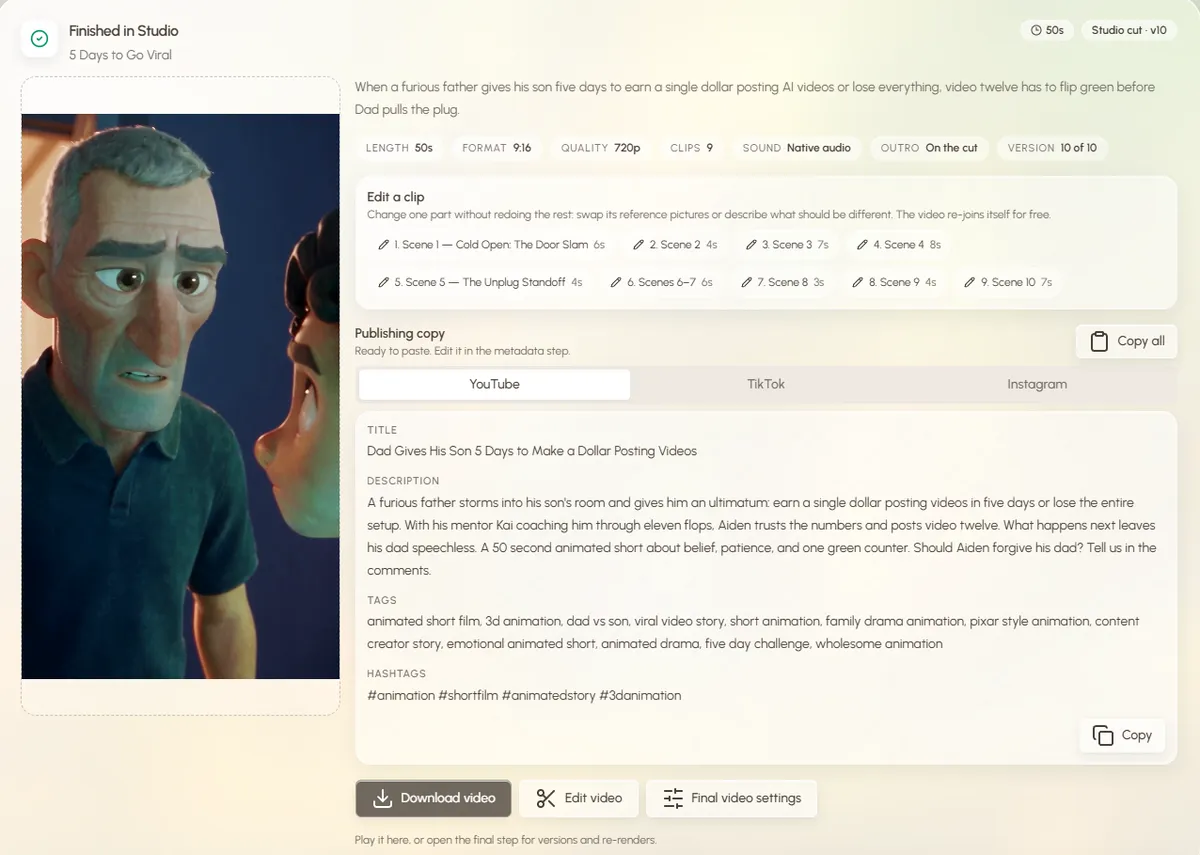
Prompt words that help (and ones that hurt)
| Use | Avoid |
|---|---|
| "stylised 3D cartoon, soft rounded shapes" | "realistic", "photoreal" (breaks the look) |
| "big expressive eyes, readable expressions" | Naming real film characters or studios' characters |
| "warm cinematic lighting, rim light" | "lots of neon", "glowing everything" |
| "same outfit in every scene: red hoodie, blue jeans" | Vague outfits ("casual clothes") that change shot to shot |
| "shallow depth of field, close-up on the face" | Ten characters in one shot |
| One clear emotion per scene | Long descriptions of every object |
The look suits underdog stories (rags to riches animated shorts), family moments and "what would happen if" explainers (Zack D Films style animation with AI). More ideas are in 3D animated short story ideas, and the product overview is on the text to 3D animation page. Prefer a handmade look? Compare it with clay in claymation vs 3D animation.
Made with Autoclips
Real videos people made in the app. Tap one to watch it with sound.
Frequently asked questions
How do I make Pixar-style AI animation?
Describe your story and the look (stylised 3D, big expressive eyes, warm cinematic light) in an AI 3D animation tool that keeps characters consistent. In Autoclips 3D Animated Studio 2.0 you type the idea, approve the script and character sheets, and it animates a short with sound.
Is Pixar-style AI animation legal?
A visual style isn't owned by anyone, so making original characters in a soft 3D cartoon look is fine. Recreating existing film characters, logos or scenes is not. Keep your characters and stories your own.
How do I keep the same character in every scene?
Design the character once from every angle and use that design in every shot. Studio does this with character sheets: front, side and back views plus expressions, used as the reference for every clip.
Can I turn my own drawing or photo into a Pixar-style character?
You can attach up to 8 pictures to your idea in Studio, for example your own character drawing, and describe how you want them to look in 3D. Studio uses them when it draws the characters, and you can redraw until it's right.
How long are Pixar-style AI shorts?
Studio makes videos from 20 to 90 seconds. For Shorts, Reels and TikTok, 30 to 60 seconds is the sweet spot.
Is there a free Pixar-style AI animation generator?
Signing up to Autoclips is free and you can open the sample films in Studio without being charged. Making your own video uses credits, shown before you start.
Can the characters talk?
Yes. Studio decides whether a narrator, the characters, or both speak, based on your idea and script. Each clip is made with its sound.
Make your own Pixar-style 3D short
Your own characters, in the soft 3D cartoon look, animated and voiced from one typed idea.
Make a Pixar-style shortAyaz Alam · Founder of Autoclips
Ayaz builds Autoclips and makes the tutorials on its YouTube channel. Every step in these guides is tested in the app before it is published.