
Stickman Video Styles: The 5 Looks and When to Use Each
Autoclips stickman story videos come in five looks: Cinematic (painted night scenes in teal and warm orange, the classic), Horror Glow (dark, lit by vivid green, red and purple), Rainy Noir (rain, hard shadows, cold blue light), Bright Day (sunny cartoon colours) and Golden Epic (huge skies and golden sunsets). The look changes the world and the light, never your characters. Here is what each one looks like and which story it fits.
Quick answer
- Cinematic fits any story. Horror Glow fits scary, survival and mystery. Rainy Noir fits crime, heists and true stories. Bright Day fits funny, feel-good and kids stories. Golden Epic fits history, war and adventure.
- A look changes places, light and colour. The stickman cast stays the same: round white heads, thick black outlines, the same clothes.
- Pick it with the look button on the Stickman page (it says Cinematic by default). A series keeps one look from Part 1 to the end.
- Looks are for story videos (You Decide, True Story, Character Speaks and My script). Explainer and Skit have their own look.
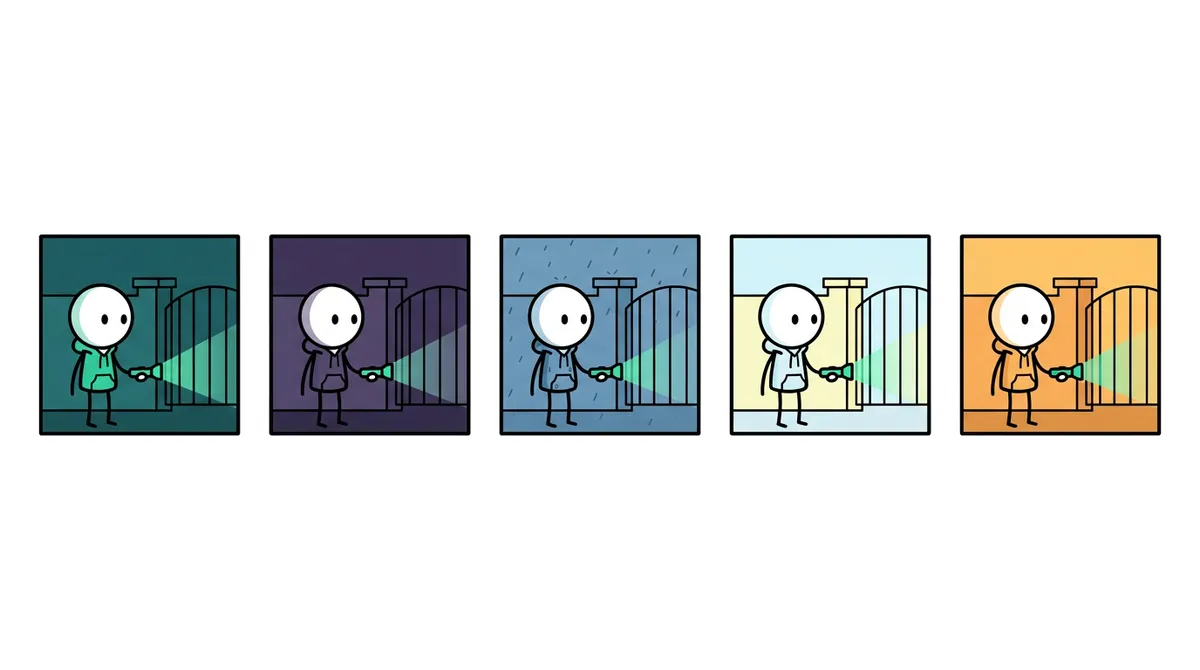
The 5 stickman video styles side by side
Here is the same scene, a stickman with a flashlight at a gate, drawn in each look. These are the sample pictures the app shows in its look picker.
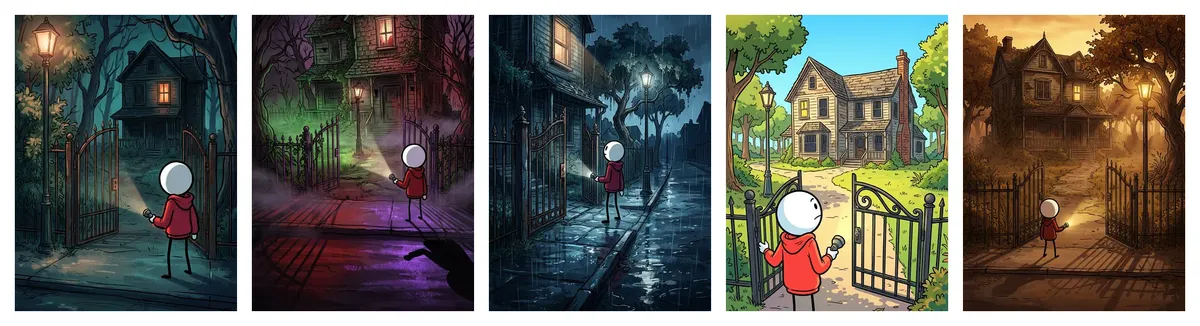
| Look | What it looks like | Best for |
|---|---|---|
| Cinematic | Painted night scenes in teal and warm orange. The classic look. | Any story |
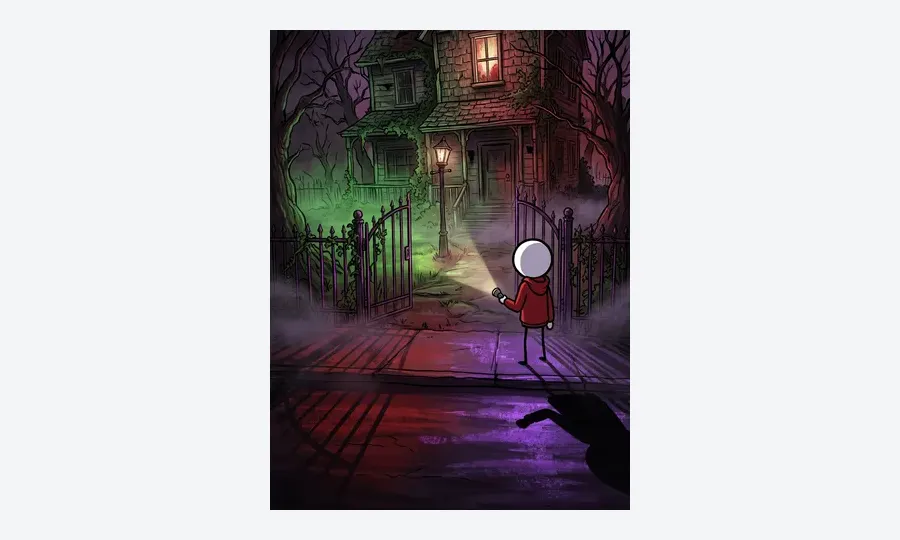
| Horror Glow | Deep black and violet shadows with fog, lit by toxic green, blood red and purple light. Dark but colourful, never gory. | Scary, survival and mystery stories |
| Rainy Noir | Rain, wet streets and reflections, hard light through blinds, cold steel-blue light with touches of crimson. | Crime, heists and true stories |
| Bright Day | Sunny and cheerful: clear blue skies, short soft shadows, sky blue, sunny yellow, grass green and coral. | Funny, feel-good and kids stories |
| Golden Epic | Vast scale, golden-hour sun, amber and burnt orange skies, dust in the air, long dramatic shadows. | History, war and adventure |
When to use each look
Cinematic: the safe default
If you're not sure, use Cinematic. It's the look most stickman story channels use, and it suits money stories, "you decide" thrillers and business stories equally well.
Horror Glow: scary without gore
For stories where the viewer should feel uneasy. The colour keeps it readable on a phone, which a plain dark look isn't. Guide: stickman horror story videos.
Rainy Noir: crime and secrets
Con men, heists, scams, disappearances. Rain and hard shadows say "something is wrong" before the narrator does. Great for true story animation videos about crime.
Bright Day: light and funny
For stories that should make people smile: a silly scheme that worked, a kid's adventure, a feel-good twist. It also suits younger audiences. For 10-second gags, see stickman skit videos.
Golden Epic: history and big moments
Battles, empires, explorers, great inventions. The golden light and huge skies make a single stickman feel like part of history.
How to choose a look in the app
- 1
Open Stickman and pick a story format
Open Stickman in Autoclips and pick You Decide, True Story or Character Speaks, or switch on My script.
- 2
Open the look picker
In the options under your idea, click the look button. It says Cinematic until you change it. Each look shows a sample picture and a one-line description.
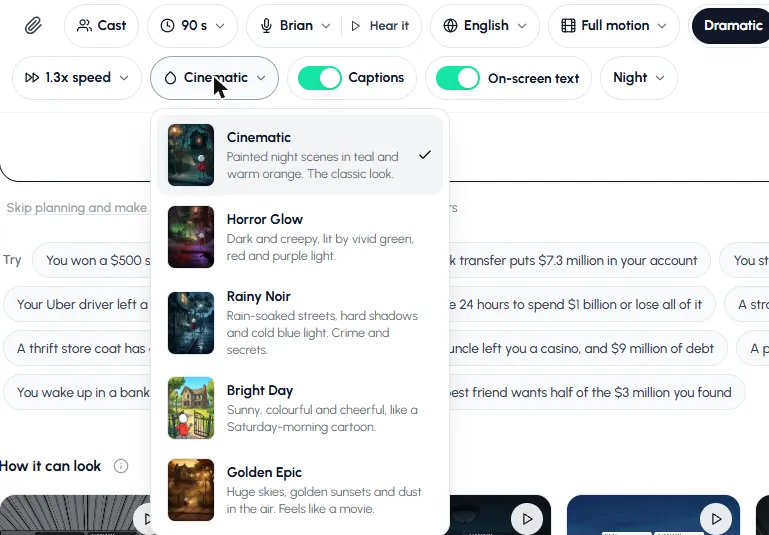
The look picker on the Stickman page. - 3
Pick a look and plan the video
Pick one and press Plan my video. Every scene is drawn in that look, and if you make Part 2 from the finished video, it keeps the same look.
- 4
For automations, pick it once
In a Story series automation, the look is under Art style in the Video step. Every part of every series uses it.
Make the same story in two looks and compare them.
Open StickmanWhat a look doesn't change
A look only changes the world: places, light and colour grade. Your characters stay exactly the same, with round white heads, thick black outlines and the clothes colours they were cast with. That's why there's no black-and-white look: your hero must look the same in every scene and every part.
Two other settings change how the video feels, and they work with any look:
| Setting | Options | What it changes |
|---|---|---|
| Motion | Stills, Key moments, Full motion | Pictures with a slow camera move, clips only where someone acts, or every scene moving |
| Action | Dramatic, Safe | Big whole-body action, or one small action and a held shot (fewer mistakes) |
| On-screen text | Night, Ink, Clean | The cards with numbers and the vote: dark with a green edge, dark tiles with pink accents and paper fact cards, or a white card with black text |
One look per channel
Pick a look that matches your niche and keep it on every video. A returning viewer recognises your channel in the feed before they read the title. If you run two niches, run two channels. Need a niche first? See stickman YouTube channel ideas.
Made with Autoclips
Real videos people made in the app. Tap one to watch it with sound.
Frequently asked questions
What styles of stickman videos are there?
In Autoclips, story videos come in five looks: Cinematic, Horror Glow, Rainy Noir, Bright Day and Golden Epic. Explainer and Skit videos have their own look.
Which stickman style is best for horror?
Horror Glow: dark shadows and fog lit by vivid green, red and purple light. It's eerie but never gory.
Which stickman style is best for true stories?
Cinematic works for any true story. Rainy Noir suits crime and heists, and Golden Epic suits history and war.
Does the style change my characters?
No. A look changes places, light and colour only. Characters keep their round white heads, thick outlines and clothes colours in every look.
Can I change the look in the middle of a series?
A series keeps one look: when you make Part 2 from a finished video, it copies the look of Part 1. In an automation you can change the art style in its settings; to keep every part of a story matching, change it between series.
Is there a black-and-white stickman style?
No. The characters need to keep their colours so they look the same in every scene, so all five looks are in colour.
Pick your channel's look
Make the same story in two looks and keep the one your viewers finish.
Try the five looksAyaz Alam · Founder of Autoclips
Ayaz builds Autoclips and makes the tutorials on its YouTube channel. Every step in these guides is tested in the app before it is published.