
How to Make Stickman Animation on PC: Pivot Animator and AI
To make stickman animation on PC, download Pivot Animator (free, Windows), drag the stick figure's joints into a pose, add a frame, move the joints a little, and repeat until the action is done, then export. On a Mac, use a browser stick figure tool or Moho. If you want a narrated story video rather than hand animation, Autoclips makes one from one line of text in any browser.
Quick answer
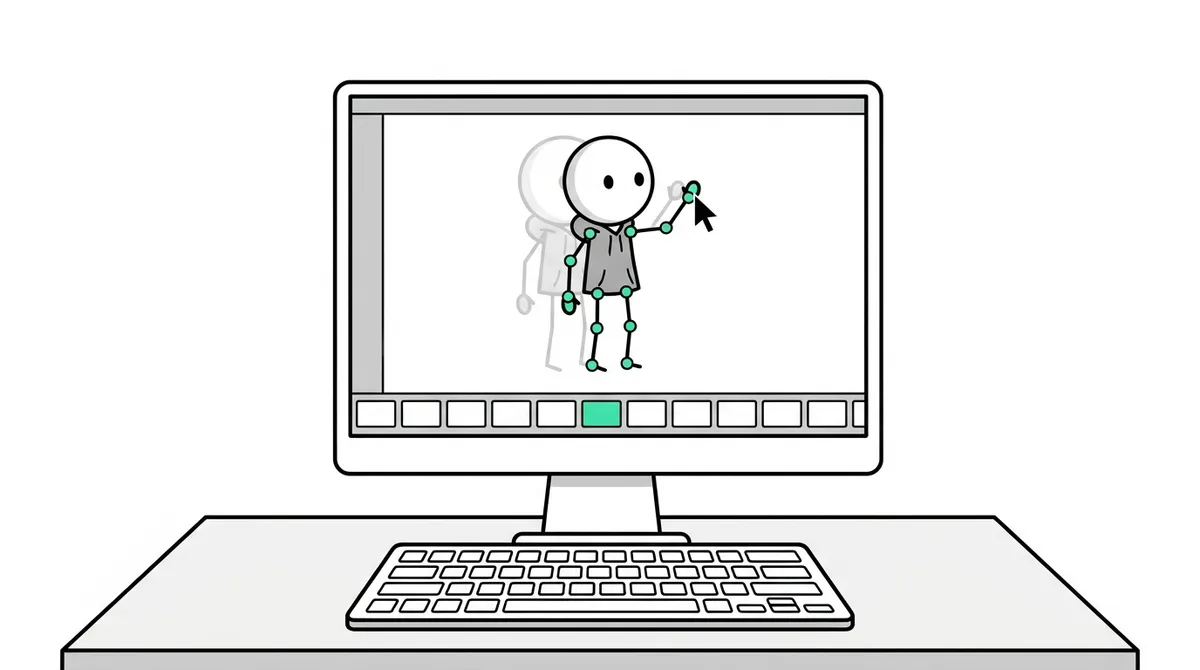
- Windows, free: Pivot Animator. Drag the red handles to pose the figure, add a frame, change the pose slightly, repeat. Export as MP4 or GIF.
- Animate key poses first, then add the frames between. A simple walk needs four key poses.
- Mac or Chromebook: Pivot is Windows only. Use a browser stick figure tool, or Moho / Adobe Animate if you want pro tools.
- Narrated story videos: Autoclips Stickman in your browser writes, voices and animates a vertical video from one line. Paid plans, credits per video.
What you need
- A Windows PC for Pivot Animator (Windows 10 or later is the comfortable choice). Mac users: skip to the Mac section.
- Pivot Animator, downloaded from its official site, pivotanimator.net. It's free. Download it there, not from mirror sites.
- A mouse. A trackpad works, but dragging small joints is easier with a mouse.
- A free video editor if you want to add a voice, music and captions afterwards.
How to make stickman animation on PC with Pivot Animator
- 1
Open Pivot and look at the figure
Start Pivot Animator. You get a stick figure in the middle of the stage. The red handles are its joints: drag one to bend that limb. The orange handle at the centre moves the whole figure.
- 2
Make the first pose and add a frame
Drag the joints into the starting pose. Then click Next Frame. Pivot copies the pose into a new frame, ready for you to change. The frames appear in a row along the top as you go.
- 3
Animate the key poses
Jump ahead to the important poses of the action: for a walk, the contact, down, passing and up positions. Set each one with a few frames between.
Small moves between frames look smooth; big moves look fast or jerky. Switch on onion skins in Pivot's options (they are off by default) to see faint copies of the frames around the one you are editing.
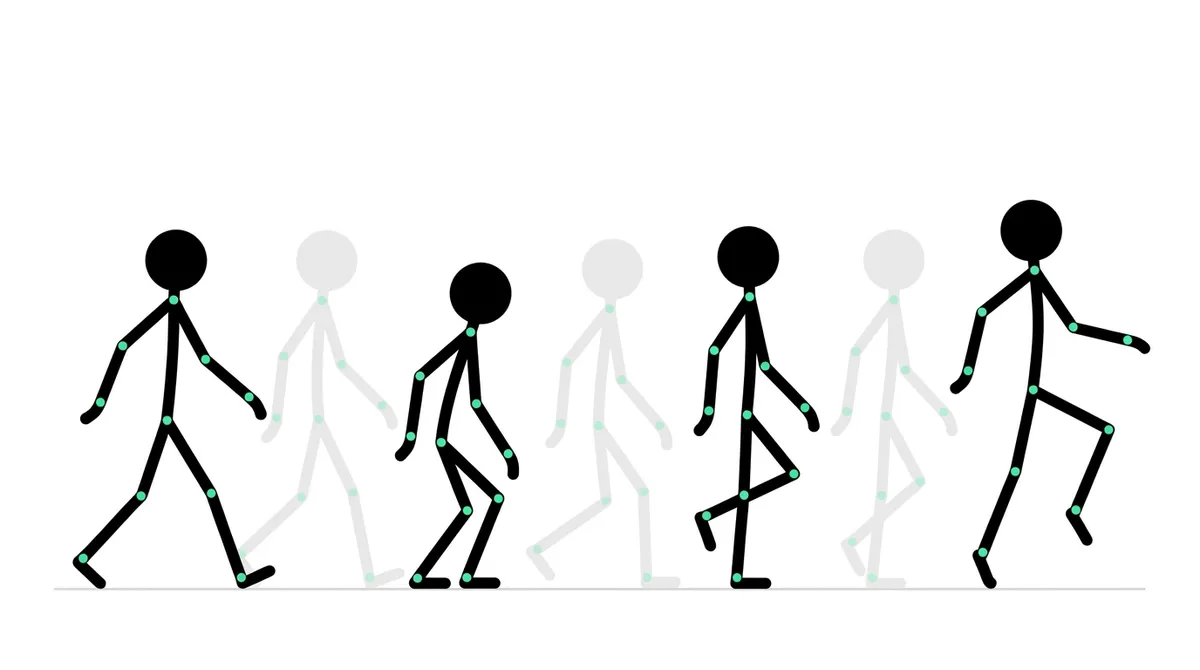
Animate the key poses first, then add the in-betweens. A walk needs only four key poses. - 4
Fill in the in-betweens and play it back
Go back and add the frames between the key poses. Press Play often. If something looks too fast, add frames; too slow, delete some. You can also change the frame rate.
- 5
Add backgrounds and more figures
Load a background image for the scene and add more figures from the figure menu. You can also build your own figure in the figure builder, for example one with a hat or a sword.
- 6
Export and finish
Export the animation: Pivot 5 saves MP4 and other video formats, as well as GIF. Then bring it into a video editor to add your voice, music and captions. For Shorts, TikTok and Reels, plan the action for a tall frame and keep it near the middle of the stage, so cropping to 9:16 doesn't cut anything off.
Stickman animation on a Mac or Chromebook
Pivot Animator only runs on Windows. On a Mac or Chromebook, you have three good options:
- A browser stick figure tool. Several free web apps copy Pivot's joint-dragging style and run in any browser.
- Moho or Adobe Animate. Paid pro software with bones and tweening, for smooth fights and longer films. A steep learning curve.
- Stick Nodes on a phone or tablet. Not on the computer, but often the quickest way for a Mac user to start. See stickman animation on mobile.
The AI way: a full stickman video on any PC
Pivot is great for learning and for action. But the narrated stickman stories you see on Shorts and TikTok also need a script, a voice, painted backgrounds and captions, and doing that by hand for every video doesn't scale. Autoclips Stickman does it in the browser on any Windows PC, Mac or Chromebook:
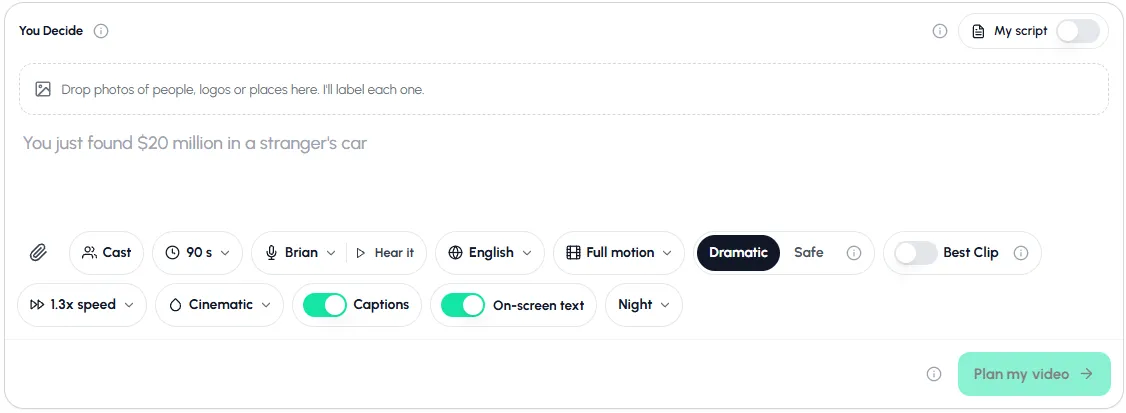
- Open app.autoclips.app/stickman and pick a mode: You Decide, True Story, Character Speaks, Explainer or Skit.
- Type one line, or switch on My script and paste your own.
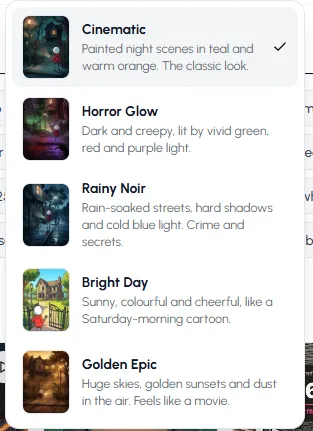
- Choose length, voice, language, how much it moves and a look.
- Press Plan my video, check the plan, make it, then download or post it.
Compare it with your first Pivot animation: type the same idea and see what comes out.
Open StickmanPivot Animator vs. AI: which one for you?
| Pivot Animator | Autoclips Stickman | |
|---|---|---|
| Runs on | Windows | Any browser |
| Cost | Free | Paid plans, credits per video |
| You control | Every frame and joint | The idea, script, cast, voice, motion and look |
| Voice and captions | Add them yourself in an editor | Built in |
| Time for 60 seconds | Hours to days | A minute or two to set up |
| Best for | Learning animation, fights, art | Story and explainer channels |
More tools compared in the stickman animation maker guide, and the full AI walkthrough is in how to make stickman animation with AI.
Made with Autoclips
Real videos people made in the app. Tap one to watch it with sound.
Frequently asked questions
What is the best software for stickman animation on PC?
For beginners on Windows, Pivot Animator: it's free and made for stick figures. For smooth, professional action, Moho or Adobe Animate. For narrated story videos without animating by hand, an AI maker like Autoclips Stickman in the browser.
Is Pivot Animator free?
Yes. Pivot Animator is free to download from pivotanimator.net and runs on Windows. Download it only from the official site.
Can I use Pivot Animator on a Mac?
No, Pivot is Windows only. Mac users can use a browser-based stick figure tool, Moho or Adobe Animate, or Stick Nodes on a phone or tablet.
How do I make stickman animation on PC for free?
Use Pivot Animator for the animation, your phone or PC to record a voice, and a free video editor for captions and music. It costs nothing but time. See how to make stickman videos for free.
How do stick figure animators make such smooth fights?
Lots of frames, careful key poses, and usually pro software with tweening, like Adobe Animate or Moho. Smooth fights also lean on camera shake, motion trails and sound effects, not just more frames.
Can I make stickman videos on a PC with AI?
Yes. Autoclips Stickman runs in any browser on Windows, Mac or Chromebook. Type one line and it writes, voices, animates and captions a 30 to 120 second vertical video.
Want the voiced story version?
Type one line in your browser. Autoclips writes, voices, animates and captions it.
Make a stickman video in your browserAyaz Alam · Founder of Autoclips
Ayaz builds Autoclips and makes the tutorials on its YouTube channel. Every step in these guides is tested in the app before it is published.