
AI Video Generation API: Make Finished Videos from Your Own Code
An AI video generation API lets your code ask for a video and get one back. Most of them return a few seconds of raw generated footage. The Autoclips API returns a finished short video instead (script, voice, scenes, captions and music), and can post it. Here is how it works, the difference between the two kinds of API, and a copyable first call.
Quick answer
- There are two kinds of AI video API: clip APIs that turn a prompt into a few seconds of footage, and finished-video APIs that return a complete, voiced, captioned video.
- The Autoclips API is the second kind: a REST API at
https://app.autoclips.app/api/v1with the same operations as the app, from making a video to editing scenes to posting. - Make a key in Settings → API, give it only the permissions it needs (read, edit, spend, delete, publish), and send it as a Bearer token.
- Paid calls never run without approval: send
max_creditsor aquote_tokenfromPOST /api/v1/quotes. Videos are jobs you check until they finish. - Docs, an OpenAPI 3.1 file and
llms.txtfor coding agents are on the API page. The same operations are an MCP server for AI apps.
Two kinds of AI video generation API
Before you pick an API, know which output you need. They solve different problems.
| Clip API (text or image to video) | Finished-video API (Autoclips) | |
|---|---|---|
| You send | A prompt, maybe a start image | A topic or a script, plus format options |
| You get | A few seconds of generated footage, usually no sound or captions | A complete vertical video: script, voice, scenes, captions, music |
| Same character across shots | Your job | Handled by the format |
| Voice, captions, editing | Separate services you stitch together | Included |
| Posting to social accounts | Not included | Included (with the publish permission) |
| Best for | Apps that need raw footage or custom editing | Content pipelines, automation, agents, SaaS that needs ready videos |
If you are building a content pipeline (a blog that gets a video for every post, a product feed turned into ads, an agent that runs a channel), a finished-video API saves you the voice, editing and captioning layers. More on that in AI content pipelines with video.
What the Autoclips API covers
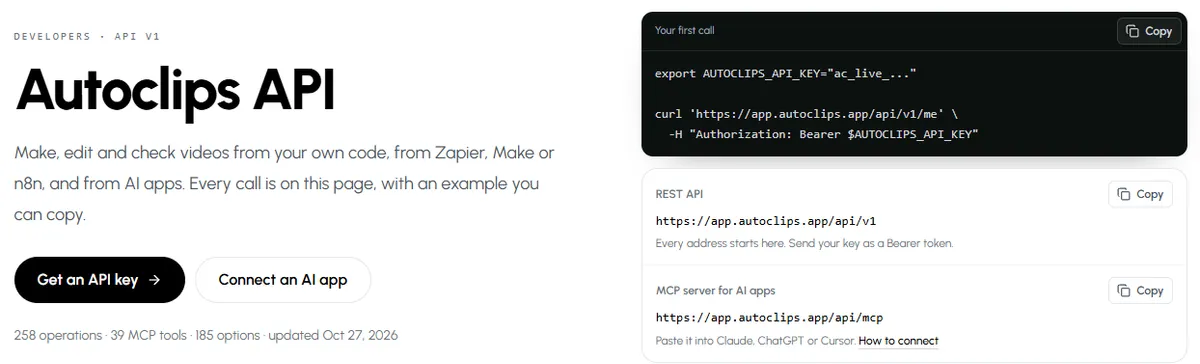
The API does what the app does. The API page lists 258 operations, each with an example you can copy, grouped by product:
- Autoclips V3: cinematic narrated story videos, quick or step by step (script, cast, scenes, render).
- Character Explainer: cartoon characters explaining a topic over gameplay.
- 3D Animated Studio: 3D animated shorts, including an autopilot with a spending limit.
- Stickman videos: explainers, skits and stories, story plans, series and automations.
- Shared: account and credits, quotes, jobs, media uploads, voices, timeline edits, covers, outros and publishing to connected social accounts.
Your first calls
- 1
Create a key with only the permissions it needs
In Autoclips, open Settings → API and create a key. Pick its permissions: read (see projects and videos), edit (free changes), spend (anything that costs credits), delete, and publish (post to your social accounts). Permissions don't include each other. The key is shown once; put it in an environment variable.
- 2
Check the key
Every address starts with
https://app.autoclips.app/api/v1. Send the key as a Bearer token:curl https://app.autoclips.app/api/v1/me -H "Authorization: Bearer $AUTOCLIPS_API_KEY"It answers with your account and what the key may do. Then read the valid choices for your product with
GET /api/v1/options, so you only send values that exist. - 3
Get a quote, then start the video
Anything that spends credits needs your approval. Either send
max_credits(the most you accept), or askPOST /api/v1/quoteswith the operation and its exact input and get aquote_tokenthat works once, for 10 minutes. If you send neither, nothing runs and you get a402 confirmation_requiredwith the quote.Requests that create something or spend credits also need an
Idempotency-Keyheader, so a retry never makes a second video. - 4
Check the job until it finishes
Making a video answers
202with a job. AskGET /api/v1/jobs/{jobId}again after the suggested wait until the status issucceeded(with the video URL),failedorcanceled(each says why).
Every operation, with a request you can copy, is on the API page.
Open the API docsBuilt so code can't overspend
- Prices are worked out on the server, never taken from the request, and a quote is an upper bound: you are never charged more than it.
- Daily credit caps per key and per account stop a runaway loop. Hitting one returns
402 daily_credit_cap_reached, and nothing runs. - Scoped keys: a key without
spendcan't spend; one withoutpublishcan't post. - Stable error codes (
insufficient_credits,quote_exceeds_max_credits,insufficient_scopeand more), each with adocs_url. - Rate-limit headers on every answer, and
Retry-Afteron every 429.
The same API for AI apps (MCP)
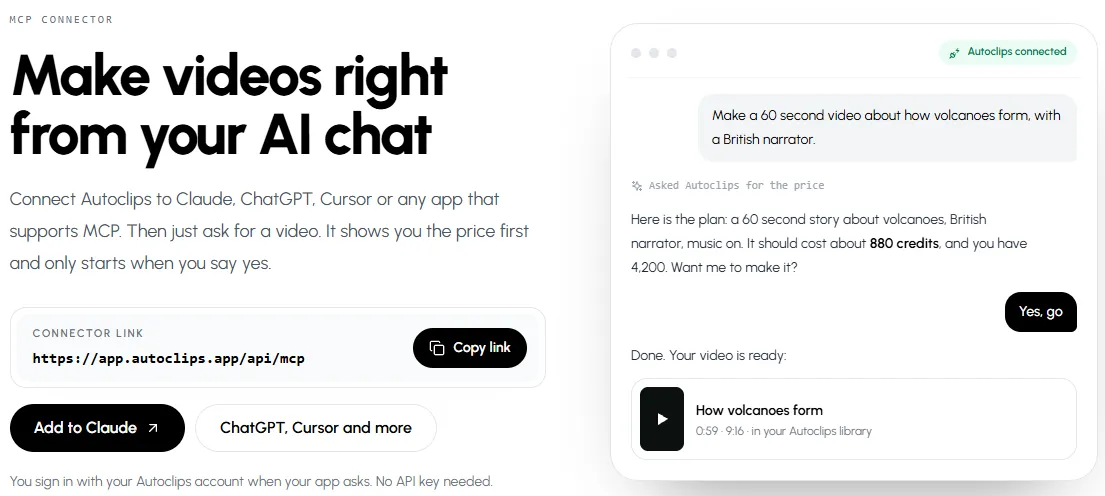
The operations are also an MCP server at https://app.autoclips.app/api/mcp, so Claude, ChatGPT, Cursor and other AI apps can use them after a sign-in, no key needed. That is the fastest way to try the API before writing code: connect it and ask for a video in plain words. See how to make videos with Claude and the MCP page.
What people build with it
- Blog to video: every new post in your CMS becomes a 60 second video for Shorts and TikTok.
- No-code flows: Zapier, Make or n8n call the API as plain HTTP requests.
- Channel agents: an AI agent picks topics, makes videos and posts them under a daily cap. See automating a YouTube channel with an AI agent.
- Apps for clients: agencies make videos for many brands from one system.
Made with Autoclips
Real videos people made in the app. Tap one to watch it with sound.
Frequently asked questions
What is an AI video generation API?
A web API your code calls to get a video made by AI. Some return short raw clips from a prompt; others, like Autoclips, return a finished video with script, voice, scenes, captions and music.
Is there a text to video API that adds voice and captions?
Yes. The Autoclips API takes a topic or your own script and returns a complete vertical video with narration, captions and music, ready to post.
How do I get an Autoclips API key?
Sign in to Autoclips and open Settings → API. Choose the key's permissions, copy it once, and keep it in an environment variable, never in a link or in your code.
How is API usage charged?
Videos use your normal Autoclips credits at the same prices as in the app. Every paid call needs a quote you approved or a max_credits limit, and keys and accounts have daily credit caps.
Does the API have webhooks?
Video creation is asynchronous: you get a job back and check GET /api/v1/jobs/{jobId} until it is final. The answer tells you how long to wait before asking again.
Can I use the API from Zapier, Make or n8n?
Yes, as plain HTTP requests with your key in the Authorization header.
Can AI agents use the API?
Yes. Coding agents can read llms.txt or the OpenAPI file, and AI apps like Claude and ChatGPT can use the same operations through the MCP server with a sign-in.
Make your first video from code
Create a key, approve a quote, check the job. The full reference, with an example for every call, is on the API page.
Read the API docsAyaz Alam · Founder of Autoclips
Ayaz builds Autoclips and makes the tutorials on its YouTube channel. Every step in these guides is tested in the app before it is published.