
Automate a YouTube Channel with an AI Agent: Ideas, Videos and Posting
To automate a YouTube channel with an AI agent, give the agent three abilities: find video ideas, make the videos, and post them. With Autoclips connected, Claude or ChatGPT can do all three from a chat, and your own agent can do it through the API with daily spending caps. Here are three setups, from a weekly chat to a fully hands-off loop, and the guardrails that keep it safe.
Quick answer
- A YouTube channel agent loops through four jobs: pick ideas, make the video, check it, post it. Then it learns from what did well.
- Easiest: connect Autoclips to Claude or ChatGPT and run the channel from a weekly chat. The agent proposes ideas, shows each price, and makes and posts what you approve.
- Hands-off: a scheduled Autoclips automation posts 1 to 3 videos a day, and you (or the agent) adjust its topics weekly.
- Custom: your own agent calls the Autoclips API with a key limited to the permissions and daily credits you set.
- Keep a human on strategy and quality. Agents are good at production, not at knowing what your audience wants next.
What an AI agent does for YouTube automation
An agent is an AI that takes steps on its own to reach a goal, using tools you connect. For a YouTube channel, the goal is "post good videos in my niche" and the tools are a video maker and your YouTube account. The loop looks like this:
- Ideas: research the niche and propose topics that fit the channel.
- Make: write the script, pick the voice and format, and produce the video.
- Check: confirm the video finished and matches the brief.
- Post: upload with a title and description, at the right time.
- Learn: look at which videos did well and steer the next ideas.
Language models are good at steps 1 to 4 when they have the right tools. Step 5 is where you still matter most.
Three ways to set it up
| Setup | How it runs | Your time | Best for |
|---|---|---|---|
| Chat agent (Claude or ChatGPT + Autoclips connector) | You open a chat, the agent proposes and makes videos, you approve each price | 15 minutes a week | Creators who want control without editing |
| Scheduled automation (Autoclips Automations) | Posts 1 to 3 videos a day on its own; you or the agent tweak topics weekly | Minutes a week | A steady daily channel |
| Custom agent (your code + Autoclips API) | Your agent runs on a schedule and calls the API under spending caps | Build time, then little | Developers, agencies, many channels |
Setup 1: run the channel from a chat with Claude or ChatGPT
- 1
Connect Autoclips to your AI app
In Claude, open the Autoclips Connect to Claude page and press Add to Claude, then sign in and approve. In ChatGPT, add the connector link
https://app.autoclips.app/api/mcpin Developer mode. Steps for every app are on the MCP page.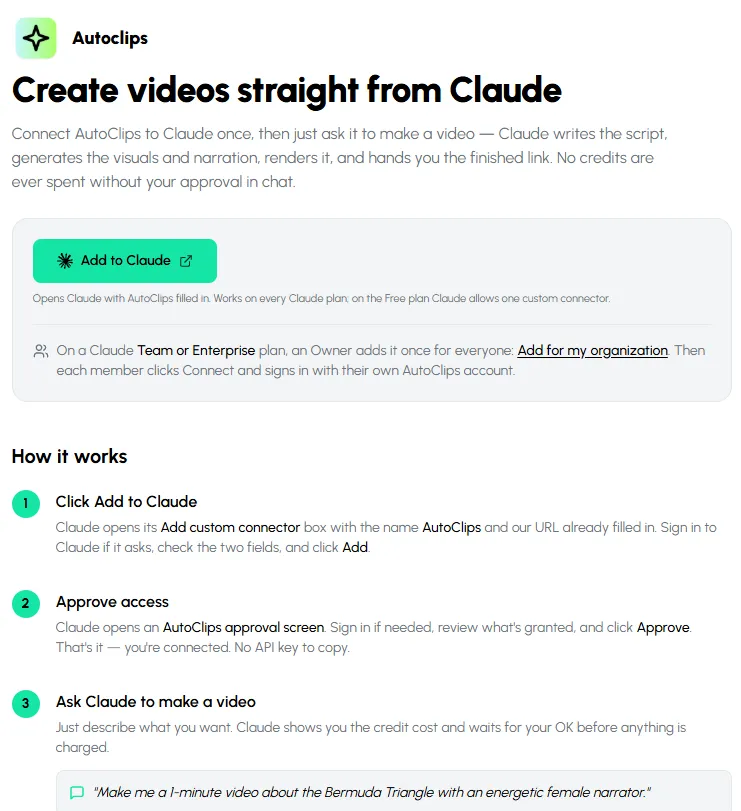
Connecting Claude takes one button and one approval. - 2
Connect YouTube in Autoclips
Under Connect Socials in Autoclips, connect your YouTube channel (and TikTok or Instagram if you post there too). The agent can only post to accounts you connected.
- 3
Give the agent a brief
Start each week with a message like the one below. Save it in a Claude Project or a custom instruction so you don't retype it.
- 4
Approve, and let it work
The agent proposes topics, you pick, it shows the price of each video and waits for your yes. When videos are ready it shows you what will be posted and asks before anything goes live.
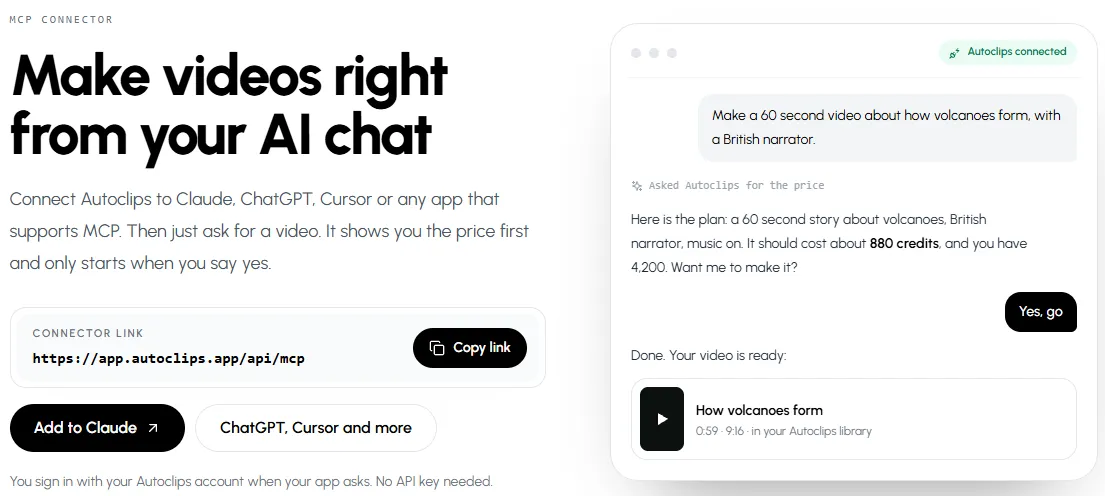
The agent quotes the price and waits for your yes before it spends anything.
You run my YouTube channel about unsolved history mysteries. Audience: US adults who like true stories. Each week, suggest 7 topics we haven't covered, one line each. When I pick, make each as a 60 second narrated story with a calm male voice, show me the price first, and post each finished video to YouTube as a Short after I say yes.
Connect Autoclips to Claude, ChatGPT, Cursor or any app that supports MCP.
See how to connectSetup 2: a scheduled automation the agent steers
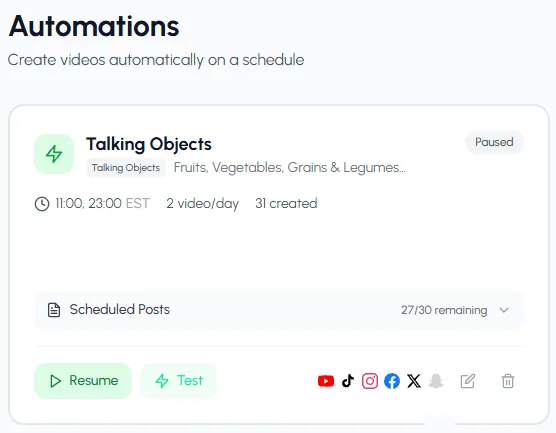
For daily posting without any chat, an Autoclips automation makes and posts 1 to 3 videos a day at fixed times. It is the most hands-off setup. Your agent, or you, then does the thinking part once a week: look at what worked and change the automation's topics or style. Stickman automations can even be listed, paused, resumed and changed through the connector.
Setup 3: your own agent on the API
Developers can run an agent on a schedule (a cron job, a workflow tool, or an agent framework) that calls the Autoclips API. Give it a key with only read, spend and publish, set a daily credit cap on the key, and send max_credits on every paid call. If the agent loops or misbehaves, the cap stops it and nothing runs past it. Details in the AI video generation API guide.
Guardrails for an AI-run channel
- Money: nothing in Autoclips costs credits without an approved price or a cap. Keep a daily cap on any key an agent uses.
- Posting: posts and deletes ask first in chat. For custom agents, leave out the
publishpermission until you trust the output. - Quality: watch the first ten videos yourself. Agents repeat mistakes as confidently as good work.
- Facts: for history, money or health topics, ask the agent to list its sources in the brief, and spot-check them.
- Originality: YouTube doesn't monetise repetitive, mass-produced content. Give the agent a clear angle and a series format, not "make videos about anything".
What to keep doing yourself
Choose the niche, set the voice of the channel, reply to comments, and review results weekly. Everything else (research, scripts, voice, editing, uploading) can be the agent's job. For more on the parts of the pipeline, see AI content pipelines with video and how to make videos with Claude.
Made with Autoclips
Real videos people made in the app. Tap one to watch it with sound.
Frequently asked questions
Can an AI agent run a YouTube channel?
It can do most of the production: research topics, write scripts, make the videos with a connected tool, and post them. Choosing the niche, judging quality and replying to comments still work best with a person involved.
Which AI agent is best for YouTube automation?
For most creators, Claude or ChatGPT with a video tool connected is enough, because you can talk to it and approve each step. Developers who run many channels build their own agent on a video API with spending caps.
Can Claude upload videos to YouTube?
With Autoclips connected, yes: Claude can post finished videos to the YouTube, TikTok or Instagram accounts you connected in Autoclips, and it asks before anything goes live.
How do I stop an AI agent from spending too much?
Autoclips never charges without an approved price or a max_credits limit, and API keys and accounts have daily credit caps. Give an agent a key with only the permissions it needs.
Is an AI-run YouTube channel allowed?
Using AI and automation is allowed. YouTube limits content that is repetitive, mass-produced or misleading, whoever made it. Original topics and a consistent series keep you on the right side.
Do I need to code to automate a channel with an agent?
No. Connecting Autoclips to Claude or ChatGPT takes a minute and no code. Code only comes in if you want your own agent running on a schedule.
Give your AI agent a video studio
Connect Autoclips to Claude, ChatGPT or your own agent. It proposes, you approve, and the videos get made and posted.
Connect your AI agentAyaz Alam · Founder of Autoclips
Ayaz builds Autoclips and makes the tutorials on its YouTube channel. Every step in these guides is tested in the app before it is published.