
Long Video to Short Video with AI: Turn One Video into a Week of Shorts
To turn a long video into short videos with AI, upload the video (or paste its YouTube link), choose how many shorts you want, how long each should be and the shape, and the AI finds the best moments, crops them to vertical around the speaker and adds captions. In Autoclips the Auto setting aims for about 10 clips from an hour of talking, so a single episode can fill a week or more of Shorts, TikToks and Reels.
Quick answer
- Works on any long video where people talk: podcasts, interviews, webinars, lessons, streams. 2 minutes to 2 hours.
- Upload up to 5 files (500 MB each) or paste a YouTube link you own or may use.
- Choose the number of clips, a length from 15 to 90 seconds (or Best length) and Vertical 9:16, Square 1:1 or Wide 16:9.
- Every short opens in the Video Editor, cut, framed and captioned, ready to tweak and export.

Why turn long videos into short ones
You already did the hard part: you recorded an hour of good conversation. Most people will never watch all of it, but plenty will watch the best 40 seconds. Short clips bring new viewers to the full video, and they let one recording keep posting for days.
How to turn a long video into short videos with AI
- 1
Upload the long video
Open Auto Clips in Autoclips and choose Upload videos. Drop in up to 5 files, 500 MB each; clips can come from any of them. Or use YouTube link for a video you own or have permission to use.
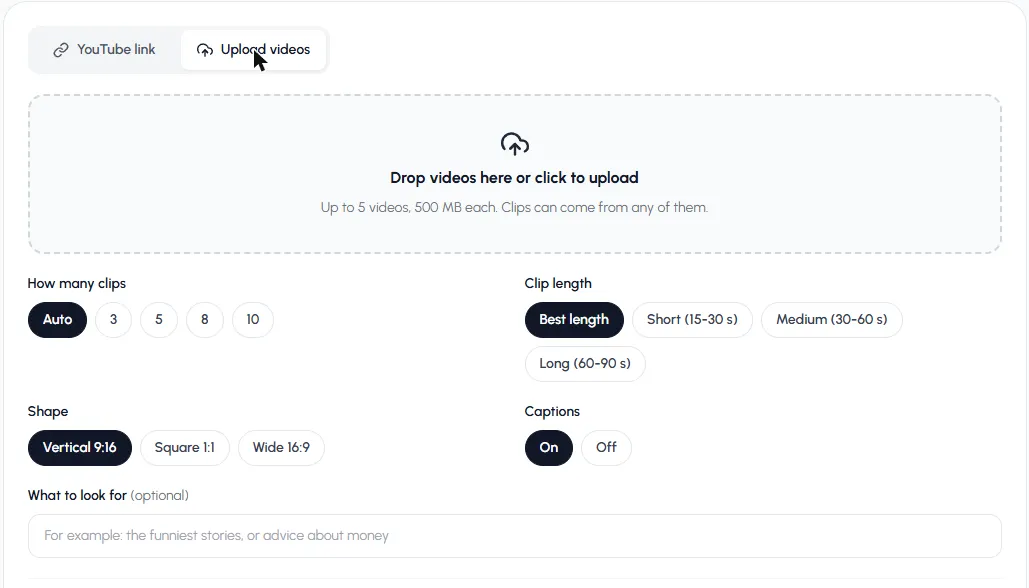
Upload up to 5 videos. Clips can come from any of them. - 2
Choose how many shorts
Auto makes about one short per 6 minutes of video (3 to 10). Or pick 3, 5, 8 or 10.
- 3
Choose the length
Best length ends each short where its moment ends (20 to 75 seconds). Or pick Short (15–30 s) for quick hits, Medium (30–60 s) for most posts, or Long (60–90 s) for stories, and for TikTok videos over a minute.
- 4
Choose the shape and captions
Vertical 9:16 for TikTok, Shorts and Reels. Square 1:1 or Wide 16:9 for other feeds. Keep Captions on.
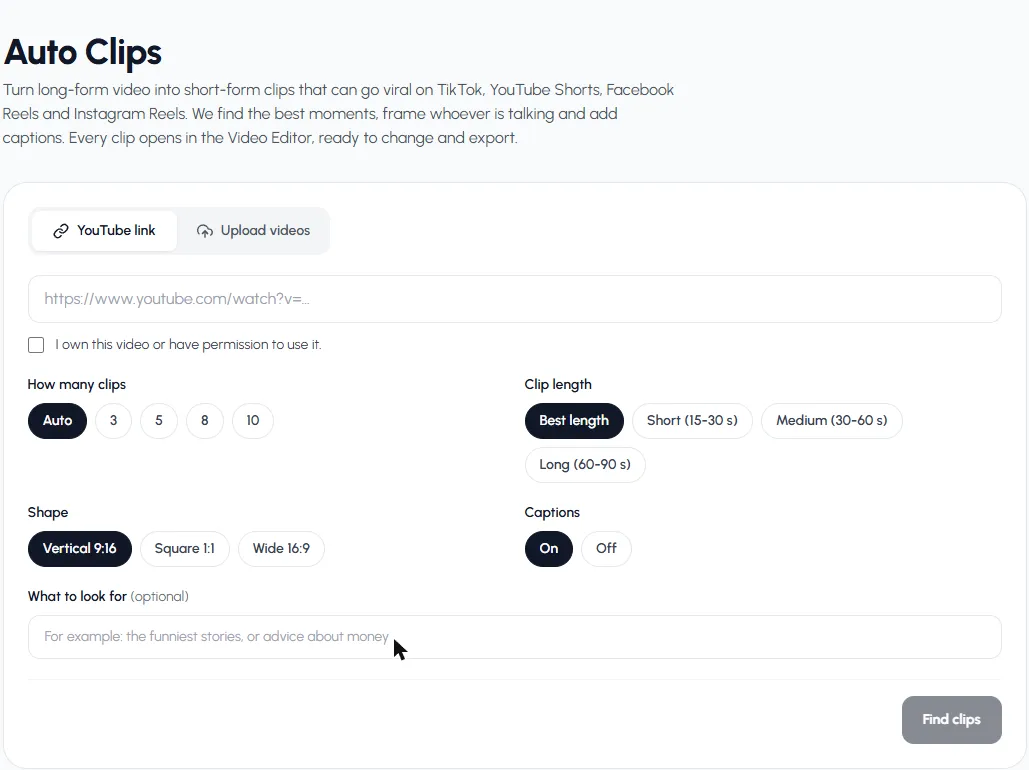
All the settings fit on one screen. - 5
Find the clips, then edit
Press Find clips. An hour of video takes a few minutes. Each short gets a score from 0 to 100; press Edit to open it in the Video Editor, change anything, and export.
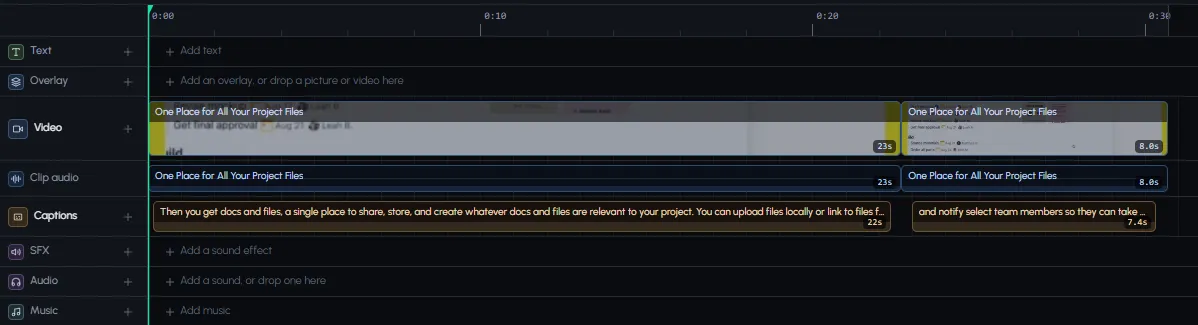
Each short is already cut, framed and captioned in the editor.
Try it on your longest recent video.
Make shortsWhich settings to use
| Your long video | How many | Length | Shape |
|---|---|---|---|
| 1-hour podcast | Auto (about 10) | Best length | Vertical 9:16 |
| 30-minute interview | 5 | Medium (30–60 s) | Vertical 9:16 |
| Webinar or lesson | 8 | Long (60–90 s) | Vertical or Square |
| Stream with commentary | 10 | Short (15–30 s) | Vertical 9:16 |
| Keynote or talk for LinkedIn | 3 | Medium (30–60 s) | Square 1:1 |
Is there a free way?
You can cut shorts by hand in a free editor, and CapCut has a long-video-to-shorts tool on desktop in some regions (see CapCut long video to short). Free AI tiers usually limit how many videos you can process or add a watermark. In Autoclips, signing up is free and finding clips uses credits per minute of video; you see the number before you start, and every credit comes back if the run fails.
Tips
- Use What to look for to keep shorts on one theme, like "money advice" or "funny stories".
- Upload the original file rather than a compressed copy; better input, sharper shorts.
- Space them out. One or two a day from the same episode keeps your feed varied.
- Run Find more clips on a strong episode to get more without uploading again.
For the deeper version of this guide, read AI clip maker. For podcasts in particular, see podcast clips, and to make new shorts from nothing, try the AI short video generator.
Frequently asked questions
How do I turn a long video into a short video?
Upload it to an AI clip maker, pick how many clips, how long and the shape, and it finds the best moments, crops them vertical and adds captions. You can also cut it by hand in any editor.
Is there a free AI that turns long videos into shorts?
Some tools have free tiers with limits or watermarks, and CapCut's desktop tool is free in some regions. Autoclips is free to sign up for; finding clips uses credits per minute of video, shown before you start.
How many shorts can I get from one long video?
It depends on how much good talking it has. Autoclips aims for about one clip every 6 minutes on Auto, up to 10 per run, and Find more clips can look for more.
What's the best length for a short?
15 to 60 seconds for most posts. Use 60 to 90 seconds for stories, or when you want TikTok videos over a minute.
Can it make shorts from several videos at once?
Yes. Upload up to 5 videos and clips can come from any of them.
Does it work on videos without talking?
No. Moments are found from what people say, so silent footage, music videos and gameplay without commentary won't give clips.
One long video, a week of shorts
Upload it once. Autoclips finds the moments, frames them vertical and adds captions.
Turn a long video into shortsAyaz Alam · Founder of Autoclips
Ayaz builds Autoclips and makes the tutorials on its YouTube channel. Every step in these guides is tested in the app before it is published.