
CapCut Long Video to Short: How It Works, and a Faster Option
CapCut's desktop app has a Long video to shorts tool: open it from the home screen, import your long video, and CapCut picks highlights and splits them into short vertical clips you can edit and export. It's only available in some regions. If you don't see it, you can cut shorts by hand in CapCut, or use an AI clip maker like Autoclips, which also frames whoever is talking and adds captions.
Quick answer
- On CapCut desktop: home screen, Long video to shorts, import the video, let it pick highlights, then edit and export.
- CapCut says the tool is available in some regions only; if it's missing, it isn't offered where you are.
- By hand in CapCut: split around each moment, set the canvas to 9:16, reframe, add auto captions, export.
- Autoclips does the same from a link or upload, frames the speaker, scores each clip and opens it in its own editor.

How to use CapCut Long video to shorts
These steps follow CapCut's own page for the tool. Menus move between versions, so names may differ slightly in yours.
- Open CapCut on your computer and look for Long video to shorts on the home screen.
- Import your long video. CapCut supports the usual video formats.
- Let it generate the shorts. It detects highlights and splits them into separate short clips.
- Open a short to edit it: trim, change captions, reframe if the speaker is off-centre.
- Export, or post straight to TikTok or YouTube from the export screen.
How to turn a long video into shorts in CapCut by hand
- New project, import the long video, drop it on the timeline.
- Find a moment, then split at its start and end (Split, or Ctrl+B / Cmd+B).
- Delete everything around it, or duplicate the project for each short.
- Set the ratio to 9:16 and scale the video so the speaker fills the frame. Move it if the speaker changes.
- Add captions with auto captions, then fix any wrong words.
- Export at 1080 × 1920.
This gives you full control, but you still have to watch the whole video to find the moments, which is most of the time. What to look for in a moment is in how to make clips from YouTube videos, and which length to cut is covered in podcast clips.
The faster option: an AI clip maker
- 1
Add the long video
Open Auto Clips in Autoclips. Paste a YouTube link you own or may use, or upload up to 5 videos of up to 500 MB each. 2 minutes to 2 hours of video works.
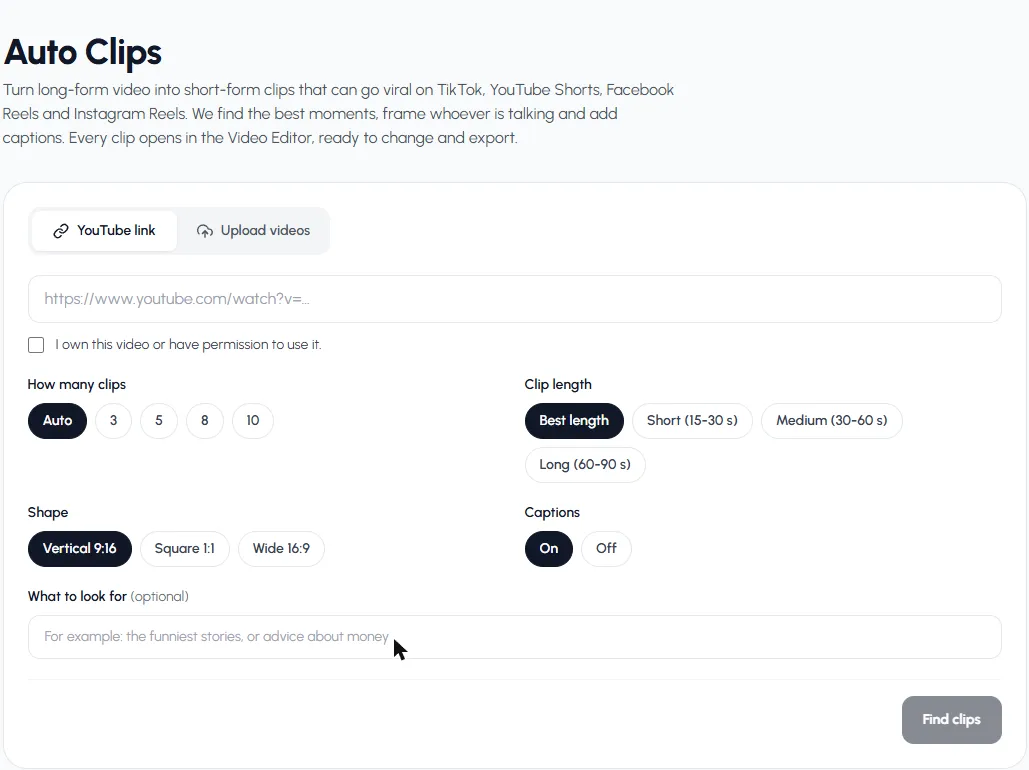
Everything is on one screen: source, count, length, shape and captions. - 2
Pick count, length, shape and captions
Auto or 3, 5, 8, 10 clips. Best length, or 15–30, 30–60, 60–90 seconds. Vertical 9:16, Square 1:1 or Wide 16:9. Captions on or off. Optionally, a topic in What to look for.
- 3
Find clips and edit
Press Find clips. Each clip comes back framed on whoever is talking, captioned and scored. Press Edit to open it in the Video Editor, then export.
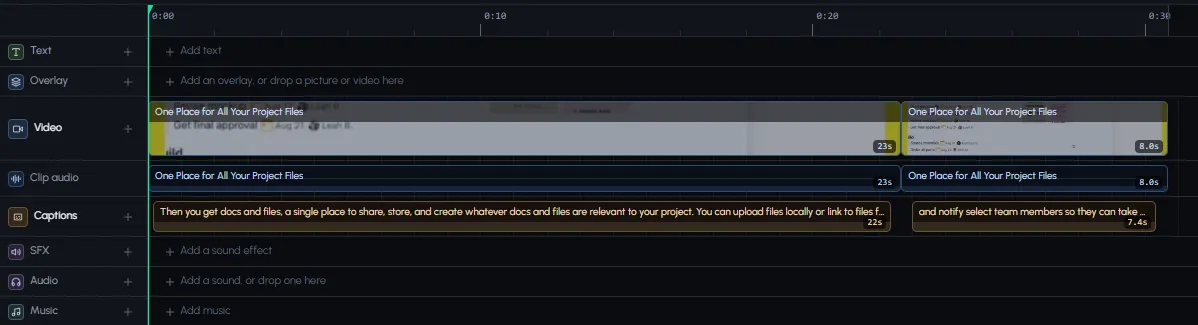
Each short arrives cut, framed and captioned in the editor.
Compare: run the same video through Autoclips.
Find clipsCapCut vs. Autoclips for long-to-short
| CapCut Long video to shorts | CapCut by hand | Autoclips | |
|---|---|---|---|
| Finds moments | Yes | You do | Yes, with a 0–100 score |
| Where | Desktop app, some regions | Desktop and phone | In the browser, on any device |
| Source | Upload | Upload | YouTube link or up to 5 uploads |
| Speaker framing | Reframe tool | You move the crop | Framed on whoever is talking |
| Captions | Yes | Auto captions | Yes |
| Cost | Free where available | Free | Credits per minute of video |
If you edit in CapCut and the tool is in your region, try it first. If it isn't, or you want clips scored and framed on the speaker from a link, Autoclips is the quicker route. More options in Opus Clip alternatives and the full method in long video to short video.
Frequently asked questions
How do I turn a long video into shorts on CapCut?
On CapCut desktop, open Long video to shorts from the home screen, import the video and let it split the highlights. You can also do it by hand: split around each moment, set the canvas to 9:16, reframe, add captions and export.
Why don't I see Long video to shorts in CapCut?
CapCut says the feature is only available in some regions. If it's not on your home screen, it probably isn't offered where you are. Cutting by hand, or another AI clip maker, are the alternatives.
Is CapCut long video to short free?
It's offered free on CapCut desktop where it's available. Check your CapCut version, since features and plans change.
Can CapCut make shorts on the phone app?
You can cut and reframe by hand on the phone app. The automatic long-video-to-shorts tool is described by CapCut as a desktop feature.
What's a good alternative to CapCut for long video to short?
An AI clip maker such as Autoclips: paste a link or upload, and you get scored clips framed on the speaker with captions, each one editable in its own editor.
Long video in, shorts out
No CapCut tool in your region? Autoclips finds the moments, frames the speaker and adds captions.
Try Autoclips insteadAyaz Alam · Founder of Autoclips
Ayaz builds Autoclips and makes the tutorials on its YouTube channel. Every step in these guides is tested in the app before it is published.