
Podcast Clips: How to Turn Every Episode into Shorts with AI
Podcast clips are 15 to 90 second moments cut from an episode and posted as vertical videos on TikTok, YouTube Shorts and Reels, where new listeners find you. To make them, upload the episode (or paste its YouTube link) to an AI podcast clips maker like Autoclips. It listens to the whole conversation, picks the moments that stand alone, frames whoever is talking, adds captions and gives each clip a score.
Quick answer
- Clips are how most podcasts get found now: a strong 40 seconds on TikTok or Shorts sends people to the full episode.
- Upload the episode (up to 5 files, 500 MB each) or paste the YouTube link. Episodes from 2 minutes to 2 hours work.
- Use Auto for about one clip per 6 minutes, or ask for 3, 5, 8 or 10. Add a topic in What to look for to stay on theme.
- Each clip is framed on the speaker, captioned, scored 0–100 and opens in the Video Editor to tweak and export.
Why podcast clips matter
A full episode asks for an hour. A clip asks for 30 seconds, and the feed shows it to people who have never heard of you. Good clips act as trailers: the best story, the boldest opinion, the funniest exchange, each one a reason to go listen to the rest.
How to make podcast clips with AI
- 1
Upload the episode
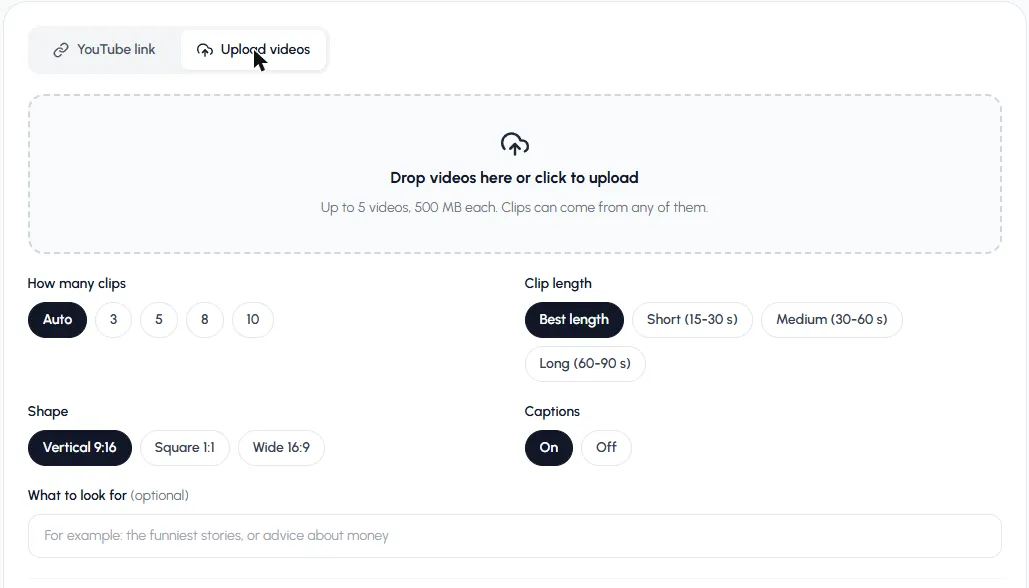
Open Auto Clips in Autoclips, choose Upload videos and drop in the episode. Clipping a backlog? Upload up to 5 episodes at once and clips can come from any of them. If the episode is on YouTube, paste the link instead and confirm it's yours.
Upload the episode, or up to 5 episodes at once. - 2
Pick the settings
How many clips: Auto (about one per 6 minutes) or 3, 5, 8, 10. Clip length: Best length works well for conversation; pick Short (15–30 s) for quick takes or Long (60–90 s) for stories. Shape: Vertical 9:16. Captions: On.
- 3
Tell it what your show is about (optional)
In What to look for, write the kind of moments you want: "business advice", "the funniest stories", "anything about relationships". It keeps clips on brand.
- 4
Review the clips
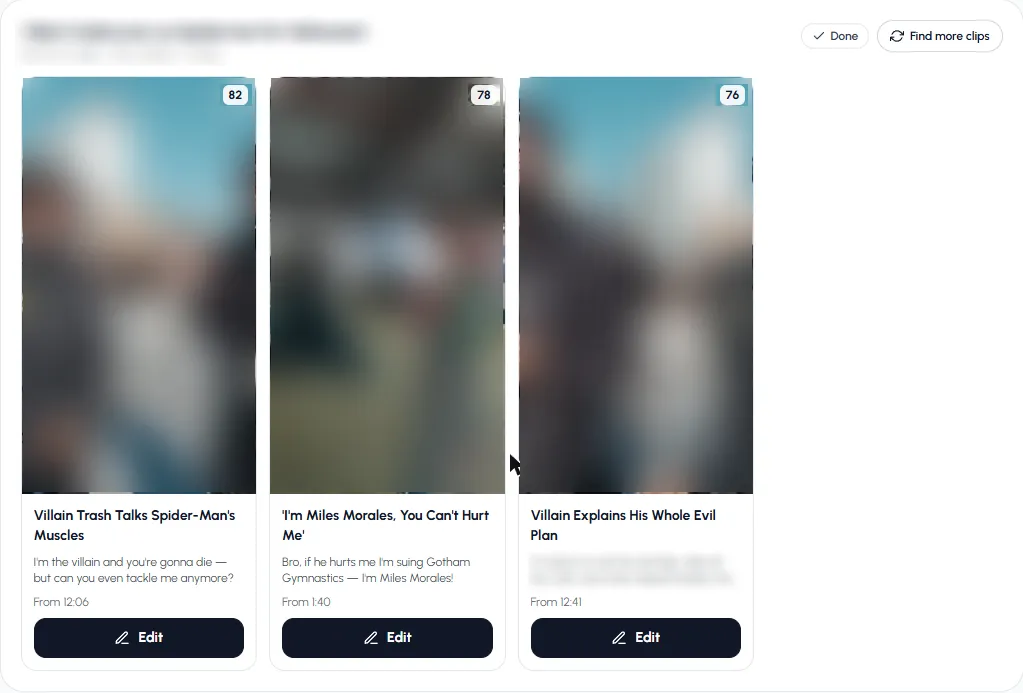
Press Find clips. An hour-long episode takes a few minutes. Clips arrive with a score (0 to 100), a title, the opening line and where they start in the episode.
Clips ranked by score, each with its start time in the episode. - 5
Polish and export
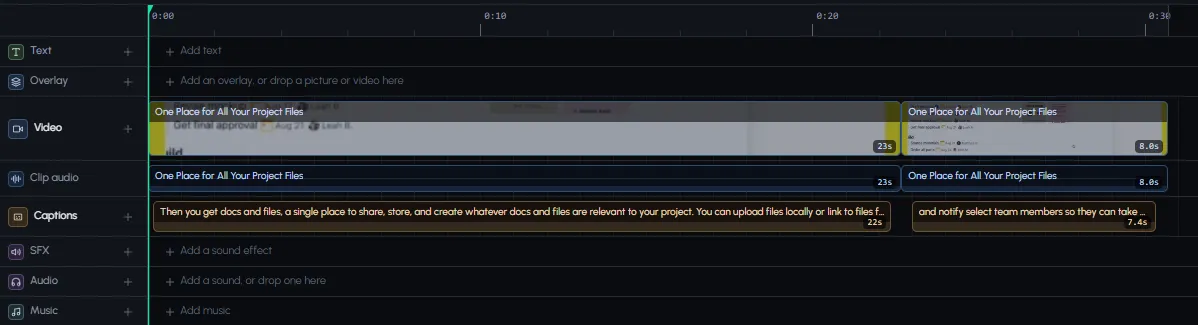
Press Edit to open a clip in the Video Editor. Each clip is split where the framing changes between speakers, with its sound and captions on their own rows. Add your show's name as text, change the caption style, then export.
A podcast clip in the editor: framed parts, its own sound and captions.
Upload your latest episode and see which moments it picks.
Make clipsWhat makes a podcast clip work
| Moment | Why it works | Ideal length |
|---|---|---|
| A hot take | People comment to agree or argue | 15–30 s |
| A personal story | A beginning, a turn and an ending | 45–90 s |
| A surprising fact or number | Stops the scroll in one line | 15–30 s |
| Practical advice | Gets saved and shared | 30–60 s |
| A funny exchange | Gets sent to friends | 15–45 s |
Tips for podcast clips
- Record on camera. Audio-only podcasts need a picture; video podcasts give you faces, which hold attention better.
- Frame each speaker. A wide two-shot squeezed into 9:16 looks empty. Speaker framing fixes that.
- Start on the line, not the question. Trim the host's setup if the answer can stand alone.
- Caption every word. Most people watch on mute.
- Post 1–2 clips a day across the week, not all on release day. See the best time to post YouTube Shorts.
- Point to the episode in your post caption or pinned comment.
More on how the tool works in AI clip maker, and on longer recordings in long video to short video. Want a show that runs without you recording? See the faceless YouTube automation guide.
Frequently asked questions
How do I make podcast clips?
Upload the episode to an AI podcast clips maker, choose how many clips, how long and the shape, and it picks the moments, frames each speaker and adds captions. Then tweak and export each clip.
What is the best podcast clips maker?
One that frames whoever is talking, captions accurately and lets you edit each clip afterwards. Autoclips does those, scores each clip and opens it in a full editor.
How long should podcast clips be?
15 to 60 seconds for most clips; 60 to 90 seconds for a full story. Let the moment decide.
How do I make podcast clips for TikTok?
Use Vertical 9:16, keep captions on, start on the strongest line, and post one or two clips a day. TikTok also rewards videos over one minute, so a 60–90 second story clip can be worth it.
Can I make clips from an audio-only podcast?
Clips are made from video files. If your podcast is audio-only, record video next time, or add a picture or waveform in a video editor first.
How many clips can I get from one episode?
On Auto, about one per 6 minutes of episode, from 3 up to 10 per run. Find more clips can look for more in the same episode.
Clip your next episode in minutes
Upload the episode. Autoclips finds the moments, frames each speaker and adds captions.
Make podcast clipsAyaz Alam · Founder of Autoclips
Ayaz builds Autoclips and makes the tutorials on its YouTube channel. Every step in these guides is tested in the app before it is published.