
How to Make Clips from YouTube Videos (By Hand and with AI)
To make clips from YouTube videos, you find the moments that work on their own, cut each one to 15 to 90 seconds, reframe it to vertical 9:16, add captions and export. You can do it by hand in any video editor, or let an AI clip maker like Autoclips do the finding, cutting, framing and captions from the link, then fine-tune in its editor. Here are both ways, step by step.
Quick answer
- A good clip starts with a hook, makes sense without the rest of the video and ends on a payoff.
- By hand: watch, note timestamps, cut, crop to 9:16 around the speaker, add captions, export. About an hour per 10 minutes of source.
- With AI: paste the link (of a video you own or may use), pick how many clips and how long, and get captioned, framed clips in minutes.
- Either way, only clip videos you have permission to use, and check the first second of every clip.
What makes a good clip
- A hook in the first second. A claim, a question, a number or a laugh. Not "So, um...".
- It stands alone. Someone who never saw the full video understands it.
- One idea. One story, one tip, one argument.
- A payoff. It ends on the punchline, the answer or the strong line, not halfway through a thought.
- The right length. 15 to 60 seconds for most Shorts and TikToks; up to 90 for a story that needs it.
How to make clips from YouTube videos by hand
- Get the video file. Use your own original upload, or download your video from YouTube Studio.
- Watch it with notes open. Write down the start and end time of every moment that fits the list above.
- Cut each moment in an editor (CapCut, DaVinci Resolve, Premiere, iMovie). Trim to the first strong word.
- Reframe to 9:16. Crop a wide shot around whoever is talking, and move the crop when the speaker changes.
- Add captions. Auto-generate them, then fix names and words they got wrong.
- Export at 1080 × 1920 and post.
It works, and you control every frame. It also takes roughly an hour for every 10 minutes of source, most of it watching. If you clip once a month, that's fine. If you clip every episode, the next way is faster.
How to make clips from YouTube videos with AI
- 1
Paste the link or upload the file
Open Auto Clips in Autoclips. Paste the YouTube link and tick I own this video or have permission to use it, or upload up to 5 video files (500 MB each). The source can be 2 minutes to 2 hours.
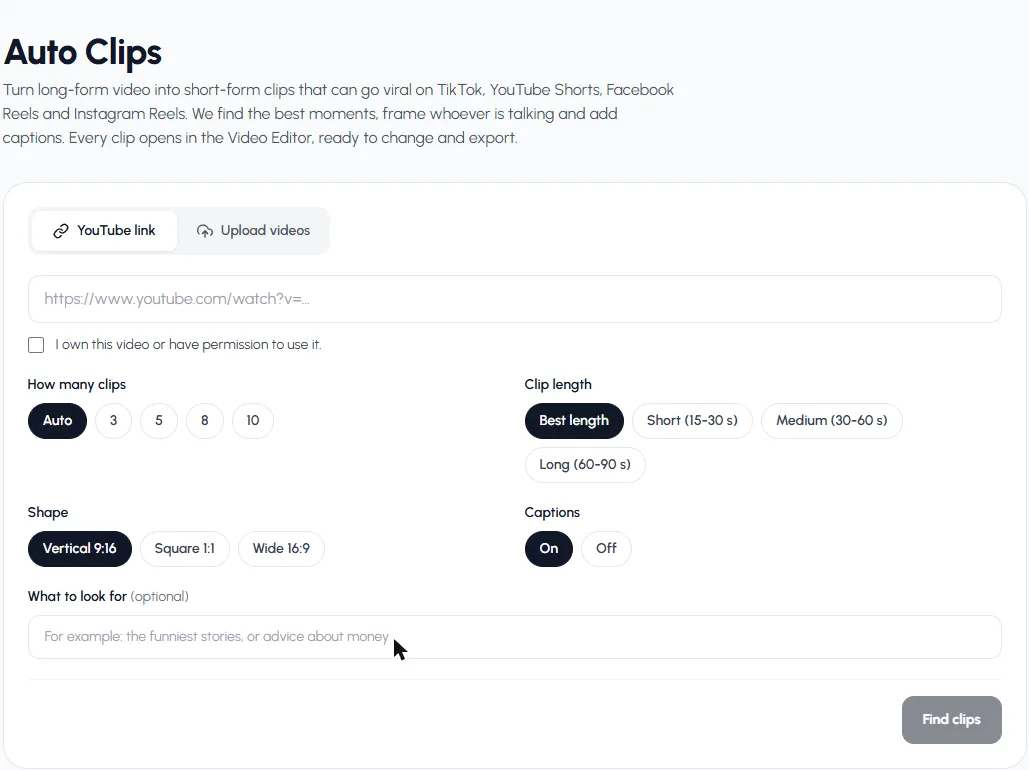
Paste the link, then choose how many clips, how long, the shape and captions. - 2
Choose the settings
How many clips (Auto or 3, 5, 8, 10), clip length (Best length or 15–30, 30–60, 60–90 seconds), shape (Vertical 9:16 for Shorts, TikTok and Reels) and captions on or off. Add a topic in What to look for if you only want one kind of moment.
- 3
Let it find the moments
Press Find clips. It gets the video, listens to it, finds the best moments, frames each clip on the speaker and makes them. About a few minutes for an hour of video.
- 4
Check the clips
Each clip shows a score (0 to 100), a title, its opening line and where it starts in the original. Watch each one on its card.
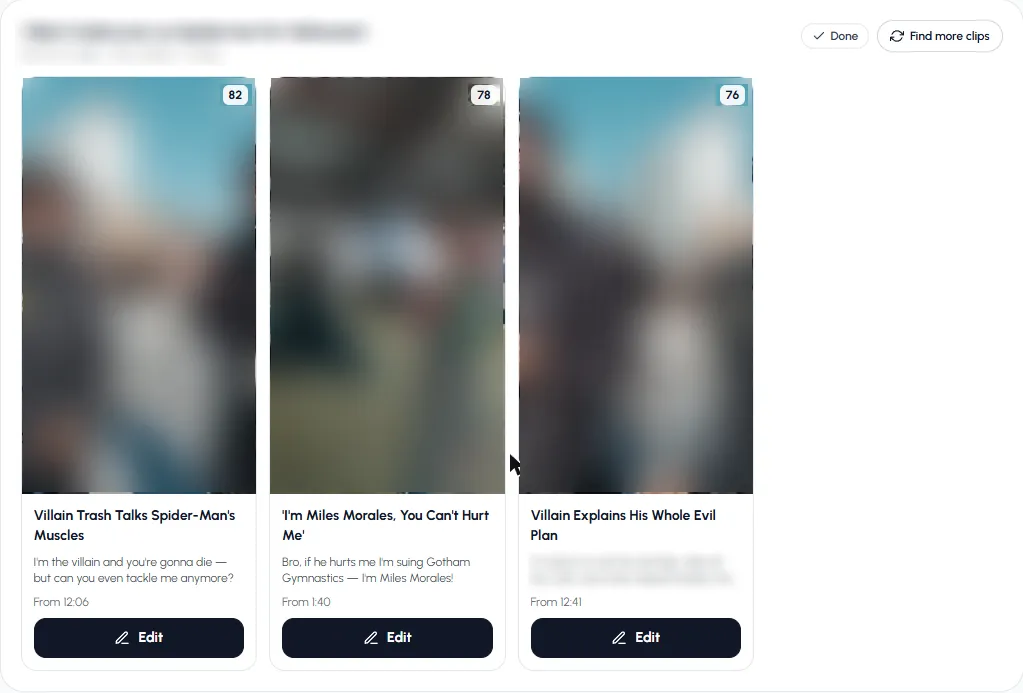
Clips appear as they're made, each with a score and where it starts. - 5
Fine-tune and export
Press Edit to open a clip in the Video Editor. It's already cut and captioned, with the video, its sound and the captions on separate rows. Trim, restyle, add music or text, then export.
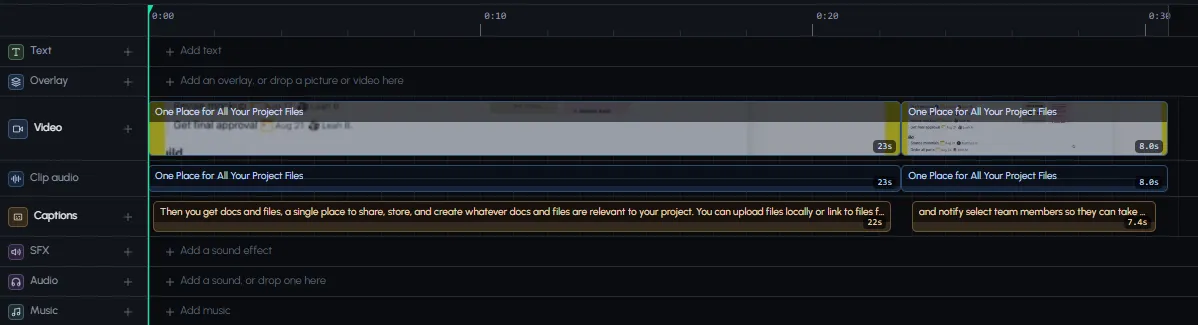
Every clip is a normal editor project you can change.
Try it on one long video and compare it with clipping by hand.
Make clipsBy hand vs. AI
| By hand | With AI | |
|---|---|---|
| Time for 1 hour of video | Several hours | A few minutes, then your review |
| Finding moments | You watch it all | Picked and scored for you |
| Framing | You move the crop | Framed on whoever is talking |
| Captions | Generate and fix | Added; fix in the editor if needed |
| Control | Total | High, through the editor |
| Cost | Free editors, your time | Credits per minute of video |
Mistakes to avoid
- Clipping videos you don't have rights to. Ask first, or only clip your own.
- Starting with the setup. Cut straight to the line that hooks.
- Leaving the speaker off-centre. A wide shot squeezed into 9:16 shows half a face.
- No captions. Most people watch on mute.
- Posting everything at once. One or two a day beats ten in an hour. See the best time to post YouTube Shorts.
More on the tool itself in AI clip maker, and on podcasts in podcast clips.
Frequently asked questions
How do I make clips from a YouTube video?
Find the moments that work on their own, cut each to 15–90 seconds, crop to vertical 9:16, add captions and export. An AI clip maker can do the finding, cutting, framing and captions from the link in a few minutes.
How do you clip videos?
In any editor, set a start and end point around the moment and cut it out. For social media, also reframe it to vertical and add captions.
What is the best length for a clip?
15 to 60 seconds for most Shorts and TikToks. Up to 90 seconds works if the story needs it. Autoclips' Best length lets each clip end where its moment ends, between 20 and 75 seconds.
Can I make clips from someone else's YouTube video?
Only with their permission. Many creators run paid clipping programs that give you that permission.
How many clips can I get from one video?
It depends on how much is said. Autoclips' Auto setting aims for about one clip per 6 minutes, from 3 to 10, or you can ask for 3, 5, 8 or 10.
Do I need to download the YouTube video first?
Not with Autoclips: paste the link of a video you own or may use. You can also upload the file instead.
Skip the watching
Paste a YouTube link. Autoclips finds the moments, frames them and adds captions in minutes.
Make clips with AIAyaz Alam · Founder of Autoclips
Ayaz builds Autoclips and makes the tutorials on its YouTube channel. Every step in these guides is tested in the app before it is published.