
YouTube Video Clipper: Cut the Best Moments into Shorts, Not Just Links
A YouTube video clipper cuts a short piece out of a longer YouTube video. YouTube's own Clip button only makes a 5 to 60 second link that plays inside YouTube. To get real vertical clips you can post on Shorts, TikTok and Reels, you need a clipper that downloads the moment, frames it 9:16 and adds captions. In Autoclips you paste the link of a video you own or may use, and it finds the best moments for you.
Quick answer
- YouTube's Clip button shares a 5–60 second part of a video as a link. It doesn't give you a file to post anywhere else.
- A clipper tool makes real video files: vertical, captioned and ready for Shorts, TikTok and Reels.
- In Autoclips: paste the YouTube link, tick that you own it or have permission, pick how many clips and how long, press Find clips.
- Each clip opens in the Video Editor to trim, retitle and export. Only clip videos you have the right to use.
Three kinds of YouTube video clipper
| YouTube's Clip button | Manual editor | AI YouTube video clipper | |
|---|---|---|---|
| What you get | A link to 5–60 s of the video | A file you cut yourself | Several files, already cut |
| Finds the moment | You do | You do | It does |
| Vertical 9:16 | No | If you reframe it | Yes, framed on the speaker |
| Captions | No | If you add them | Yes |
| Post to TikTok or Reels | No | Yes | Yes |
| Best for | Sharing a moment with a friend | One clip you want to perfect | Many clips from long videos |
YouTube's Clip button is great for sharing. But a clip made that way stays on YouTube and links back to the original, so it's not something you can post as your own Short or on TikTok. For that you need a file.
How to use a YouTube video clipper with AI
- 1
Copy the YouTube link
Open the video on YouTube and copy its address from the browser or the Share button. It must be your video, or one you have permission to clip.
- 2
Paste it into Autoclips
Open Auto Clips in Autoclips, keep YouTube link selected and paste it. Tick I own this video or have permission to use it. The video can be 2 minutes to 2 hours long.
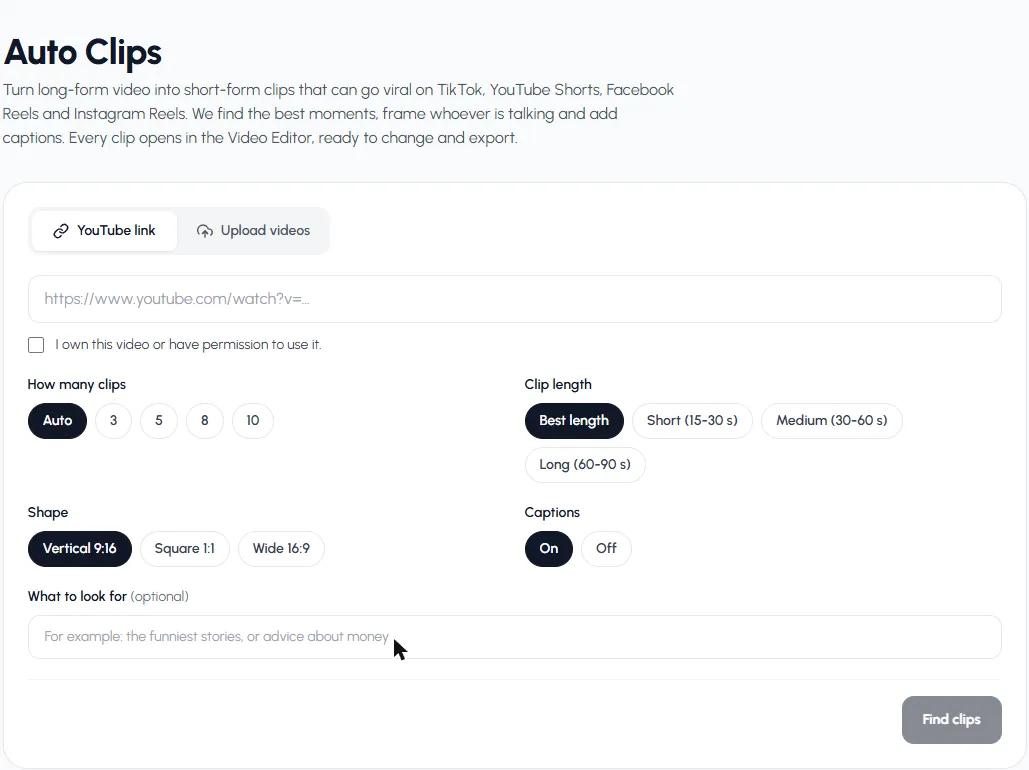
Paste the link, confirm you may use it, then pick your settings. - 3
Pick how many clips, how long and what shape
Choose Auto (about one clip per 6 minutes) or 3, 5, 8 or 10 clips. Best length ends each clip where the moment ends; or pick 15–30, 30–60 or 60–90 seconds. Choose Vertical 9:16 for Shorts, TikTok and Reels.
- 4
Say what to look for (optional) and start
Type a topic in What to look for, like "the best advice" or "the funniest moments", then press Find clips. You see the credits before it starts, and if anything fails they're refunded.
- 5
Pick, edit and export
Clips show up with a score from 0 to 100, a title, the opening line and where they start in the original. Play them on the card, press Edit to fine-tune one in the Video Editor, then export.
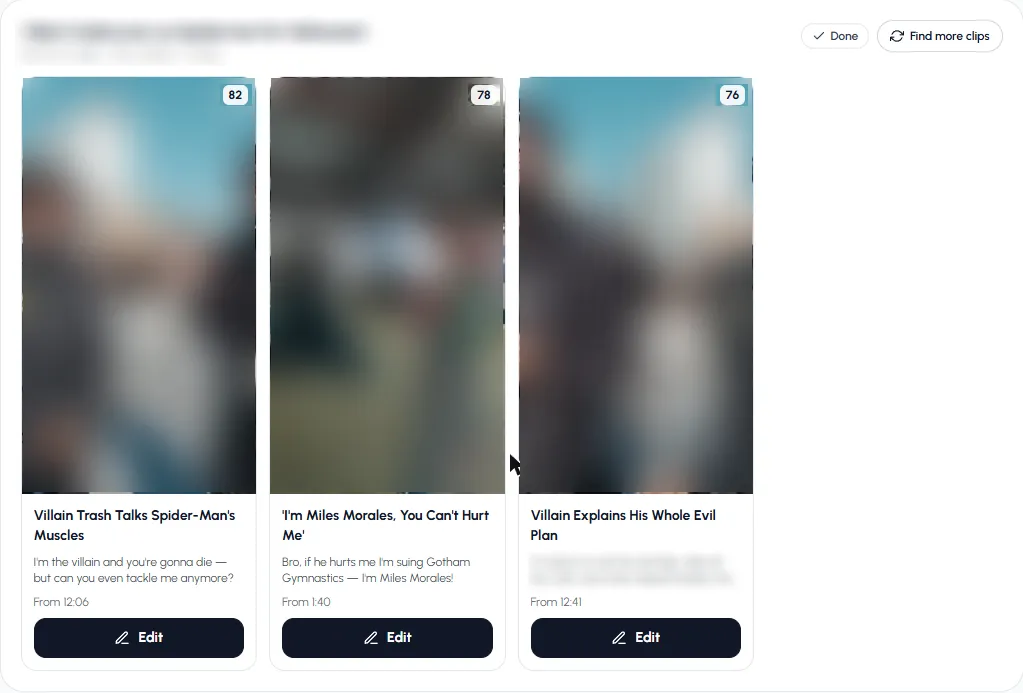
Clips from one YouTube video, ranked by score.
Paste the link of your latest long video and see which moments it finds.
Clip a videoWhose videos can you clip?
- Your own videos. Always fine.
- Videos you have permission for. A guest's podcast, a client's webinar, a creator who runs a clipping program. Get it in writing.
- Other people's videos without permission. Don't. Reposting someone else's content can get your posts removed and your account flagged, even with credit in the caption.
Tips for clipping YouTube videos
- Long videos give better clips. A 40-minute interview has far more strong moments than a 4-minute vlog.
- Talking matters. Clips are found from what's said, so silent footage and gameplay with no voice won't work.
- Use the start time on each clip to check the context before you post it.
- Trim the first second if the clip opens mid-word.
- Run Find more clips on a good video instead of uploading it again.
For the full process, by hand and with AI, see how to make clips from YouTube videos. For what the AI does under the hood, see AI clip maker. Want Shorts made from scratch instead? Try the YouTube Shorts AI generator.
Frequently asked questions
How do I clip a YouTube video?
For a shareable link, press Clip under the video on YouTube and choose 5 to 60 seconds. For a file you can post as a Short or on TikTok, paste the link into a clipper like Autoclips, which cuts the moments, frames them vertical and adds captions.
Can I download a YouTube clip made with the Clip button?
No. A YouTube clip is a link that plays the moment inside the original video. To post it elsewhere you need a file from a clipper or an editor, and the right to use the video.
Is there a free YouTube video clipper?
YouTube's own Clip button is free but only makes links. Free editors let you cut by hand. AI clippers that find the moments for you usually use credits or a paid plan; Autoclips is free to sign up for and shows the credits before each run.
Is it legal to clip YouTube videos?
Clipping your own videos, or ones you have permission for, is fine. Reposting other people's videos without permission can break copyright and platform rules.
How long can the YouTube video be?
In Autoclips, from 2 minutes to 2 hours.
Can I clip a YouTube video into vertical Shorts?
Yes. Pick Vertical 9:16 and each clip is framed on whoever is talking, with captions.
Clip your next YouTube video
Paste the link. Autoclips finds the moments, frames them vertical and adds captions.
Clip a YouTube videoAyaz Alam · Founder of Autoclips
Ayaz builds Autoclips and makes the tutorials on its YouTube channel. Every step in these guides is tested in the app before it is published.