
Opus Clip Alternatives: 4 Honest Options (Free and Paid)
The main Opus Clip alternatives are Autoclips (finds clips and opens each one in a full video editor), CapCut's free desktop Long video to shorts tool, and clipping by hand in any editor. Opus Clip itself has a free plan with limits. Which one fits depends on how much you clip, whether you want to edit after, and your budget. Here's an honest comparison, with only details we could check.
Quick answer
- Opus Clip has a free plan (reported at 60 credits a month, with a watermark) and paid plans from about $15 a month. Check their pricing page for today's numbers.
- Autoclips: paste a link or upload, get scored, framed, captioned clips, and edit each one in a full editor. Free to sign up; credits per minute of video.
- CapCut desktop: a free Long video to shorts tool, available in some regions.
- By hand: free and fully in your control, but slow.

Why people look for an Opus Clip alternative
Opus Clip is one of the best-known AI clipping tools. People look elsewhere for three usual reasons: the free plan's limits and watermark, wanting a full editor after the clips are cut, or wanting clips and other kinds of AI videos in one place. None of that makes Opus Clip a bad tool; it's a question of fit.
Opus Clip alternatives compared
| Opus Clip | Autoclips | CapCut desktop | By hand | |
|---|---|---|---|---|
| Finds moments with AI | Yes | Yes, with a 0–100 score | Yes | No |
| Frames the speaker vertical | Yes | Yes | Yes (reframe) | You do it |
| Captions | Yes | Yes | Yes | You add them |
| Source | Link or upload | YouTube link or up to 5 uploads, 2 min to 2 h | Upload | Any file |
| Edit after | Its own editor | Full Video Editor with separate video, sound and caption rows | Full CapCut editor | Any editor |
| Free option | Free plan with limits | Free sign-up; credits per minute | Free in some regions | Free |
| Best for | Creators who clip every day | Clips plus a full editor, and other AI video formats | CapCut users on desktop | One clip you want perfect |
1. Autoclips
Paste a YouTube link (of a video you own or may use) or upload up to 5 videos. Pick how many clips (Auto, 3, 5, 8, 10), how long (Best length or 15–30, 30–60, 60–90 seconds), the shape (9:16, 1:1, 16:9) and captions, and add an optional "what to look for". Each clip gets a score, a title and its start time, and opens in the Video Editor where editing is free. You pay credits per minute of video to find clips, and every credit comes back if a run fails.
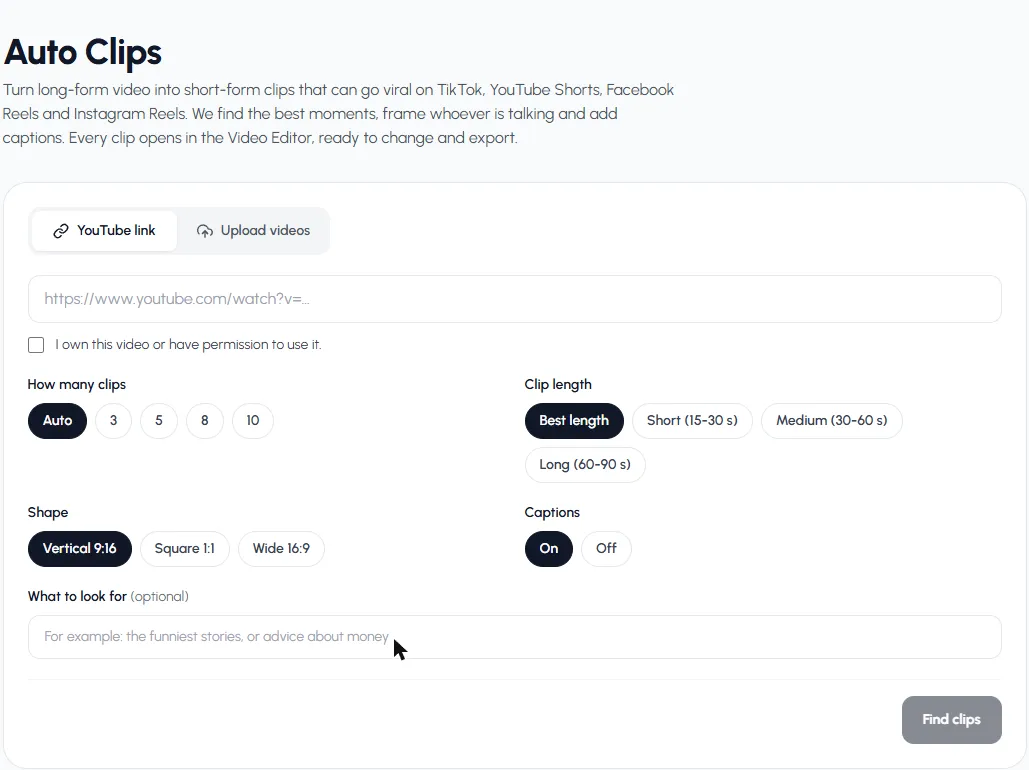

Where it's weaker: it only works on videos where people talk, and it's newer than Opus Clip. Where it's stronger: you also get the rest of Autoclips, from stickman and 3D animated shorts to automations that post for you.
2. CapCut desktop: Long video to shorts
CapCut's desktop app has a Long video to shorts tool that splits a long video into several shorts, and you edit them in CapCut. It's a good fit if you already edit in CapCut. CapCut notes it's only available in some regions. Steps in CapCut long video to short.
3. Clipping by hand
Any editor (CapCut, DaVinci Resolve, Premiere, iMovie) can cut, crop and caption. It's free and you control every frame, but finding moments means watching everything. The full method is in how to make clips from YouTube videos.
4. Opus Clip itself
If you clip a lot of video every day and want a dedicated clipping tool, Opus Clip may still be the right pick. Its free plan is reported at 60 credits a month with a watermark, with paid plans from about $15 a month (Castmagic's breakdown). Check opus.pro for current terms.
Compare for yourself: run one video through Autoclips.
Find clipsIs Opus Clip free?
Partly. Reports put the free plan at 60 credits a month with a watermark on clips, and some say free exports expire after a few days. Paid plans remove the watermark. Check their pricing page before deciding, as plans change.
How to choose
- You clip daily and want a dedicated tool: Opus Clip.
- You want clips plus a full editor and other AI videos: Autoclips.
- You already edit in CapCut on desktop: CapCut's tool.
- You clip once a month and have time: by hand.
We also have a side-by-side page on Autoclips vs Opus Clip, and a deeper guide on the AI clip maker.
Frequently asked questions
What is the best Opus Clip alternative?
It depends on how you work. Autoclips suits people who want clips plus a full editor and other AI video formats; CapCut's desktop tool suits CapCut users; clipping by hand suits people who clip rarely and want full control.
Is Opus Clip free?
It has a free plan with limits. Reports put it at 60 credits a month with a watermark. Paid plans start around $15 a month; check opus.pro for current pricing.
Is there a free alternative to Opus Clip?
CapCut's desktop Long video to shorts tool is free in some regions, and clipping by hand in a free editor costs only time. Autoclips is free to sign up for and uses credits per minute of video.
What does Autoclips do that Opus Clip doesn't?
Every clip opens as a project in a full video editor with the video, sound and captions on separate rows, and the same account makes other AI videos and runs posting automations. Opus Clip is more specialised in clipping.
Can I clip YouTube videos with these tools?
Yes, with a link or an upload, as long as you own the video or have permission to use it.
Try it on one video
Paste a link or upload a video and see which moments Autoclips finds. You see the credits before it starts.
Try AutoclipsAyaz Alam · Founder of Autoclips
Ayaz builds Autoclips and makes the tutorials on its YouTube channel. Every step in these guides is tested in the app before it is published.