
YouTube Shorts Automation: Make and Post Shorts Every Day on Autopilot
YouTube Shorts automation means a tool makes a new Short (script, voice, visuals, captions) and uploads it to your channel at the times you set, every day, without you editing or uploading anything. Here is how to set it up, what to automate, and the settings that keep an automated Shorts channel growing instead of stalling.
Quick answer
- A YouTube Shorts automation tool writes, voices, animates and captions a vertical video, then uploads it to your channel at set times.
- In Autoclips: connect YouTube once, create an automation, pick a format and topics, set 1 to 3 Shorts a day, and switch on Post to YouTube (public, unlisted or private).
- The same automation can post the same video to TikTok, Instagram, Facebook, X and Snapchat at once.
- Start at one Short a day, watch the first ten, then adjust topics and style before adding more.
What YouTube Shorts automation does
Making one Short by hand takes an hour or more: research, script, voiceover, finding or making visuals, captions, editing, exporting, uploading, writing a title. Automated YouTube Shorts production hands every one of those to software and runs it on a timer. You decide the niche and the look once; the tool does the daily work.
There are two kinds of tools, and it helps to know which one you need:
| Kind of tool | What it starts from | Good for |
|---|---|---|
| Clipping tools | Your long videos or streams; they cut the best moments into Shorts | Channels that already film long videos |
| Generators with scheduling | A topic; they make a new video from nothing and post it | Faceless channels, and anyone without footage |
| Upload schedulers | A video you already made; they only post it | People who edit by hand but hate uploading |
Autoclips is the second kind, an autopilot AI video generator: it makes brand-new Shorts from a topic and posts them. If you need to understand the whole chain first, read how to automate video creation with AI.
How to automate YouTube Shorts in Autoclips
- 1
Connect your YouTube channel
Open Connect Socials in the left menu and connect YouTube. You do this once; every automation can then post to it.
- 2
Create an automation and pick a format
Go to Automations and press Create Automation. Pick the kind of Short: Character Explainer, Stickman, Text Story, Quiz, Talking Objects, Miniature, Fruit AI / Animal Stories, or Autoclips V3 · 3D Studio for cinematic stories.
- 3
Set how many Shorts a day, and when
Choose 1, 2 or 3 videos per day, the posting time for each, and your timezone. If your viewers are in the US and you are not, set a US timezone.
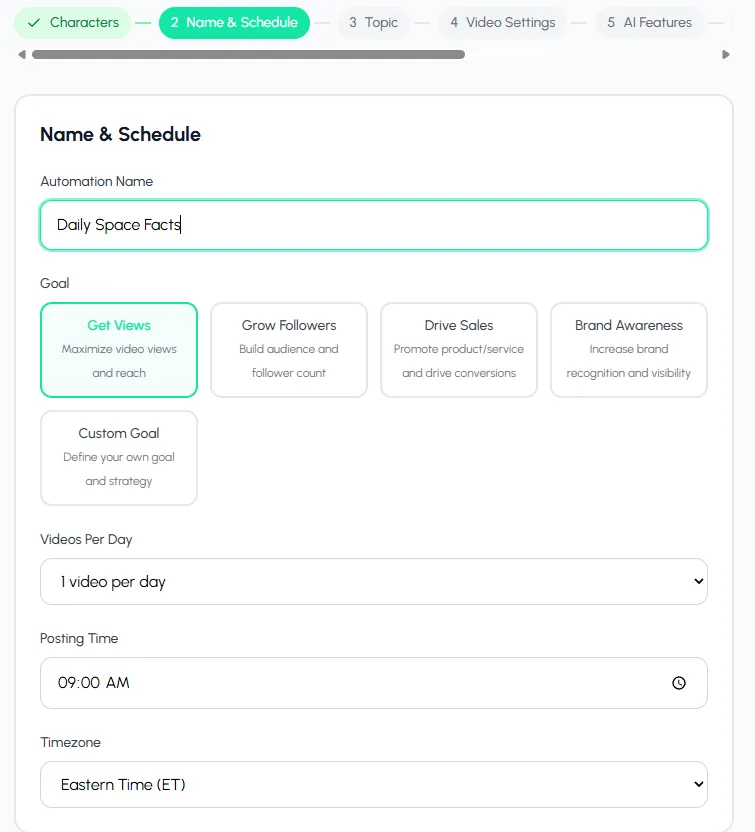
Set 1 to 3 Shorts a day, the time each one posts, and your timezone. - 4
Choose topics and style
Pick a topic category or write your own, then the style and the call to action at the end. Keep one niche per channel.
- 5
Switch on Post to YouTube
In Publishing, switch on Post to YouTube and pick public, unlisted or private. Unlisted is a safe way to check the first few Shorts before the channel sees them.
Switch on TikTok, Instagram, Facebook, X or Snapchat too if you want the same video everywhere.
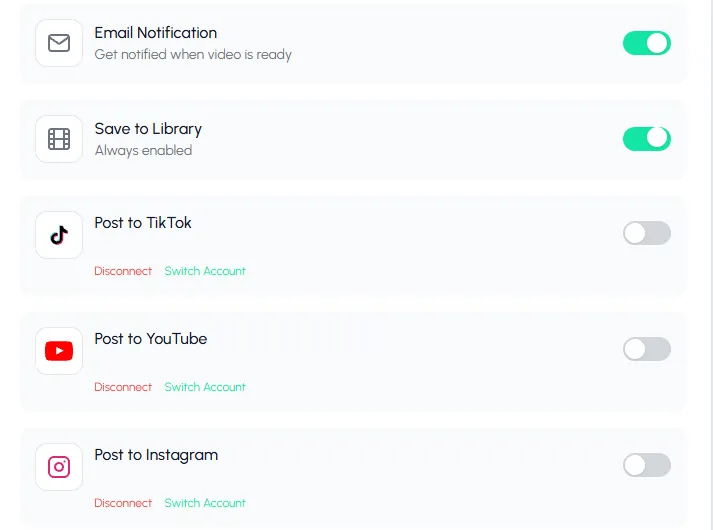
Switch on YouTube, and the same video can go to TikTok and Instagram too. - 6
Create it, then press Test
The review screen shows the credits per video and per month. Create the automation, then press Test on its card to make one Short right away and see what your channel will get.
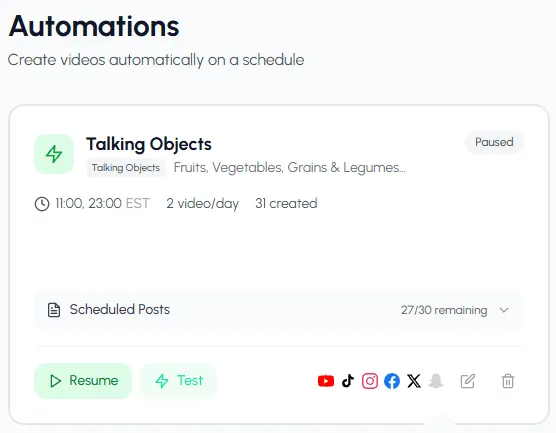
Each automation shows its times, how many videos it has made and where it posts.
One setup, and a new Short goes up at the times you picked.
Create a Shorts automationSettings that make automated Shorts work
- Length: Shorts can run up to 3 minutes, but most automated channels do best at 30 to 70 seconds. Long enough to tell something, short enough to be rewatched.
- Hook: the first two seconds decide whether people swipe. Story and money topics with a number up front hold best.
- Captions on: many people watch Shorts on mute.
- One format per channel: a Stickman channel, a Text Story channel and a Quiz channel are three channels, not one.
- Same time every day: viewers and the feed both get used to a rhythm. See how many Shorts to post per day.
Can you make money with automated Shorts?
Yes, through the YouTube Partner Program, which shares Shorts ad revenue with creators once a channel qualifies (for full monetisation, YouTube asks for 1,000 subscribers plus either 4,000 public watch hours in a year or 10 million public Shorts views in 90 days). Shorts pay much less per view than long videos, so automated Shorts channels usually earn through volume, sponsors, or by sending viewers to a product. Read the current rules on YouTube's Partner Program page, and see which faceless niches pay the most.
Common problems and fixes
| Problem | Likely cause | Fix |
|---|---|---|
| Views stop after a week | Topics too broad, or the same angle every day | Narrow the topic or switch to Custom Topic with a clear angle |
| Short didn't post | YouTube connection expired, or a daily upload limit was hit | Reconnect YouTube under Connect Socials; keep to a few posts a day |
| Automation paused | Not enough credits for the next video | Add credits, then press Resume on the card |
| Videos feel samey | Same style and call to action every time | Change one setting a week and compare results |
Want ideas for what to post? Try YouTube Shorts ideas without showing your face, the YouTube Shorts AI generator, or, for a stickman channel, stickman videos for TikTok and Shorts.
Made with Autoclips
Real videos people made in the app. Tap one to watch it with sound.
Frequently asked questions
What is the best YouTube Shorts automation tool?
It depends on your starting point. If you film long videos, a clipping tool turns them into Shorts. If you have no footage, a generator that makes new Shorts from a topic and posts them, like Autoclips, is the faster way to a daily channel. If you edit by hand, an upload scheduler is enough.
Can you automate YouTube Shorts uploads?
Yes. Connect your channel once, then an automation uploads each new Short at the times you set, with a title and description. You can choose public, unlisted or private.
Is YouTube Shorts automation allowed?
Uploading through YouTube's official connection is allowed. What YouTube limits is repetitive or copied content without original value. Original topics and a consistent format are fine.
How many Shorts can I automate per day?
Each Autoclips automation posts 1 to 3 videos a day. Start with one, and add more only if each Short still gets views.
Do automated Shorts get monetised?
They can, once the channel meets the YouTube Partner Program requirements and the content is original. Shorts revenue per view is low, so most channels combine it with sponsors or their own product.
Can the same automation post to TikTok and Instagram?
Yes. Switch on TikTok, Instagram, Facebook, X or Snapchat in the same automation and each video goes to every platform you picked.
Put your Shorts channel on a schedule
Pick a format and a time. A new Short is made and uploaded every day.
Automate your ShortsAyaz Alam · Founder of Autoclips
Ayaz builds Autoclips and makes the tutorials on its YouTube channel. Every step in these guides is tested in the app before it is published.