
How to Start a Stickman YouTube Channel with AI (Faceless, Step by Step)
To start a stickman YouTube channel, pick one niche, create the channel with a name and look that match it, make 10 videos before you post the first, then post on a fixed schedule and keep the same character in every video. With an AI stickman video generator like Autoclips you never draw, record or edit, so the whole channel can be faceless. Here is the full setup.
Quick answer
- Pick one narrow niche (money true stories, heists, history, horror) and one format that fits it.
- Create a YouTube channel with a name, banner and profile picture that use your stickman hero.
- Make 10 videos before you post, with the same character, look and narrator, so the channel looks finished from day one.
- Post one Short a day at the same time, or let a Story series automation make and post each part for you.
- Monetisation starts at 1,000 subscribers plus 4,000 watch hours or 10 million Shorts views in 90 days, and the videos must be original.
What you need
- A Google account for the channel (plus TikTok or Instagram if you want to post there).
- A niche you can make 100 videos about. Ideas: stickman YouTube channel ideas.
- A tool that makes the videos. This guide uses Autoclips Stickman: it writes, voices, animates and posts.
How to start a stickman YouTube channel, step by step
- 1
Pick one niche and one format
Narrow beats broad: "Heists that went wrong in small towns" is a channel, "interesting stories" is not. Match a format: True Story for real events, You Decide for thrillers where viewers vote, Explainer for tips, Skit for jokes.
- 2
Create the channel
Name it after the niche ("Small Town Heists", not "StickVids 2026"). Use a still of your stickman hero as the profile picture, a scene in your look as the banner, and a one-line description of what you post and how often.
- 3
Choose your hero, look and narrator
Open Stickman in Autoclips. Pick a format, a narrator (press Hear it) and a look: Cinematic, Horror Glow, Rainy Noir, Bright Day or Golden Epic. Use Cast to save your hero, so every video stars the same character.
Keep these three the same on every video. That's your brand.
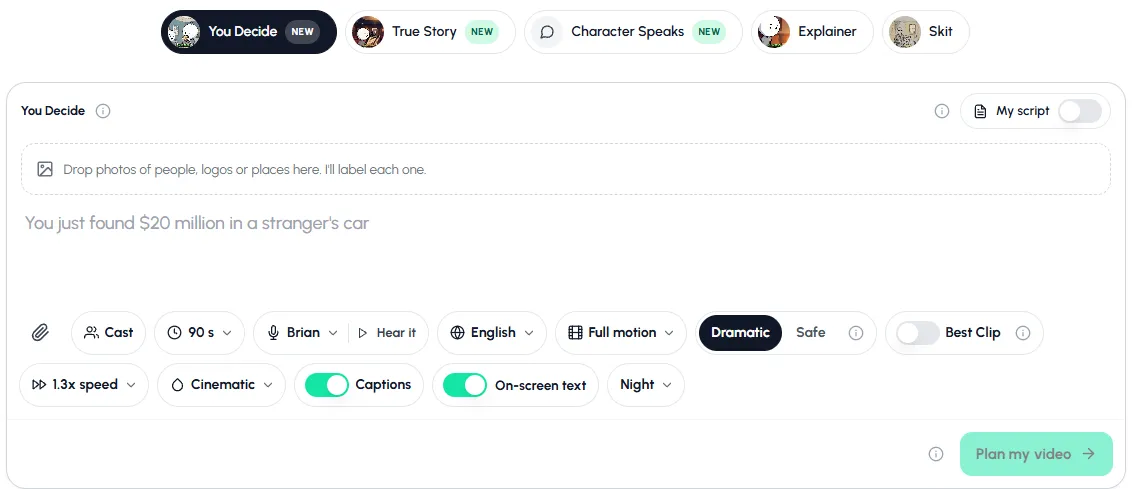
Pick the format, then set Cast, voice, language, motion and look once for the whole channel. - 4
Make 10 videos before you post
Type one line per video, press Plan my video, read the plan, then make it. Ten videos make a new channel look real and show early if the niche is too thin.
- 5
Connect your accounts and post on a schedule
Connect YouTube (and TikTok, Instagram or Facebook) under Connect Socials. Post one Short a day at the same time, with the hook as the title ("He sold a rock for $4").
- 6
Put it on autopilot (optional)
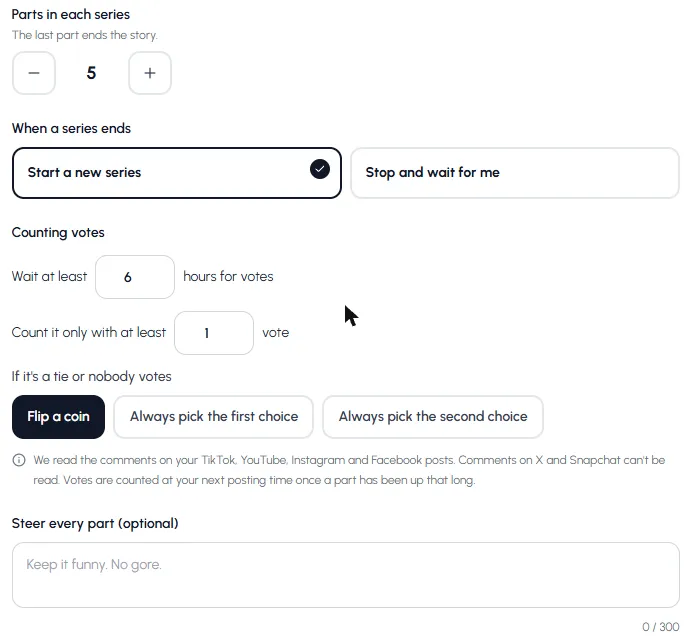
Go to Automations, create one, pick Stickman and then Story series. Pick You Decide, True Story or Character Speaks, where the ideas come from, how many parts per series, the vote rules and your posting time. Each run makes the next part and posts it.
Turn on posting for your accounts in the Publishing step, or new videos only go to your library.
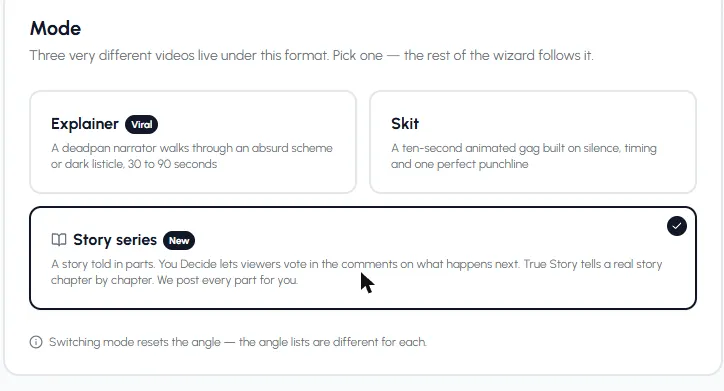
A Stickman automation can make Explainers, Skits or a Story series, and post them for you.
Make your first video now. Set it up once and reuse the same hero, voice and look.
Open StickmanA posting plan for your first 30 days
| Days | What to do | Goal |
|---|---|---|
| Before day 1 | Make 10 videos in one niche | A channel that looks finished |
| 1 to 7 | Post 1 a day, same time | Find out which hooks get watched |
| 8 to 14 | Keep posting; try 2 lengths (60 s and 90 s) | Find your best length |
| 15 to 21 | Start a series (Part 1, 2, 3...) | Get return viewers |
| 22 to 30 | Double down on the top 3 topics | Grow what works |
Series bring viewers back, and You Decide series also get comments. More in You Decide stickman videos and stickman videos for TikTok and Shorts.
How a stickman channel gets monetised
YouTube's Partner Program asks for 1,000 subscribers plus either 4,000 public watch hours in the last 12 months or 10 million public Shorts views in the last 90 days (YouTube Help). Then a human reviews the channel.
Ad money is only one part. Sponsors, TikTok's creator rewards for videos over a minute, and selling your own product often pay more. Realistic numbers are in do stickman videos make money, and the wider picture in how to start a faceless YouTube channel.
Mistakes new stickman channels make
- Several niches on one channel. One niche per channel.
- A new look every video. Same hero, same look, same voice.
- Slow first lines. Start with the number or the threat.
- Posting in bursts, or quitting at video 20. Steady wins, and most channels need dozens of videos.
Made with Autoclips
Real videos people made in the app. Tap one to watch it with sound.
Frequently asked questions
How do I start a stickman YouTube channel?
Pick one niche, create a channel named after it, choose one stickman hero, look and narrator, make 10 videos before you post, then post one a day at the same time. An AI tool like Autoclips writes, voices and animates each video from one line.
Can I start a stickman channel without showing my face?
Yes. The stickman is the face and an AI narrator is the voice. You never appear on camera or record yourself.
How much does it cost to start a stickman channel?
The channel itself is free. Making videos by hand in a free animation app costs only time. An AI tool saves the time and uses credits per video; you can sign up for Autoclips for free and see the price of each video before you make it.
How long until a stickman channel is monetised?
It varies a lot. You need 1,000 subscribers plus 4,000 watch hours in a year or 10 million Shorts views in 90 days. Some channels get there in weeks, most take months, and many never do. Posting steadily in one niche gives you the best chance.
Should I post Shorts or long videos?
Shorts are the easiest way to get a new channel seen. Stickman videos in Autoclips are 30 to 120 seconds, which fits Shorts, TikTok and Reels. For longer stories, make a series of parts.
Start your stickman channel this week
Make your first 10 videos in Autoclips, then let it post them on schedule.
Make your first videoAyaz Alam · Founder of Autoclips
Ayaz builds Autoclips and makes the tutorials on its YouTube channel. Every step in these guides is tested in the app before it is published.