
Stickman Video Maker: How to Pick One and Make Your First Video
A stickman video maker is any tool that gets you from an idea to a finished stick figure video. There are three kinds: AI makers that write, voice and animate the whole thing from one line, animation apps where you pose the figure yourself, and template editors where you drop stick figure stickers onto a timeline. This guide shows which kind fits what you want to post, and walks through a first video in Autoclips.
Quick answer
- AI stickman video makers (like Autoclips Stickman) write the script, voice it, draw every scene with the same character and add captions. Best if you want to post often.
- Animation apps (Pivot Animator on Windows, Stick Nodes and FlipaClip on phones) give you control of every frame, but you do the drawing, voice and editing yourself.
- Template editors let you place ready-made stick figure stickers on a timeline. Quick for one-off slides, weak for stories.
- In Autoclips: open Stickman, pick a mode, type one line, choose length, voice, language, motion and look, then press Plan my video. Videos come out vertical with captions.
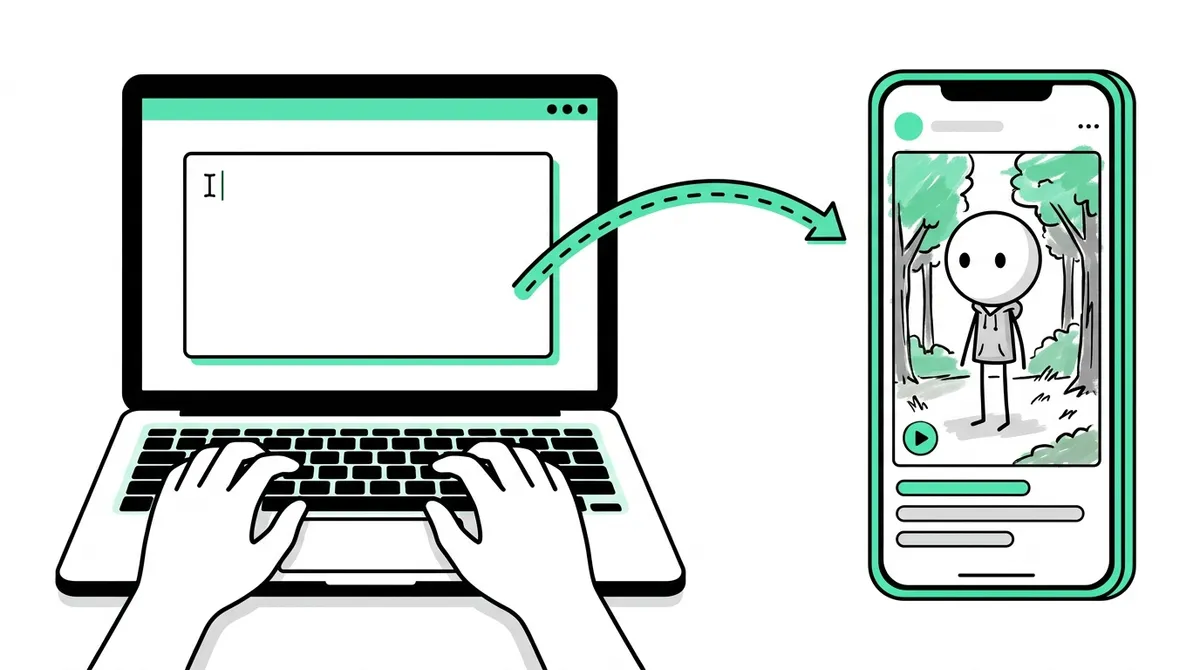
The 3 kinds of stickman video maker
Search for a stickman video maker and you get three very different things mixed together. They solve different problems, so it pays to know which one you are looking at before you sign up for anything.
| AI stickman video maker | Stick figure animation app | Template video editor | |
|---|---|---|---|
| What you do | Type an idea or paste a script | Pose the figure frame by frame | Drag stickers and text onto a timeline |
| Script and voice | Written and voiced for you | You write and record | You write and record, or add text only |
| Scenes | Drawn for you, same character in each | You draw or load backgrounds | Stock backgrounds and stickers |
| Time for 60 seconds | Minutes to set up | Hours | An hour or so |
| Control | Scene level: you edit lines and pictures | Every frame | Every element, but limited motion |
| Cost | Credits or a plan | Often free, paid upgrades | Free tiers, paid exports |
| Best for | Story and explainer channels that post daily | Learning animation, fight scenes, art | Simple slides and ads |
If you want the stick figure videos you see on Shorts and TikTok, with a narrator, painted scenes and big numbers on screen, you want the first kind. If you want to learn animation or make Alan Becker style fights, you want the second. Our guide to the stickman animation maker compares the animation apps in detail.
How to make a video with the Autoclips stickman video maker
Here is the whole thing from an empty page to a video you can post. It works the same in a browser on a computer or a phone.
- 1
Open Stickman and pick a mode
Sign in at app.autoclips.app and open Stickman. Across the top are the modes: You Decide, True Story, Character Speaks, Explainer and Skit. Each writes a different kind of video, so choose by what you want the viewer to do: come back for Part 2, learn a real story, laugh, or pick up a quick tip.
- 2
Type one line
Write the idea the way you'd say it to a friend: "You just found $20 million in a stranger's car" or "The man who traded one red paperclip for a house". Under the box are suggestions that already work as videos if you're stuck.
Already have a script? Switch on My script and paste it. Your words are spoken as written.
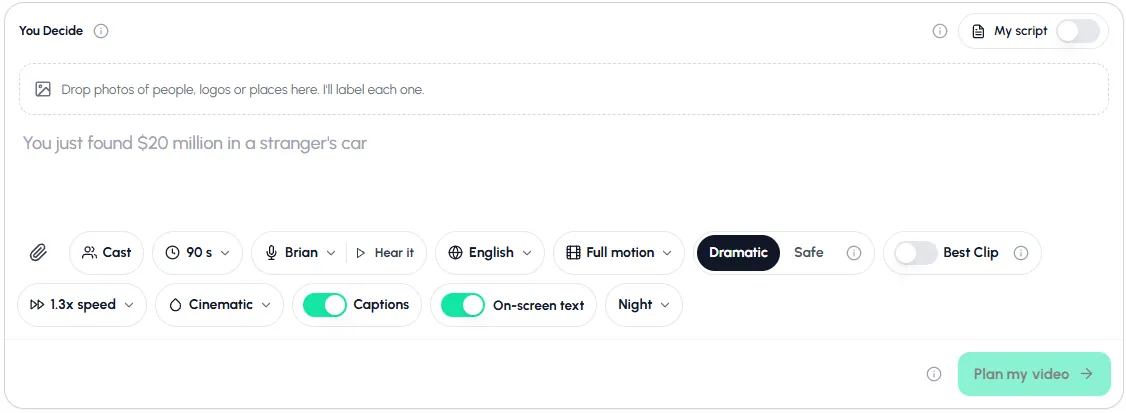
Everything is on one screen: type the idea, set the options, press Plan my video. - 3
Add photos or a cast (optional)
Drop photos of people, logos or places into the box and each one is labelled and drawn into the story in the stickman style. Cast brings back characters you've used before, so a series keeps the same face.
- 4
Choose length, voice, language, motion and look
Story videos run from 30 to 120 seconds. Pick a narrator and press Hear it to listen first. Pick the spoken language: the script is written in it, not translated afterwards.
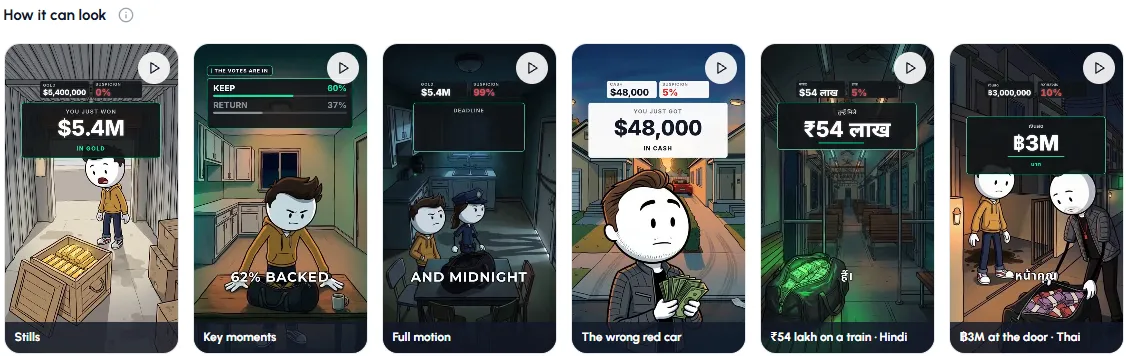
Motion has three levels: Stills (pictures with a slow camera move), Key moments (clips where someone acts) and Full motion (every scene moves). Then choose a tone (Dramatic or Safe), the speed and the look. Keep Captions and On-screen text switched on.
- 5
Plan, check, make
Press Plan my video. The planner writes the scenes and shows you the plan before anything is drawn, so you can ask for changes first. When it reads right, make the video. In a rush, Skip planning and make it now makes a classic stickman video straight away.
- 6
Download or post
The finished video is 9:16 with captions. Download it, or post it to your connected YouTube, TikTok and Instagram accounts from the app. For a channel that posts on its own, set up a series automation; see stickman videos for TikTok and Shorts.
Pick one of the suggested ideas and see what the stickman video maker plans for it.
Try StickmanWhich stick figure video should you make?
The mode decides the shape of the script, so it matters more than any other setting. Here is how they differ, with an example line for each that you can paste in as it is.
| Mode | Length | Example line to try |
|---|---|---|
| You Decide | 30 to 120 s | You win a storage unit for $500. Inside: 40 gold bars. |
| True Story | 30 to 120 s | The man who got rich selling rocks |
| Character Speaks | 30 to 120 s | Your best friend wants half of the $3 million you found |
| Explainer | 30 to 90 s | 5 unethical but legal ways to save money |
| Skit | About 10 to 15 s | Me home alone at 3 AM |
You Decide videos end on a question and the comments pick what happens in Part 2, which is why they grow through comments. True Story researches a real person or brand. Character Speaks has no narrator: the characters say every line on camera (English only for now). Explainer is a fast, deadpan voiceover over pictures and is made in one step, so it suits daily posting. Skit is a short gag with a visual punchline. More on two of them: stickman explainer videos and you decide stickman videos.
Pick a look that fits the story
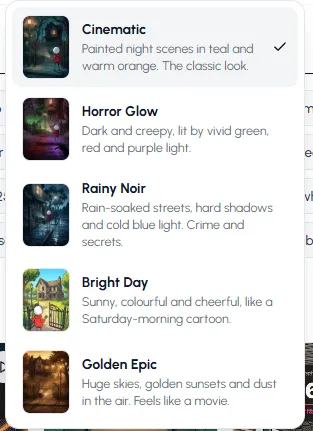
The same story feels different in different light. Autoclips has five looks, and each one sets the colours, light and mood of every scene:
- Cinematic: painted night scenes in teal and warm orange. The classic look, good for any story.
- Horror Glow: dark and creepy, lit by vivid green, red and purple. Scary, survival and mystery stories.
- Rainy Noir: wet streets, hard shadows, cold blue light. Crime, heists and true stories.
- Bright Day: sunny and cheerful, like a Saturday-morning cartoon. Funny, feel-good and kids stories.
- Golden Epic: huge skies, golden sunsets, dust in the air. History, war and adventure.
What to check before you choose a stick figure video generator
Most AI tools look the same on their home page. These are the things that decide whether a channel built on them works after video number ten:
- Same character in every scene. If the hero's face or hoodie changes between shots, viewers notice. Look for a cast or character library you can reuse across a series.
- A real script, not a list of facts. A good stickman video has a hook in the first two seconds and an ending that pays off. Test the tool with a story you already know and read what it writes.
- Voice in your audience's language. Translating an English script word for word sounds wrong. The script should be written in the language from the start.
- Captions and on-screen numbers. Most short videos are watched on mute.
- Your own script option. Once you find a voice for your channel, you'll want to write some videos yourself.
- Vertical export and posting. 9:16 out of the box, and ideally posting or scheduling from the same place.
- Clear pricing. Credits or minutes per video should be shown before you press make, not after.
Mistakes that make stickman videos flop
- A slow start. "This is the story of..." loses people. Start on the moment: the money, the mistake, the choice.
- Too many characters. One hero with one problem beats an ensemble in 60 seconds.
- Switching looks every video. A consistent look and character is how people recognise your channel in the feed.
- Posting once and stopping. Stickman channels grow on volume and series. Plan ten videos, not one. Stickman YouTube channel ideas has niches to start from.
Thinking about the bigger picture? Our guide on how to start a faceless YouTube channel covers niche, posting schedule and monetisation, and the AI stickman video generator guide goes deeper on how the AI side works.
Made with Autoclips
Real videos people made in the app. Tap one to watch it with sound.
Frequently asked questions
What app do people use to make stickman videos?
It depends on the style. The narrated story videos on Shorts and TikTok are mostly made with AI stickman video makers such as Autoclips Stickman. Hand-animated fights and comedy are usually made in Pivot Animator on Windows, or Stick Nodes and FlipaClip on phones, with the voice and captions added in a video editor.
Is there a free stickman video maker?
Yes, if you animate by hand: Pivot Animator is free on Windows, and Stick Nodes and FlipaClip have free versions on phones. AI makers cost something because every video is written, voiced and animated for you. In Autoclips, signing up is free, and making stickman videos needs a paid plan and uses credits. See how to make stickman videos for free.
Can I make stickman videos online without downloading anything?
Yes. Autoclips runs in the browser on a computer or phone, so there is nothing to install. There are also browser-based stick figure animation tools if you'd rather pose the figure yourself.
How long does it take to make a stickman video?
With an AI maker, setting it up takes a minute or two, then the video is made while you do something else. Animating 60 seconds by hand usually takes several hours, plus time to record a voice and add captions.
Can I use my own voice?
In Autoclips you can pick from built-in narrators in many languages, and on paid plans you can clone your own voice for a character. Or paste your own script with My script and keep your exact words.
What size should a stickman video be for TikTok and Shorts?
Vertical 9:16, which is what Autoclips exports. For TikTok's creator rewards, videos need to be longer than a minute, so 60 to 90 seconds is a good target for stories.
Can a stickman video maker post for me?
Autoclips can. Connect YouTube, TikTok or Instagram and post from the app, or set up a Stickman series automation that makes and posts new parts on a schedule.
Make your first stickman video
Pick a mode, type one line and choose a look. Autoclips writes, voices and animates it, ready for Shorts, TikTok and Reels.
Open the stickman video makerAyaz Alam · Founder of Autoclips
Ayaz builds Autoclips and makes the tutorials on its YouTube channel. Every step in these guides is tested in the app before it is published.